132 of 220 Analog Outputs - Anatel A643a
RPS - June 2007 - Edition 12
Operator Manual Anatel
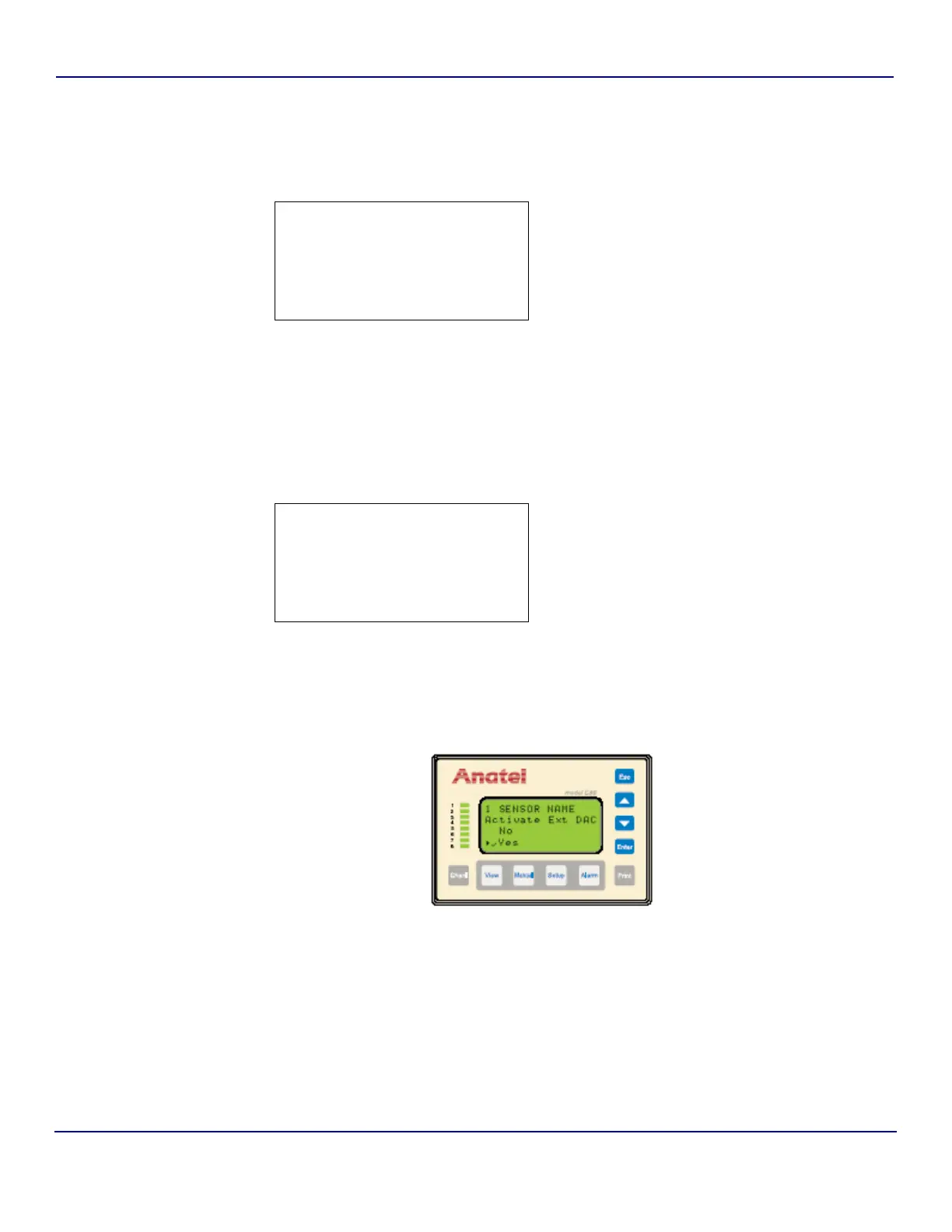
To enable/disable the External DAC Module interface:
1) With the desired Analyzer selected in any View, press the Setup Key to display its
menu.
2) Use the Up and Down Keys to specify Sensor Setup.
3) Press Enter to display the Sensor Setup Menu.
4) Specify Analysis Setup and press Enter.
5) Specify Analog Setup and press Enter to access its parameter options.
6) With the Analog Setup Menu displayed, specify Ext DAC Module.
7) Press Enter to view its parameter screen.
8) Use the Up and Down Keys to toggle the software switch to Yes to enable this analog
output, No disables it.
On activation of the External DAC Module, an Error Code #17: “Bad DAC Module” indicates
that there is a communications problem.
9) Press Enter to save the Ext DAC Module setting.
10) Press Esc to return to the Analog Setup Menu.
X
Sensor Setup:
System Setup:
C80 Setup:
Gateway Setup:
Fig 9-20 : Setup Menu
1 SENSOR NAME
DAC Range:
X
Ext DAC Module:
DAC Modes:
Fig 9-21 : DAC Error Output Menu
Fig 9-22 : External DAC Module Screen


 To Next Page