90 of 220 Calibration and Validation - Anatel A643a
RPS - June 2007 - Edition 12
Operator Manual Anatel
15) Press Enter three times. Each time Enter is pressed, the next validation level results
are averaged then reported in the form of a ppb response and deviation percentage.
The instrument passes the validation test if all responses have a deviation of less than
15% from the given standard value.
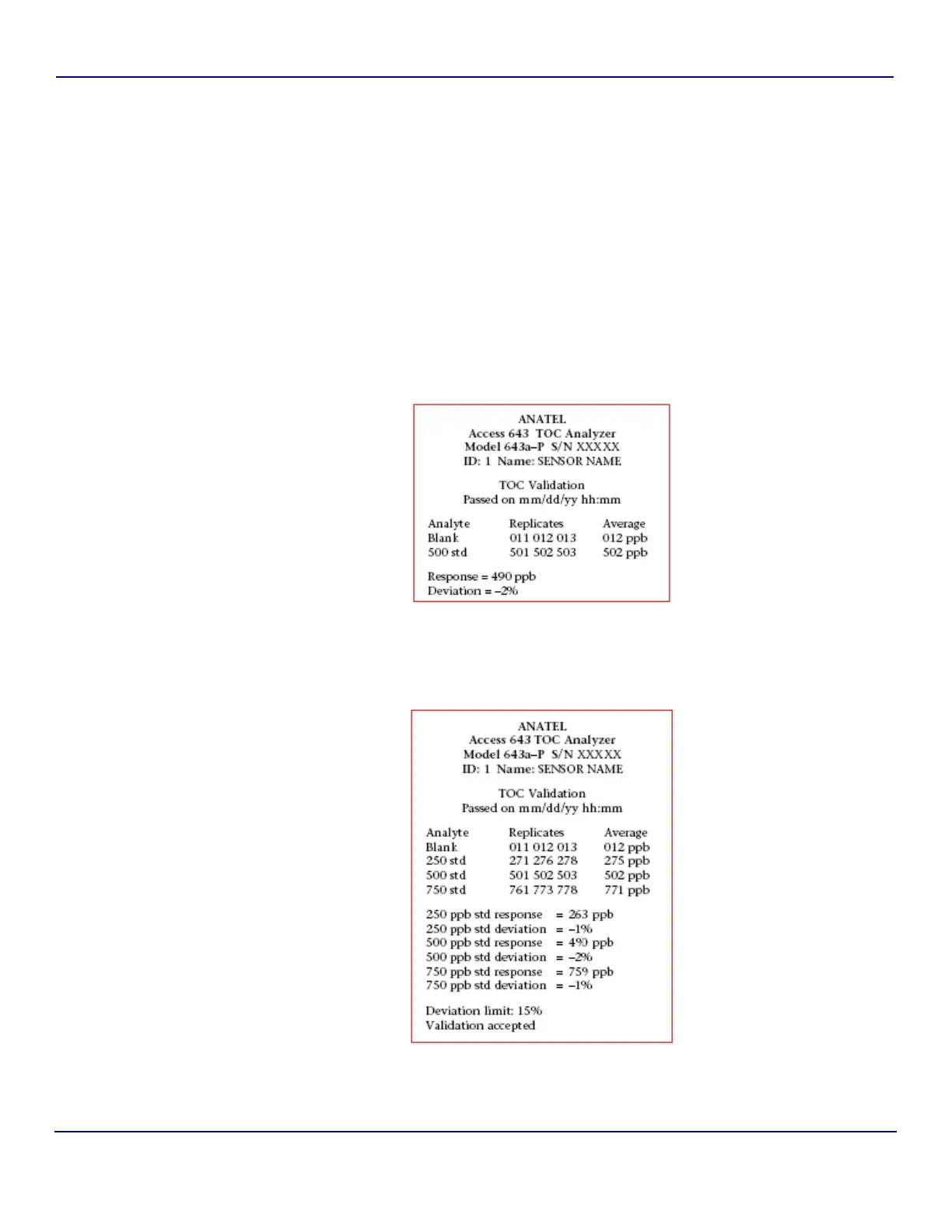
16) Press Enter again to accept the test results and initiate a printout of the data. If the
response deviation exceeds ±15%, the corresponding results are displayed and the
validation is deemed “unacceptable.” The opportunity to repeat the validation
procedure using a new sucrose standard will be given.
17) Once the validation procedure is complete, remove the standard vial and reinstall the
sample vessel before proceeding.
A printout or display of this validation information also is available through the Data History
Menu selection (see “Data History” on page 99).
Fig 6-15 : Sample Single-Point TOC Validation Printout
Fig 6-16 : Sample Three-Point TOC Validation Printout


 To Next Page