113
6.4 Tapering
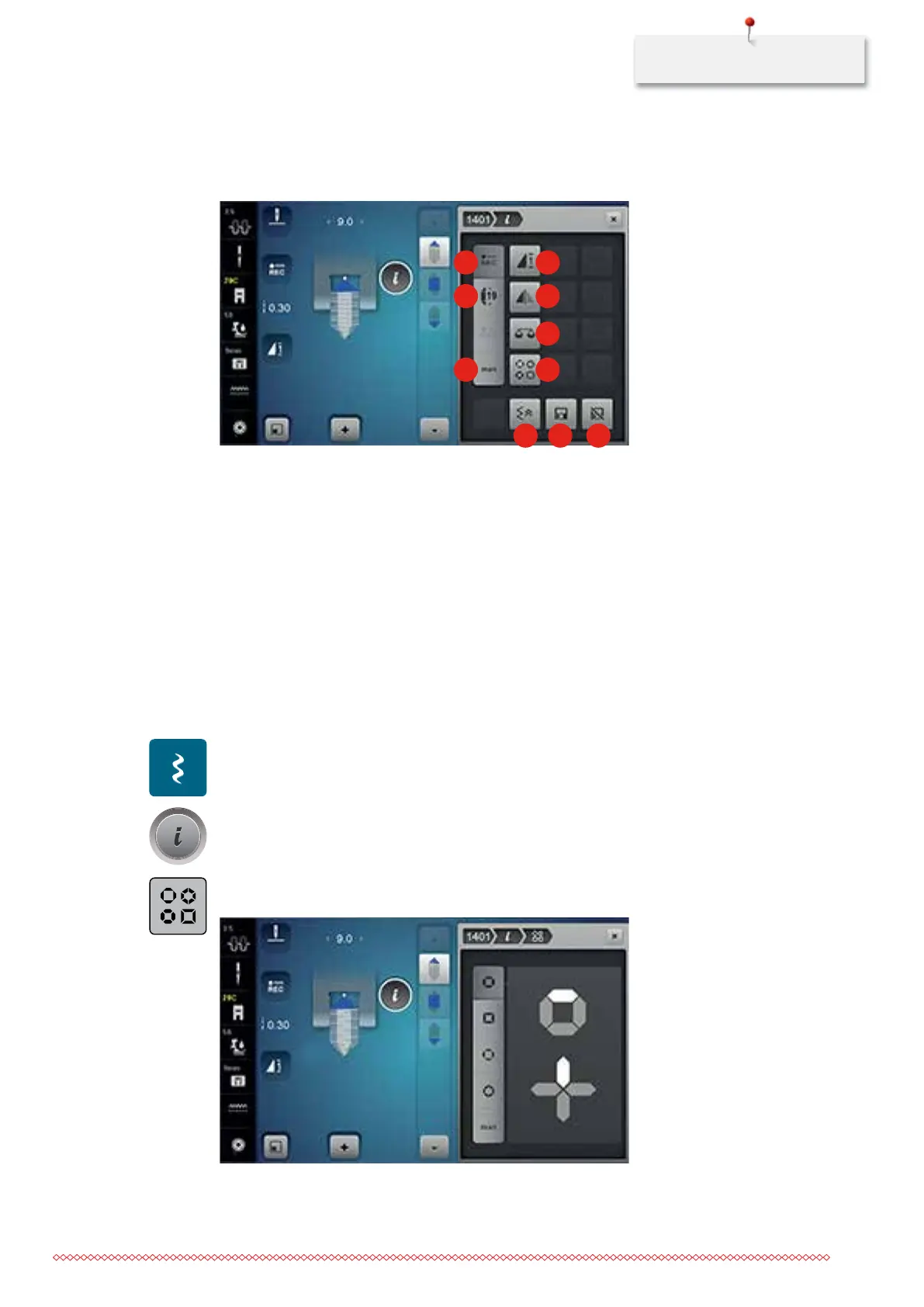
Overview Tapering
1 2
3
4
5
6 7
8 9 10
1 Programming length 6 Determining the length manually
2 Pattern repeat 7 Selecting kind of tapering
3 Adjusting the length 8 Backstepping
4 Mirror image left/right 9 Saving stitch pattern settings
5 Balance 10 Back to basic setting
Altering points of a stitch pattern
Tapering is a technique in which the stitch patterns come to a point at the beginning and the end. Four
different points are pre-programmed. In addition to that, the points of stitch patterns can also be determined
manually.
> Touch the icon «Decorative stitches».
> Select a stitch pattern of the Category 1400.
> Touch the icon «i»-Dialog.
> Touch the icon «Selecting type of tapering».
> Select the desired point of the stitch pattern in the right portion of the display.
035964.50.04_2014-08_Manual_B790_EN



 To Next Page