169
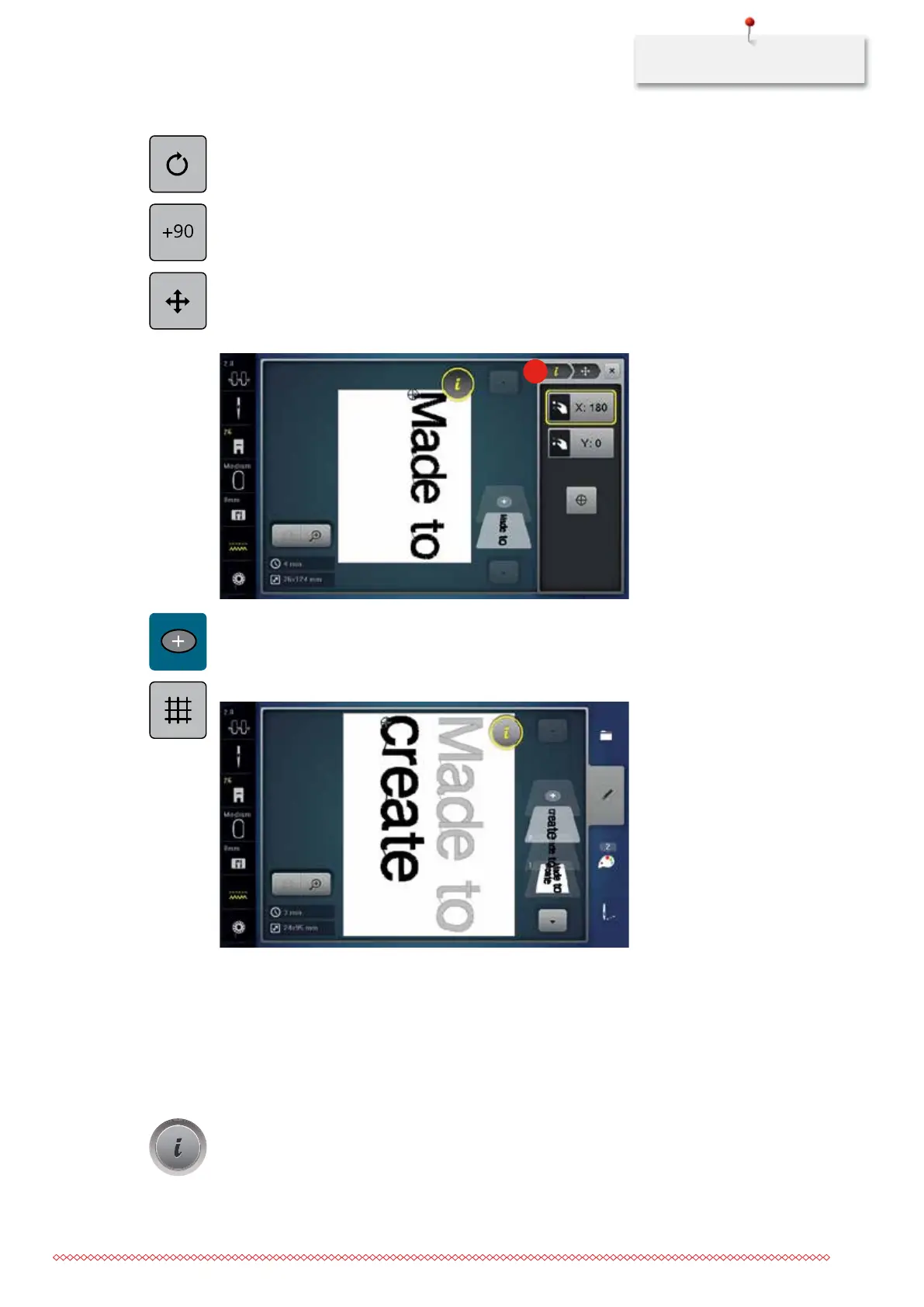
> Touch the icon «Rotating the embroidery motif».
> Touch the icon «+90» to rotate the text by 90°.
> Touch the icon «i» (1).
> Touch the icon «Relocating the embroidery motif».
> Turn the «Upper Multifunctional knob» to move the embroidery motif horizontally.
> Turn the «Lower Multifunctional knob» to move the embroidery motif vertically.
> Touch the yellow-framed icon to reset the alterations to basic setting.
1
>
Touch the icon «Adding an embroidery motif».
> Enter the text «create».
> Touch the icon «Grid on/off» to position the text lines more exactly.
11.15 Endless embroidery
When embroidering a border, it is advantageous to use the «Mega Hoop» (optional accessory) or the «Maxi
Hoop» (optional accessory). The embroidery project requires less rehooping. We recommend marking
reference lines on the fabric, and using the template when hooping and rehooping. Here, the reference lines
must run parallel to the lines on the template. In the following example, the supplied «Oval-Hoop» is used.
> Select an embroidery motif.
> Touch the icon «i»-Dialog.
035964.50.04_2014-08_Manual_B790_EN



 To Next Page