170
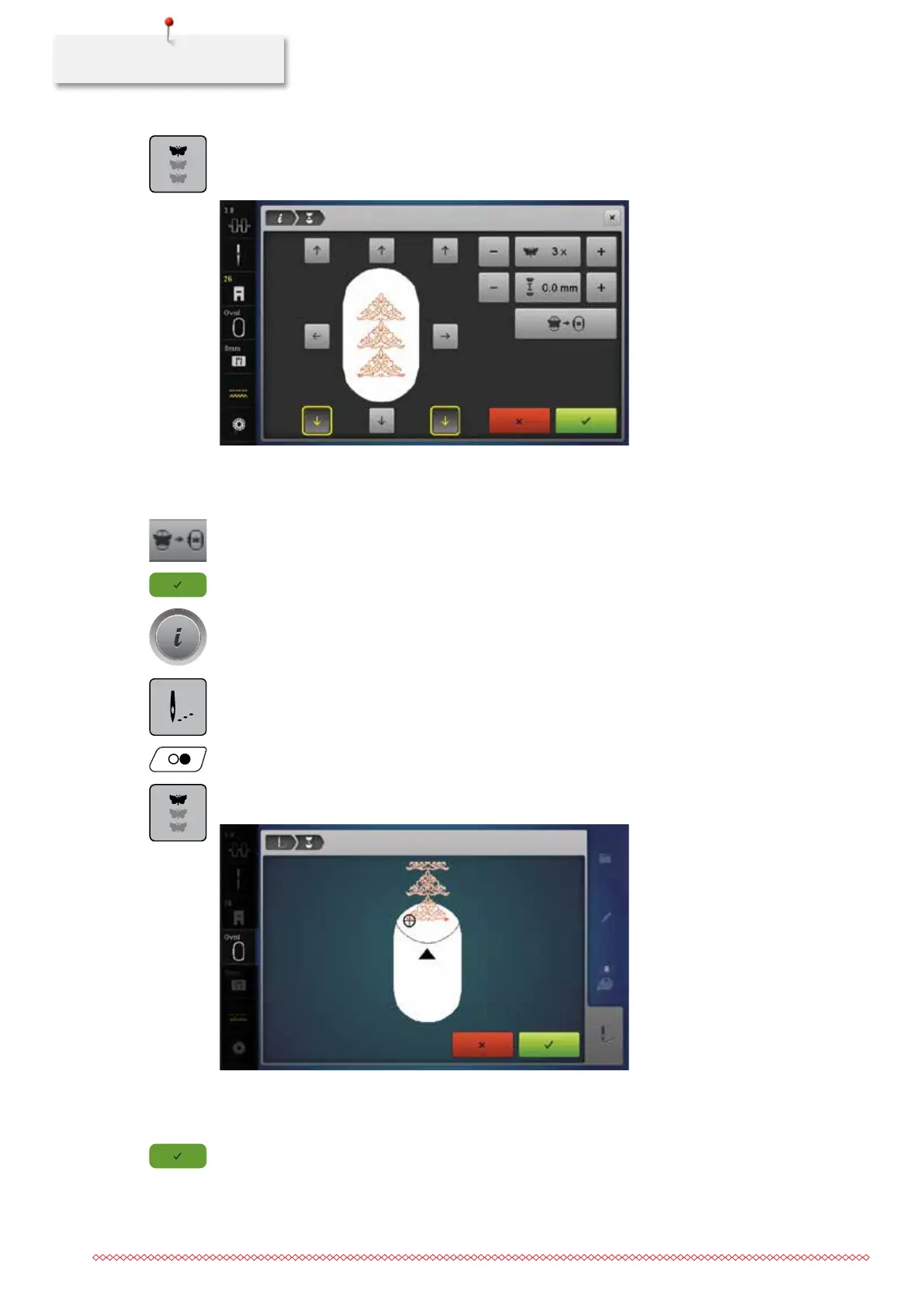
> Touch the icon «Endless Embroidery».
– The embroidery motif will be duplicated as many times as possible to fill the hoop.
– The reference points, which are necessary when rehooping the fabric, are also stitched out.
> Add more reference points, if required, using the arrow icons.
> Turn the «Upper Multifunctional knob» to determine the number of embroidery motif repeats.
> Turn the «Lower Multifunctional knob» to adjust the distance between the embroidery motifs.
> Touch the icon «Fit to hoop» to adjust the size of the motifs automatically so they all fit in the hoop.
> Touch the icon «Confirm».
> Touch the icon «i»-Dialog.
> Touch the icon «Embroidering».
> Push the button «Start/Stop» and embroider the border.
> Touch the icon «Endless Embroidery» when the reference points have been embroidered.
– An animation indicates that the fabric must be rehooped.
> Remove the hoop and rehoop the fabric so that the stitched out reference points are in the upper part of
the embroidery area and at least 3 cm from the top edge of the hoop.
> Attach the hoop.
> Touch the icon «Confirm».
– The hoop is moved automatically near the last stitch.
– The icon «AUTO» is activated and the hoop moves automatically near the last reference point.
035964.50.04_2014-08_Manual_B790_EN



 To Next Page