130
> Touch the icon (6).
– The machine sews the bottom bartack and stops automatically.
> Touch the icon «Scrolling down» so that the last icon appears.
> Touch the icon.
– The machine secures and stops automatically.
8.13 Sewing the manual 5-step buttonhole
Prerequisite:
• The Buttonhole foot No. 3C (optional accessory) is attached.
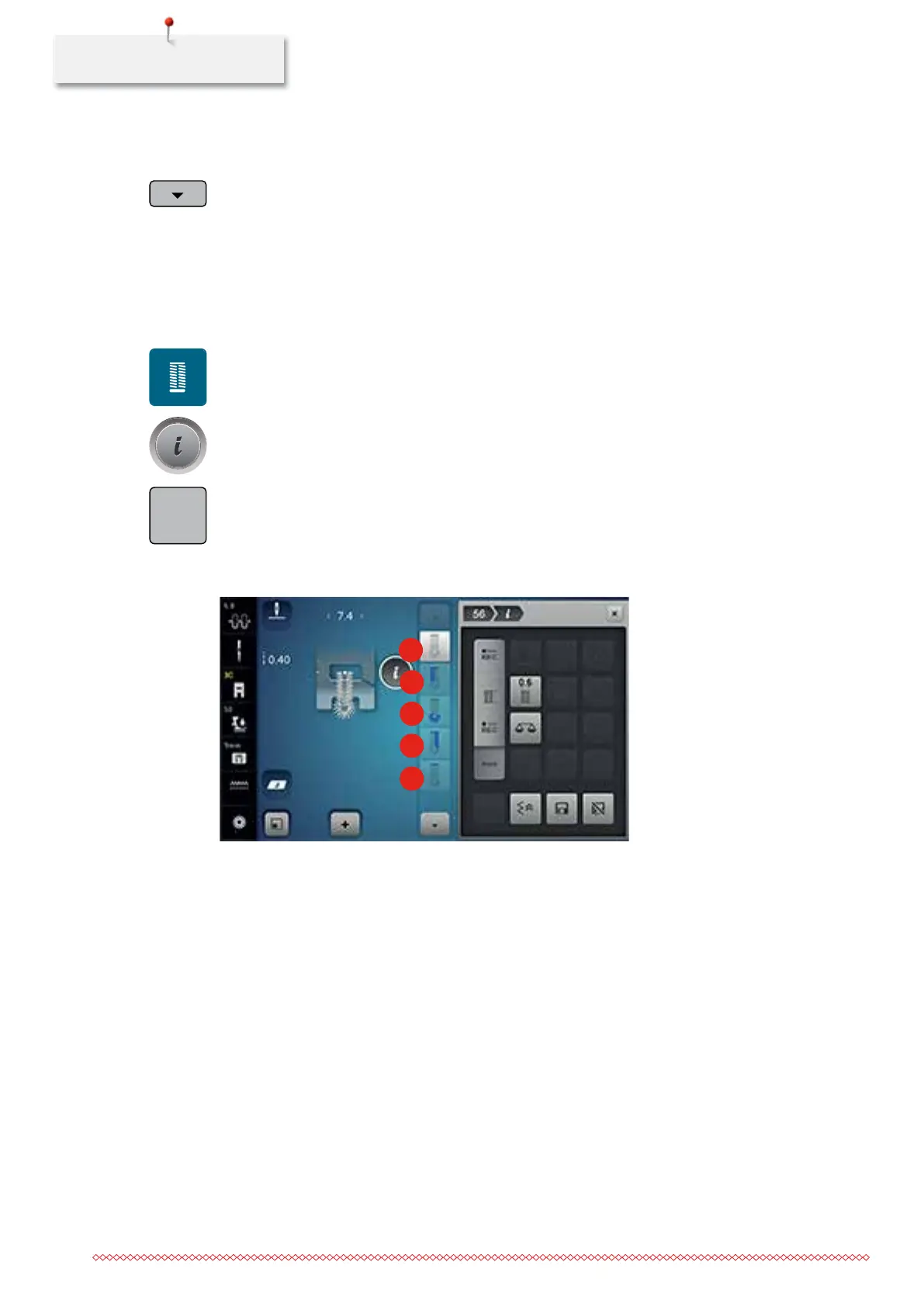
> Touch the icon «Buttonholes».
> Select the Buttonhole No. 56.
> Touch the icon «i»-Dialog.
> Touch the icon «Adjusting the length manually».
– Icon (1) in the display is activated for the buttonhole start.
> Sew the desired length of the buttonhole.
– Icon (2) is activated.
> Stop sewing at the desired length of the bead or at the marking.
2
3
4
5
1
> Touch the icon (3).
– The machine sews the eye or the keyhole and stops automatically.
> Touch the icon (4).
– The machine sews the second bead in reverse. Stop the machine at the first stitch at the buttonhole
start.
> Touch the icon (5).
– The machine sews the upper bartack and secures automatically.
man
035964.50.04_2014-08_Manual_B790_EN



 To Next Page