164
> Touch the icon «Deleting embroidery motif».
– The icon «Embroidery machine» is activated.
> Select the embroidery motif which is to be deleted.
> Touch the icon «Confirm».
Deleting an embroidery motif from the BERNINA USB stick
> Touch the icon «Selection».
> Touch the icon «Deleting embroidery motif».
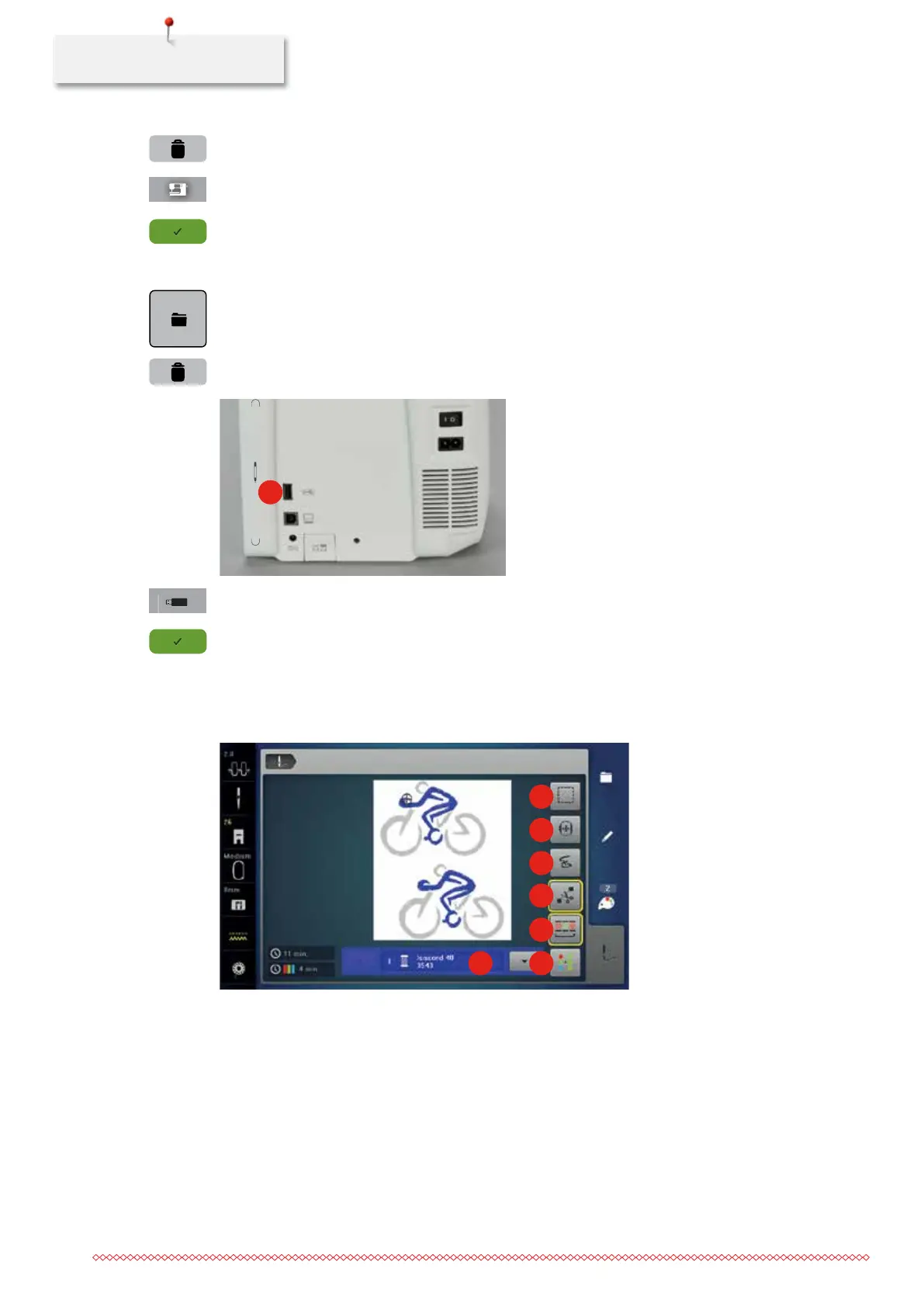
> Insert the BERNINA USB stick into the port (1).
1
> Touch the icon «USB stick».
> Select the embroidery motif which is to be deleted.
> Touch the icon «Confirm».
11.11 Embroidery menu
Overview Embroidery menu
1
2
3
4
5
67
1 Basting 5 Reducing color changes
2 Moving the hoop 6 Multi-colored embroidery motif on/off
3 Embroidery sequence control when thread
breaks
7 Color indication
4 Cutting connecting stitches
035964.50.04_2014-08_Manual_B790_EN


 To Next Page