158
Mirroring embroidery motifs
> Select an embroidery motif.
> Touch the icon «i»-Dialog.
> Touch the icon «Mirror image left/right» to mirror the embroidery motif horizontally.
> Touch the icon «Mirror image up/down» to mirror the embroidery motif vertically.
> Touch the yellow-framed icon to reset the alteration to basic setting.
Bending text
> Select an alphabet embroidery motif.
> Touch the icon «i»-Dialog.
> Touch the icon «Bending text».
> Turn the «Upper Multifunctional knob» to alter the distance between the characters in millimeter-steps.
> Turn the «Lower Multifunctional knob» to the left or to the right to bend the lettering upwards or
downwards.
Changing satin stitch to step stitch
> Select an embroidery motif.
> Touch the icon «i»-Dialog.
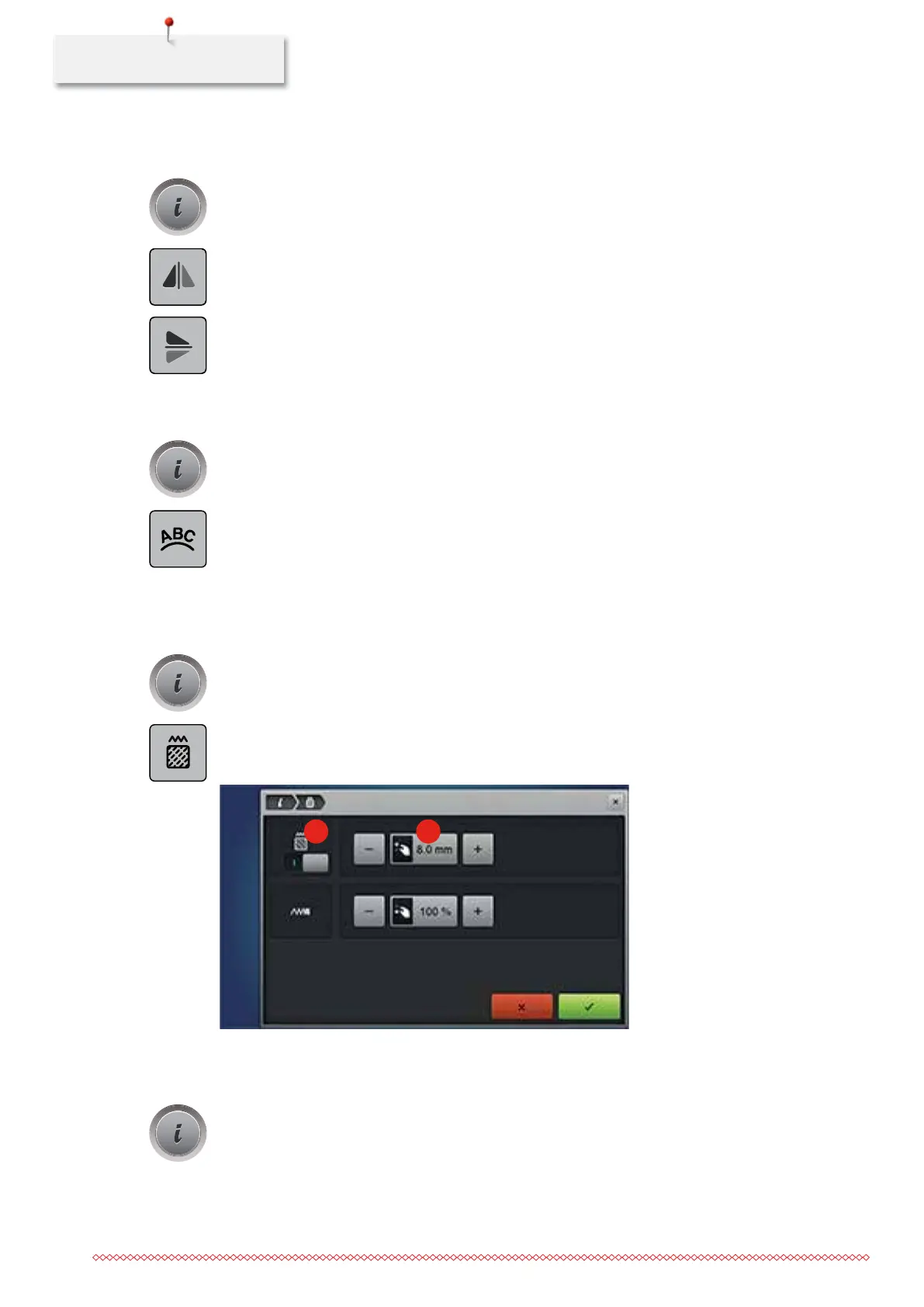
> Touch the icon «Altering the stitch type/stitch density».
> Touch the switch in the upper portion of the display (1) to activate the step stitch.
> Adjust the desired stitch length (2) with the icons «-» or «+».
21
Altering the stitch density
> Select an embroidery motif.
> Touch the icon «i»-Dialog.
035964.50.04_2014-08_Manual_B790_EN



 To Next Page