155
11.8 Editing the embroidery motif
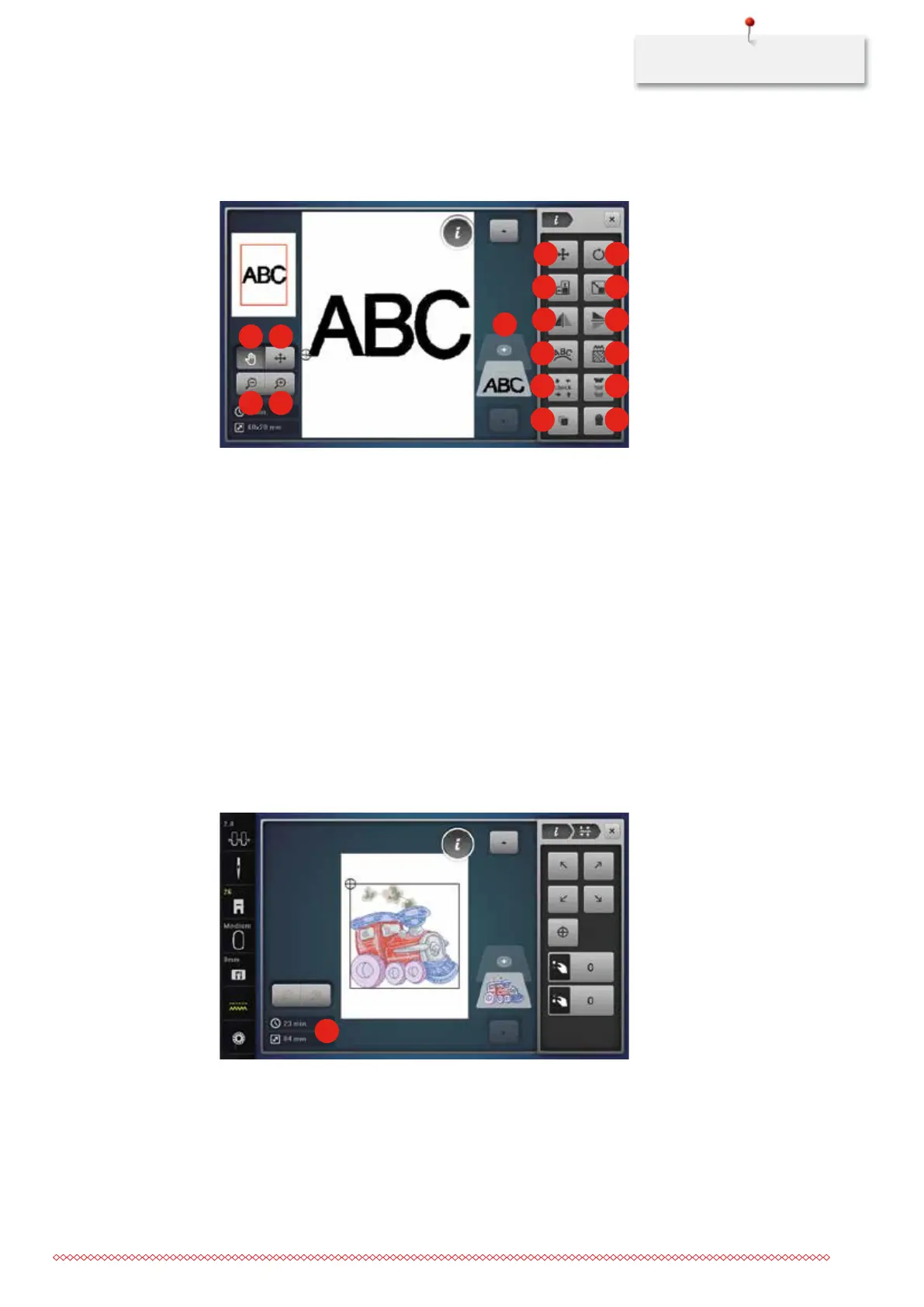
Overview Editing embroidery motif
1 2
3 4
5
6
8
10
12
14
16
7
9
11
13
15
17
1 Relocating the view 10 Mirror image left/right
2 Moving the view of the motif 11 Mirror image down/up
3 Zoom out 12 Bending the text
4 Zoom in 13 Altering the stitch type/stitch density
5 Adding an embroidery motif 14 Checking motif size
6 Relocating the motif 15 Endless Embroidery
7 Rotating the motif 16 Duplicating the motif
8 Altering the motif in height and width 17 Deleting the motif
9 Altering the embroidery motif proportionally
Monitoring the embroidery time
In the display «Editing» at lower left (1), the estimated embroidery time is indicated in minutes and the width
and height of the embroidery motif is indicated in millimeters.
1
Adjusting the upper thread tension
The basic setting of the upper thread tension is set automatically as soon as a stitch pattern or an embroidery
motif is selected.
The upper thread tension is set optimally at the BERNINA factory and the sewing computer has been tested.
Metrosene-/Seralon thread size 100/2 (Company Mettler, Switzerland) is used for upper and bobbin thread.
035964.50.04_2014-08_Manual_B790_EN



 To Next Page