If a conrmation window appears
● When <Conrm Entered Fax Number> is set to <On>, the input screen reappears so that you can conrm
the destination ( Checking Destinations before Sending Documents(P. 561) ). Enter the destination
again.
Adding a destination
● To enter a second or subsequent destination, tap <Destination>
<Specify Using Numeric Keys>. You can
specify up to 10 destinations.
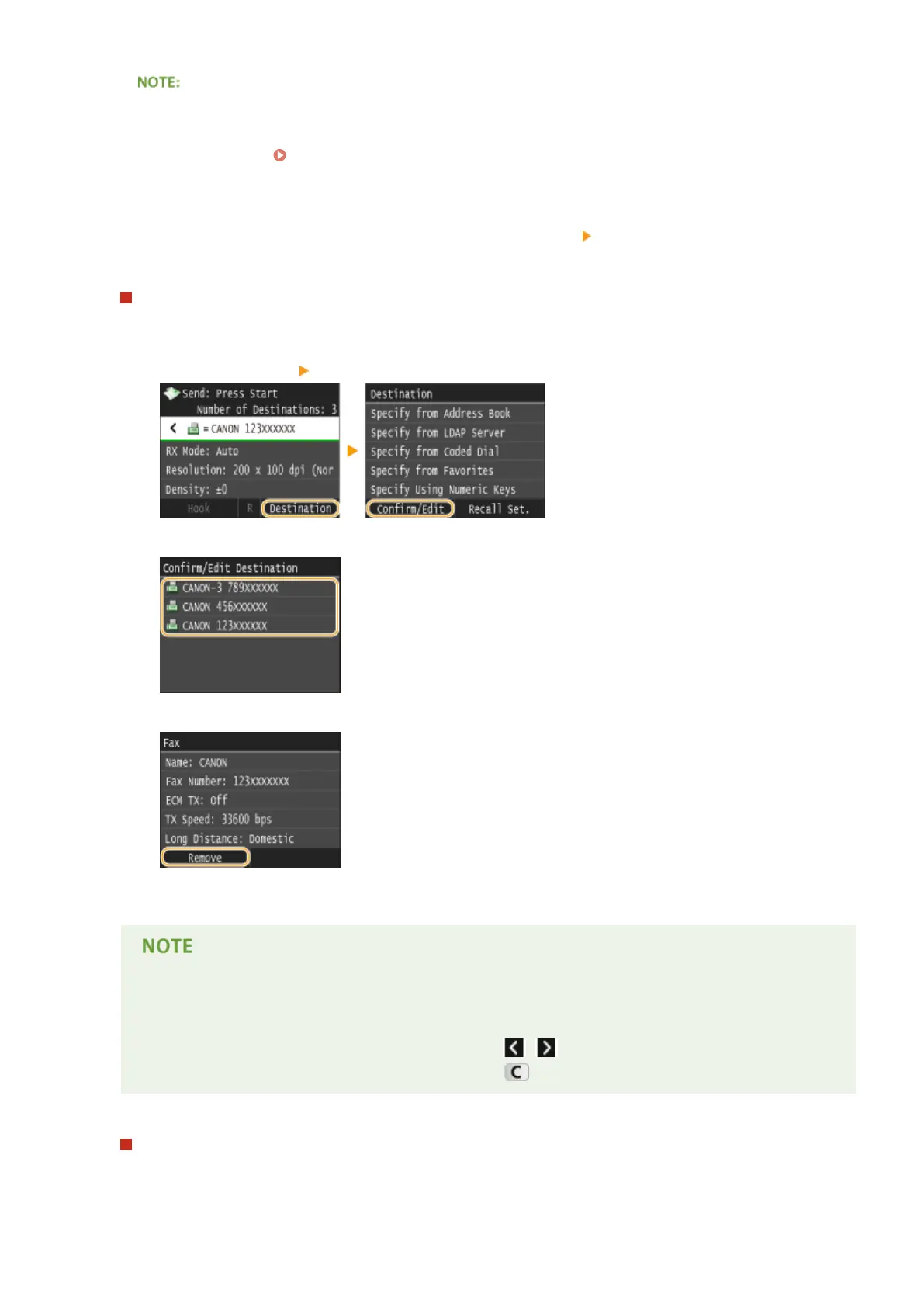
To delete destinations
If you specied multiple destinations, you can delete destinations as necessary.
1
Select <Destination> <Conrm/Edit>.
2
Select a destination you want to delete.
3
Tap <Remove>.
4
Tap <Yes>.
If you want to easily and quickly delete destinations without displaying a list of
destinations
● Before tapping <Destination> in step 1, you can tap / to toggle the destinations you specied.
Display a destination you want to delete, and press .
To send overseas
Enter the international access code, the country code, the area code, and the fax number to specify the
destination.
Faxing
150











 To Next Page