CRITICALPOINT 700/800MHZ BDA/DAS/BBU V3 USER MANUAL
©2024 Comba Telecom. All Rights Reserved.
568 Gibraltar Drive, Milpitas, CA 95035 | +1 408 526 0180
Rev. 1-0-2 Rev. Date: 11-1-2024
3.17 CLASS A CARRIER MODE FILTER TEMPLATES
The V3 BDA/DAS provides two sets of Class A filter bandwidth template options that the user can choose
between. The “High Rejection” Filter Set includes digital filters that prioritize High Rejection over Delay
Performance. The “Low Delay” Filter Set includes digital filters that prioritize Low Delay over High
Rejection/Selectivity. There is only one Class B filter option. Choose the option that best fits your
requirements. See Table 16 below for more details.
Table 16: V3 BDA/MU/RU Class A Digital Filter Templates
High rejection Filter Set
≥ 60dBc @ filter edge + 30KHz
≥ 60dBc @ filter edge + 50KHz
≥ 60dBc @ filter edge + 130KHz
≥ 60dBc @ filter edge + 200KHz
≥ 60dBc @ filter edge + 65KHz
≥ 60dBc @ filter edge + 75KHz
≥ 60dBc @ filter edge + 75KHz
≥ 60dBc @ filter edge + 100KHz
≥ 60dBc @ filter edge + 200KHz
≥ 60dBc @ filter edge + 200KHz
≥ 60dBc @ filter edge + 205KHz
Note: When viewing the values in the Delay column, the first number shown is for “DAS mode” based on
using a 1-meter fiber between FOU and RU; the second number shown in parentheses is for “MU Only” and
is the delay value for the BDA only.
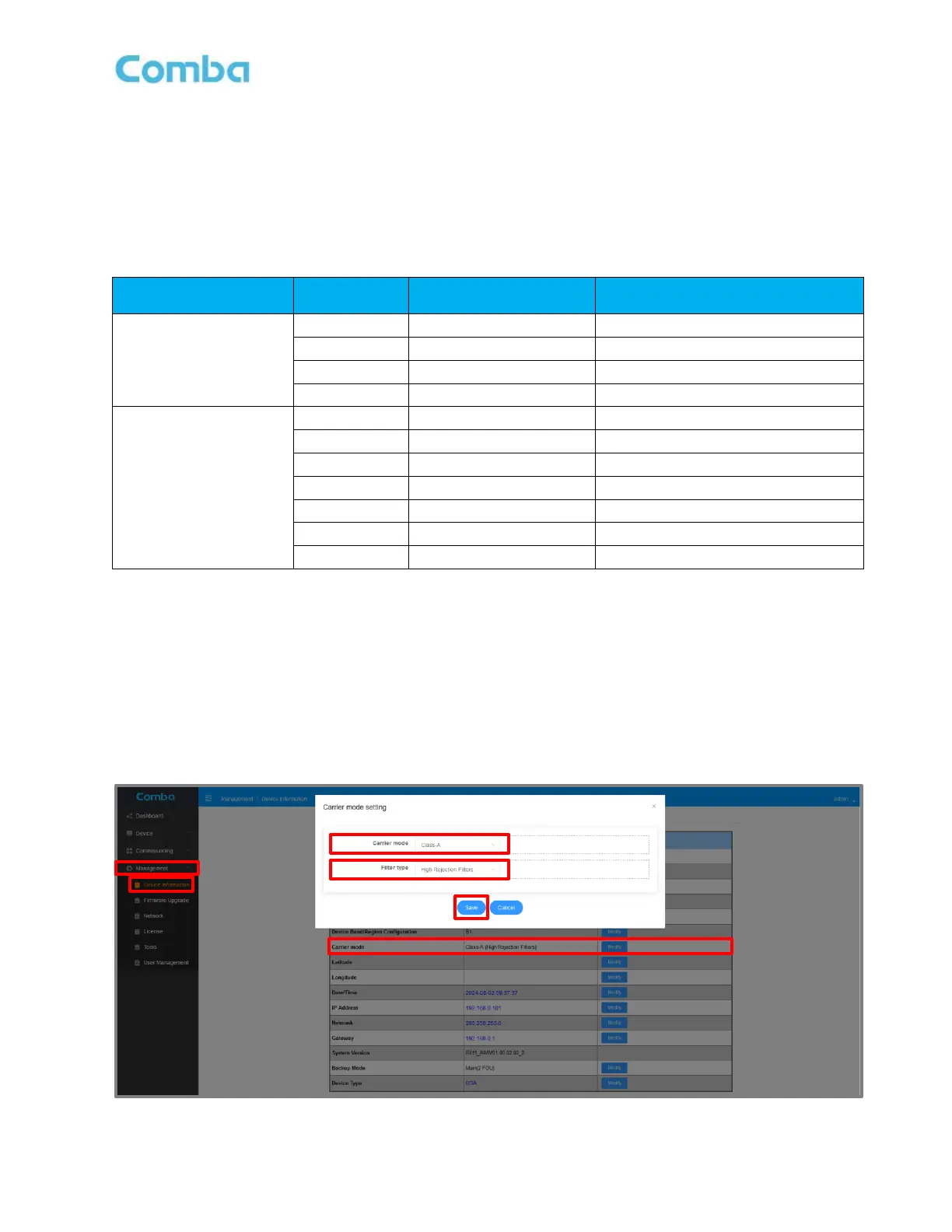
Follow the procedure below to change the Carrier Mode:
• Login to the BDA/MU and navigate to <Management – Device Information-Carrier Mode>.
• Click <Modify> to change the Carrier Mode/Filter Template. Click <Save> to apply the change.
The device will reboot after changing the Carrier Mode. Wait 4 minutes before logging back in.
Figure 98: V3 BDA/MU Changing Class A Carrier Mode Filter Template (High Rejection / Low Delay)



 To Next Page