©2024 Comba Telecom. All Rights Reserved.
568 Gibraltar Drive, Milpitas, CA 95035 | +1 408 526 0180
2.24 V1 AP ANNUNCIATOR PANEL INSTALLATION AND WIRING
The V3 BDA/MU or RU can be easily integrated with a Comba V1 AP Annunciator Panel. For complete
instructions on how to install and commission the V1 AP with the V3 BDA/MU/RU, please refer to the V1 AP
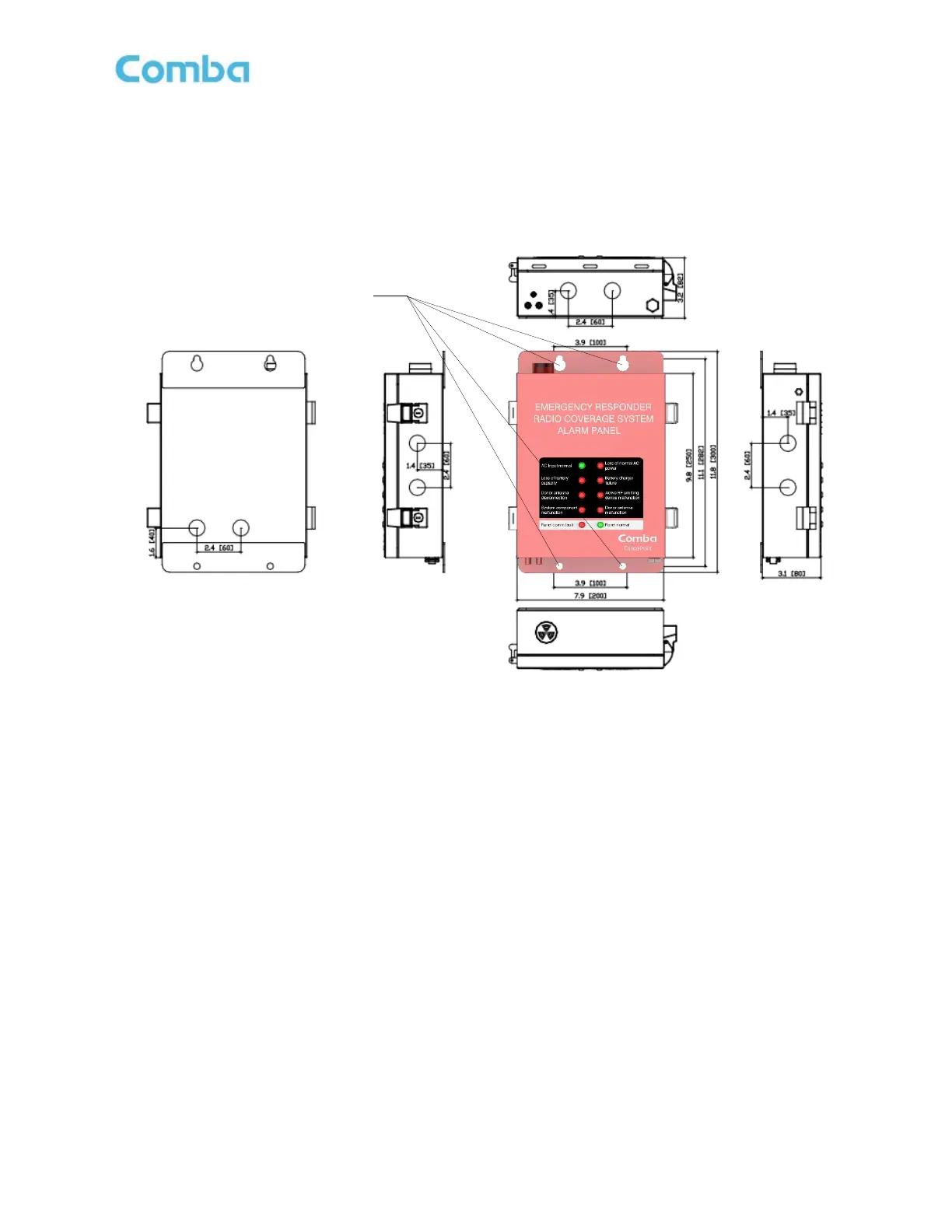
User Manual. V1 AP Dimensions, Installation, Wiring Details, and discovering the V1 AP in the software GUI
are explained below. Further details are provided within the commissioning and alarms sections of this manual.
Figure 57: V1 AP Annunciator Cabinet Dimensions and Installation
Follow the instructions below to wall mount the V1 AP:
• Drill four holes on the wall/plywood using the position of four holes on the AP mounting bracket as a
guide (AP mounting bracket is built into the AP cabinet).
• Install the AP cabinet on the wall. It is recommended to use 3/16” x 1-1/2” lag screws and fender
washers when mounting to 3/4” fire treated plywood. If mounting to a concrete wall, DIN Rails, or any
other materials, refer to the local building code. Secure the AP cabinet.



 To Next Page