©2024 Comba Telecom. All Rights Reserved.
568 Gibraltar Drive, Milpitas, CA 95035 | +1 408 526 0180
6.9 EXTERNAL ALARMS
In some cases, the user may require incorporating external device alarms into the DAS solution and have
them monitored at the FACP and displayed on the AP. An example would be a third-party bias-T system
required to monitor a donor antenna or a room high-temp alarm. These third-party device alarm outputs can
be connected to an external alarm input of the BDA/MU/RU device for the purpose of monitoring and sending
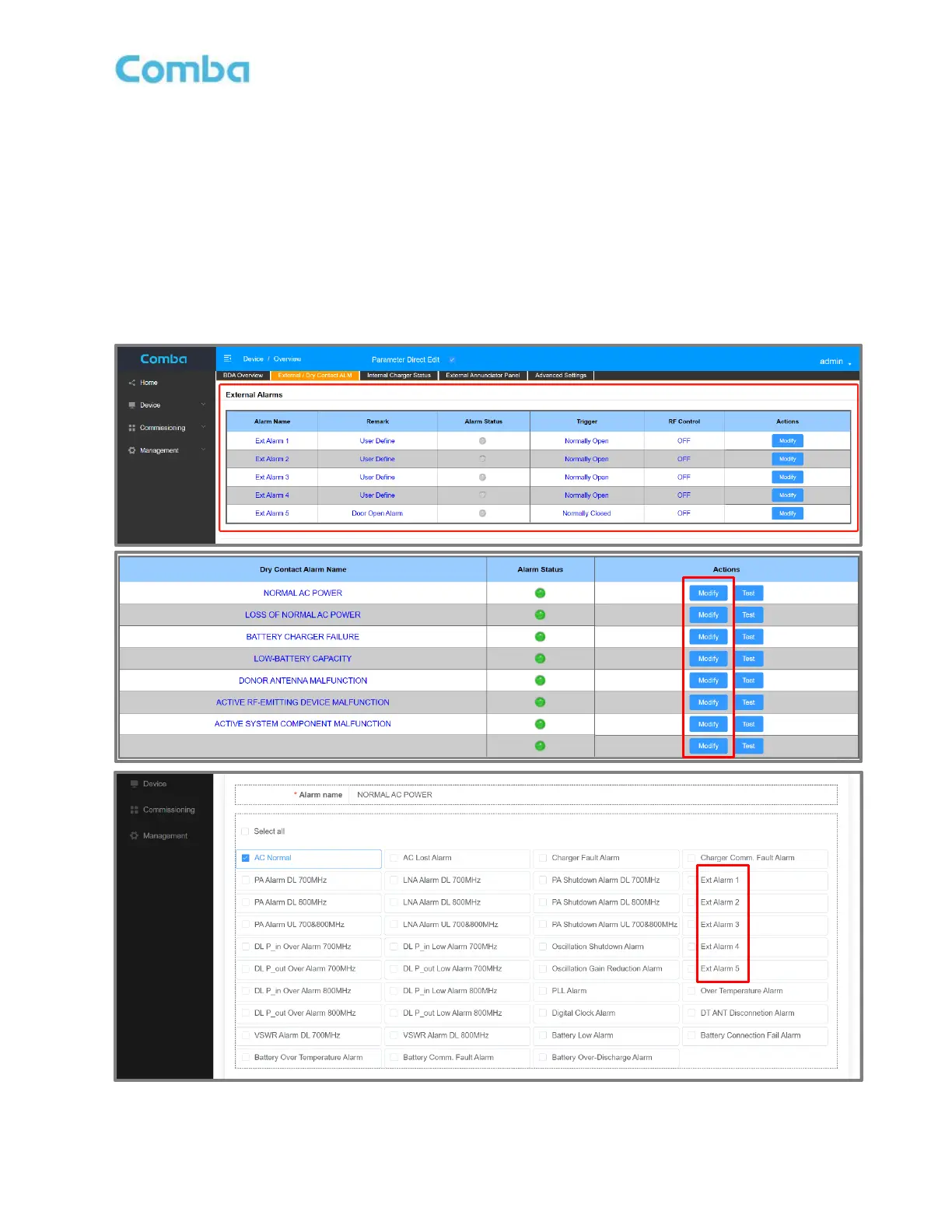
out an alarm. Once an external input is enabled in the web GUI, configure the alarm on the Dry Contacts
and AP LEDs by activating the external alarm within the Dry Contact. Figure 189 below is an example of
how to configure the Dry Contact you wish to map the External Alarm. For further details, see the V3
BDA/DAS User Manual.
• Navigate to Device –> Overview -> External/Dry Contact ALM
Figure 189: V3 BDA/MU/RU - External Alarm Settings



 To Next Page