©2024 Comba Telecom. All Rights Reserved.
568 Gibraltar Drive, Milpitas, CA 95035 | +1 408 526 0180
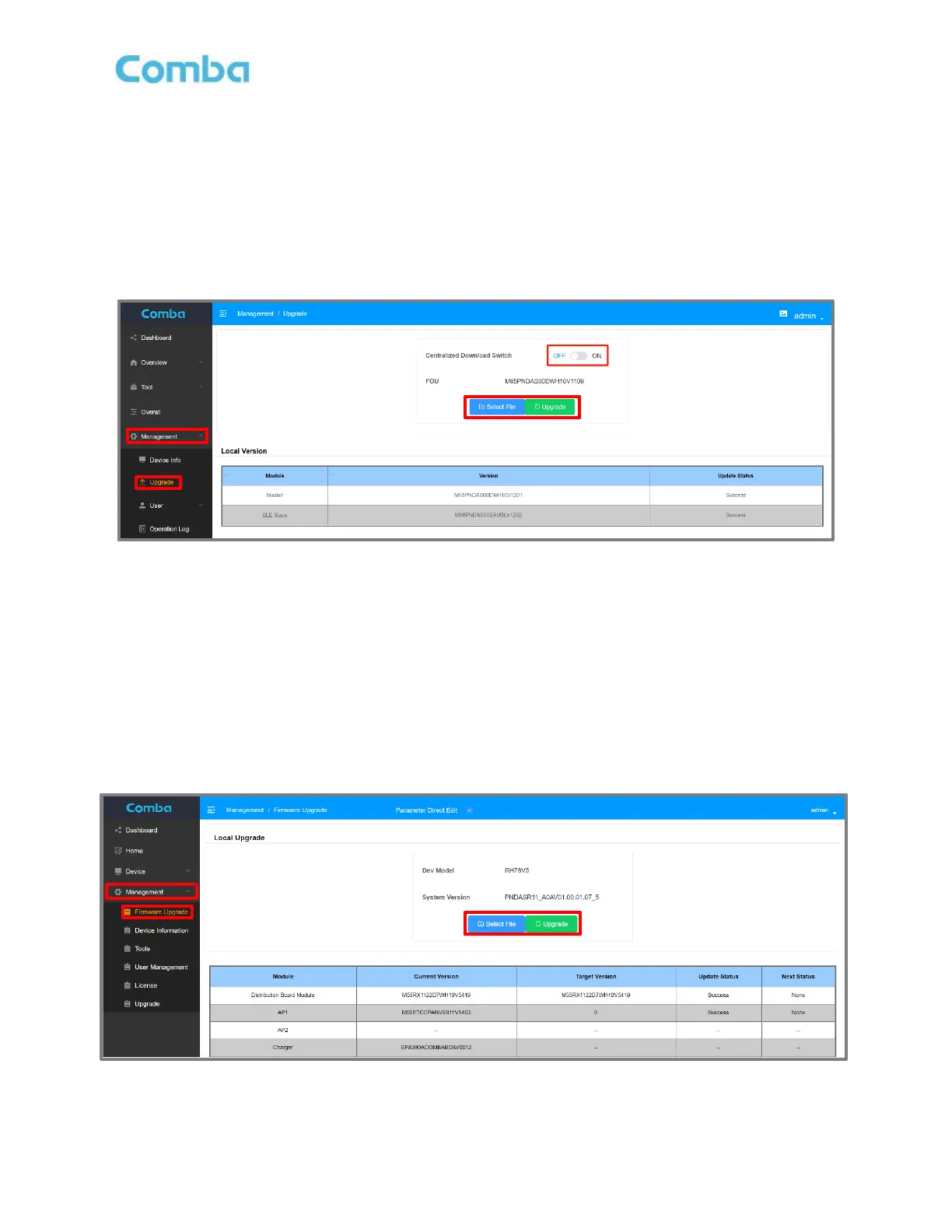
4.3 V2 FOU LOCAL FIRMWARE UPGRADE
1. Login to the FOU OMT port.
2. In Management -> Upgrade, switch OFF <Centralized Download Switch>.
3. Click <Select File> and select the firmware file. Then click <Upgrade>.
4. A progress window will pop up. Once the upgrade has been completed you will receive a success
message. Click <Finish> after completion.
5. The device will take approximately 2-4 minutes to reboot after the upgrade.
Figure 162: V2 FOU Local Firmware Upgrade
4.4 V3 RU LOCAL FIRMWARE UPGRADE
1. Login to the RU OMT port and go to Management -> Firmware Upgrade.
2. Click <Select File> and select the firmware file. Then click <Upgrade>.
3. A progress window will pop up. Once the upgrade has been completed you will receive a success
message. Click <Finish> after completion.
4. The device will take approximately 2-4 minutes to reboot after the upgrade.
Figure 163: V3 RU Local Firmware Upgrade



 To Next Page