©2024 Comba Telecom. All Rights Reserved.
568 Gibraltar Drive, Milpitas, CA 95035 | +1 408 526 0180
3.19 ALARMS (DRY CONTACT / EXTERNAL ALARM / RF CONTROL)
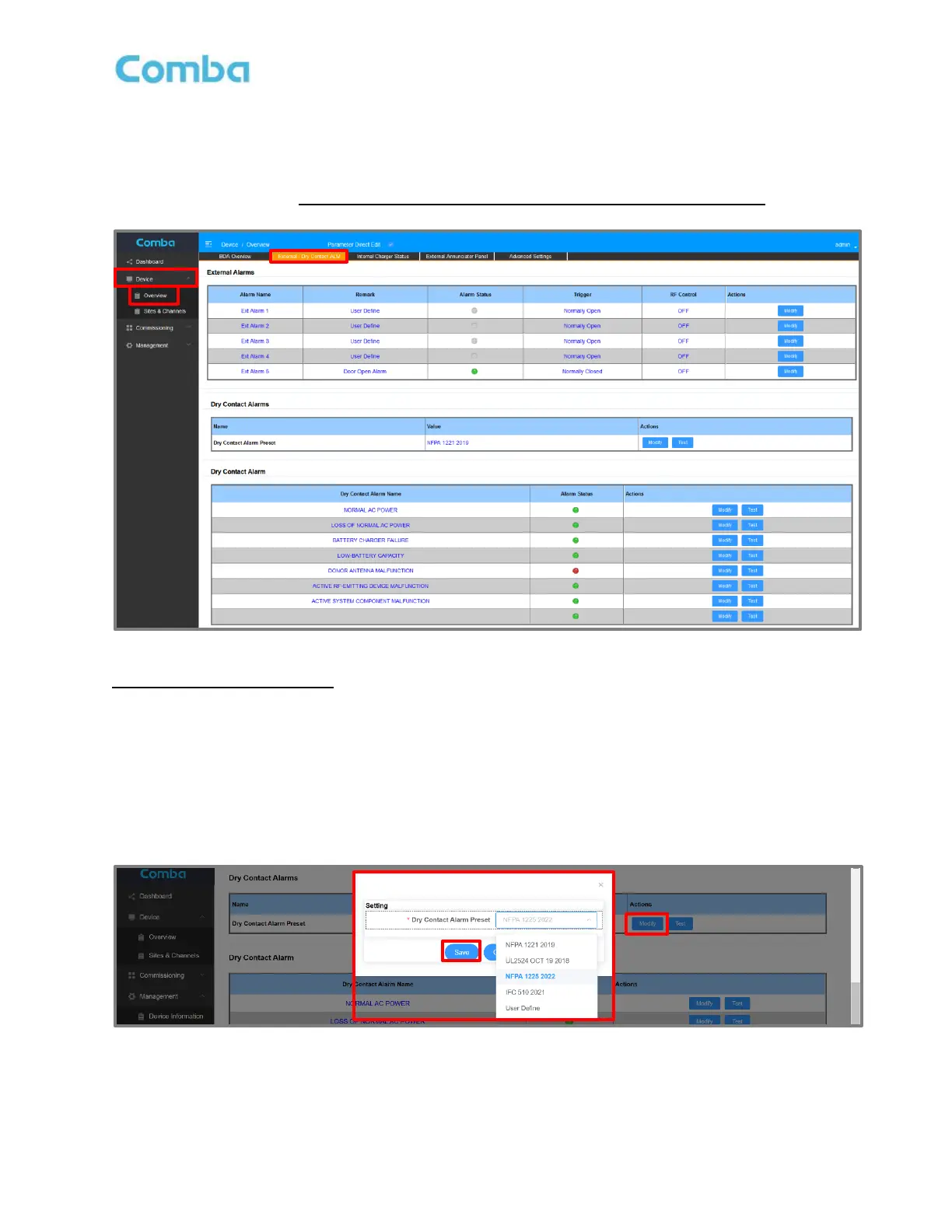
The user can change the Dry Contact and External Alarm configuration as desired. The user can choose
between one of the available default alarm configuration presets or they can customize the alarms for a
specific alarm application. Refer to the Alarm section of this User Manual for more details.
Figure 100: V3 BDA/MU/RU Dry Contact Alarms, External Alarms, and SW RF Control
Dry Contact Alarms (Presets):
• For BDA Mode, Login to the BDA/MU and navigate to <Device – Overview – Alarm>. For DAS
Mode, Login to the BDA/MU and navigate to <Home – Device Checkbox – Alarm>.
• Click <Modify> in the <Dry Contact Alarms> section to change the configuration. Click <Save> to
apply the change.
There are preconfigured dry contact alarms by different standards, as shown below:
The <Test> Button next to each alarm can be used to temporarily trigger an alarm for test purposes.
Figure 101: V3 BDA/MU/RU Dry Contact Alarm Preset Configurations



 To Next Page