©2024 Comba Telecom. All Rights Reserved.
568 Gibraltar Drive, Milpitas, CA 95035 | +1 408 526 0180
3.20 BATTERY BACKUP UNIT
The BDA/MU/RU device must be configured properly for connection to either a Comba V3 BBU or an
alternate power source. From the factory, the BDA/MU device is configured to connect to a Comba V3 BBU
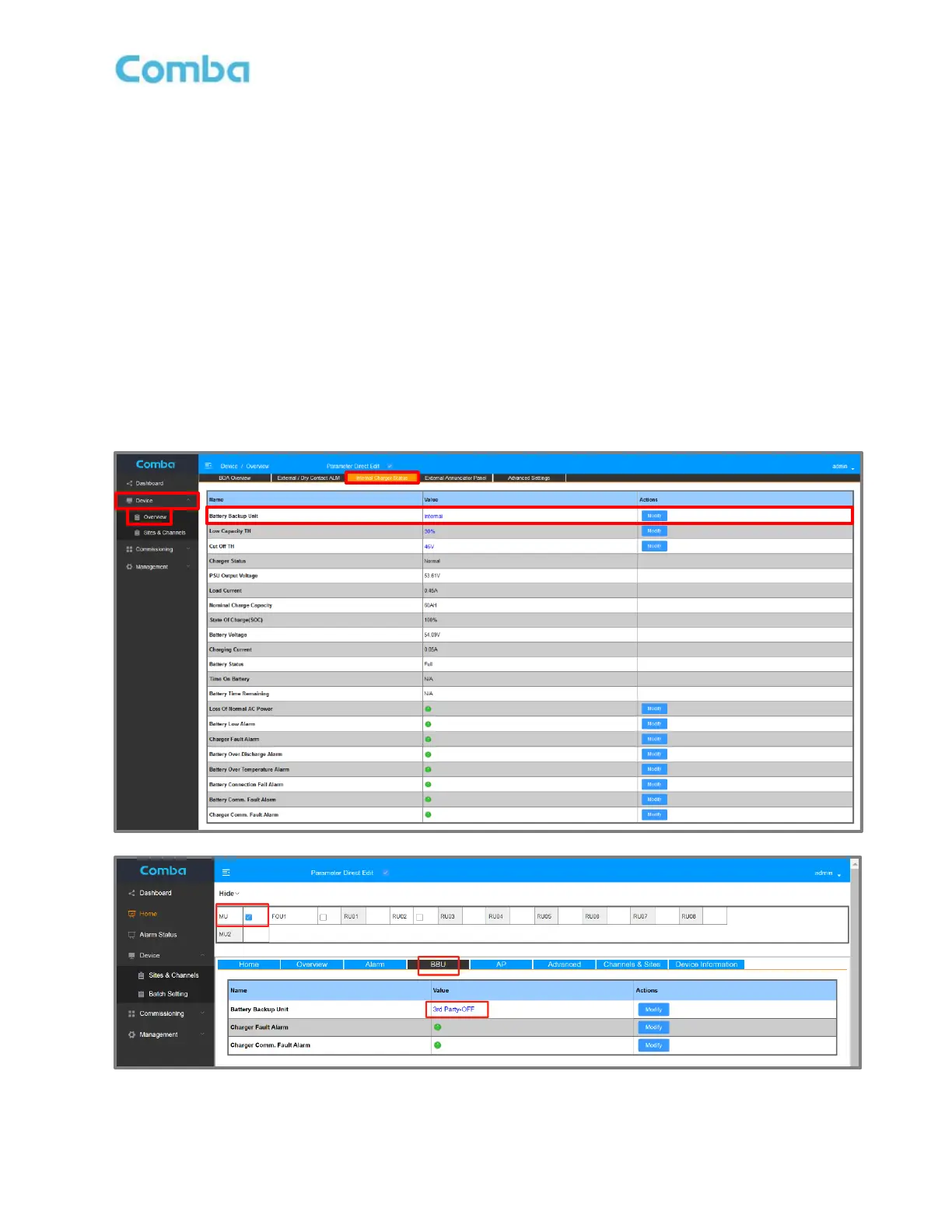
and the <Battery Backup Unit> parameter will be set to “Internal”. This means the device will use the internal
charger to power the system and charge the batteries. If the V3 BDA/DAS is using a Comba V2 BBU or a
third-party power source, the BDA/MU device must be configured accordingly, and the <Battery Backup
Unit> parameter must be changed to “3
rd
Party OFF”.
Follow the procedure below to change the Battery Backup Unit Configuration:
• For BDA Mode, Login to the BDA/MU and navigate to <Device – Overview – Internal Charger Status
– Battery Backup Unit>. For DAS Mode, Login to the BDA/MU and navigate to <Home – Device
Checkbox – BBU – Battery Backup Unit>.
• Click <Modify> and change from “Internal” to “3
rd
Party OFF”.
When “3
rd
Party OFF” power source is selected, the BDA/MU turn OFF the internal charger and ignore
internal device alarms related to the V3 Comba BBU.
Figure 105: V3 BDA/MU/RU Battery Backup Unit Configuration



 To Next Page