©2024 Comba Telecom. All Rights Reserved.
568 Gibraltar Drive, Milpitas, CA 95035 | +1 408 526 0180
3.36 ADVANCED SETTINGS – DONOR ANTENNA DISCONNECTION
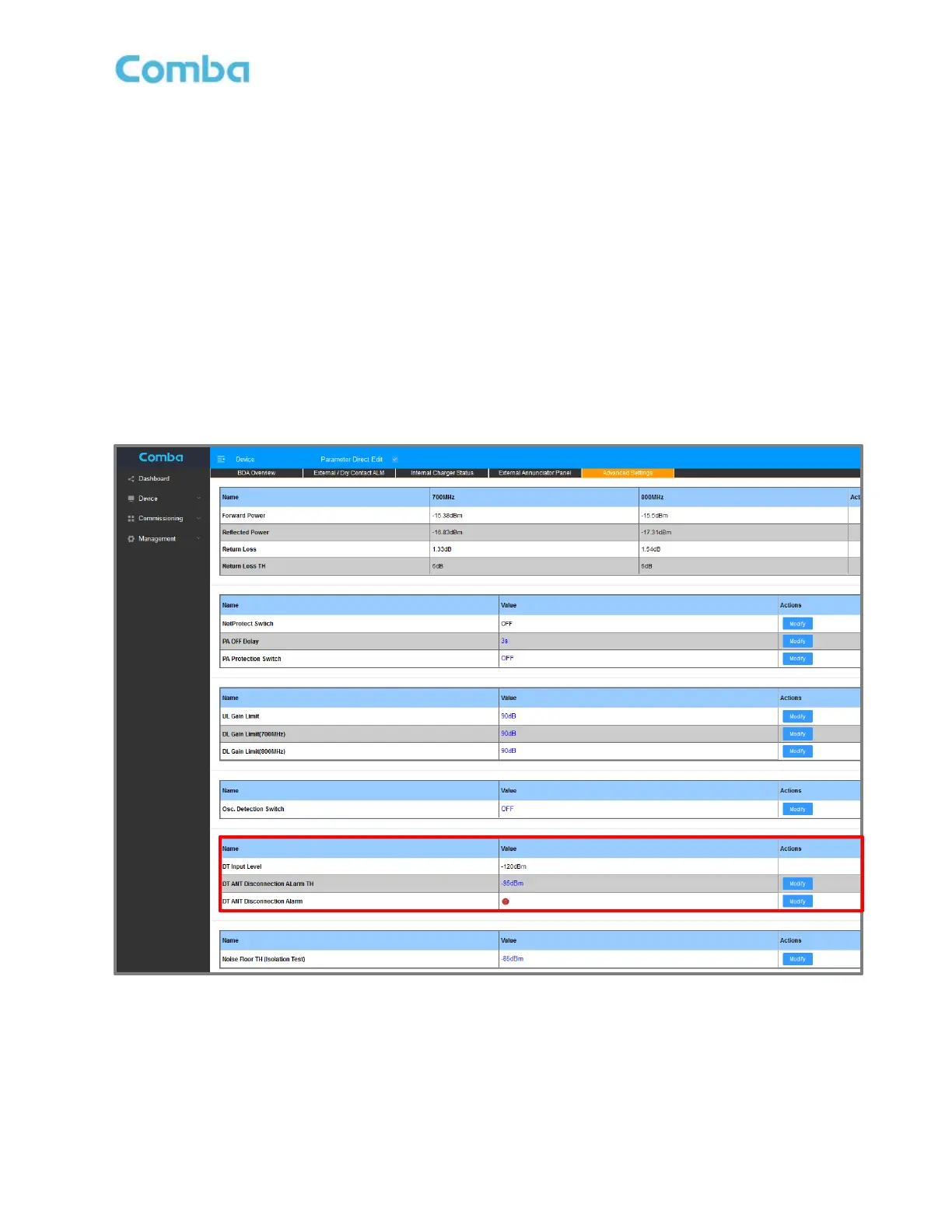
The Donor Antenna Disconnection Alarm configuration is found in the Advanced Settings page of the BDA or
MU. Once the system has been commissioned, the user can view the broadband DT Input Level reading and
set a threshold to generate an alarm when the donor antenna becomes disconnected.
To configure the Donor Antenna Disconnection alarm:
• For BDA, navigate to <Device – Overview – Advanced Settings>
For MU, navigate to <Home – MU Checkbox – Advanced>
• Review the DT Input Level reading for a few minutes and try to determine an average. Set the DT
ANT Disconnection Alarm TH 10-20dB below the average DT Input Level.
• Click on <Modify> in the <DT ANT Disconnection Alarm TH> row. Modify value accordingly.
• Click on <Modify> in <DT ANT Disconnection Alarm> row to Enable/Disable the alarm.
Note: During the initial system turn up and commissioning, the user may choose to temporarily disable this DT
ANT Disconnection alarm to prevent false nuisance alarms from occurring. See Figure 157 below.
Figure 157: Advanced Settings – DT Donor Antenna Disconnection Alarm



 To Next Page