5 V3 BDA/MU/RU LICENSE UPGRADES
A customer can purchase a License Upgrade from Comba Telecom to upgrade a V3 BDA, MU, or RU.
License Upgrades allow the user to upgrade certain features such as Band Configuration from Single Band
to Dual Band, Power Level from 27 – 33dBm, and Filter Class from Class B to Class A. The complete list of
available upgrades can be found on the device datasheet or in the General Information section of this user
manual. Once a customer has purchased a License Upgrade, they will receive a license certificate that has
the upgrade instructions as well as a new label to affix to the exterior of the device.
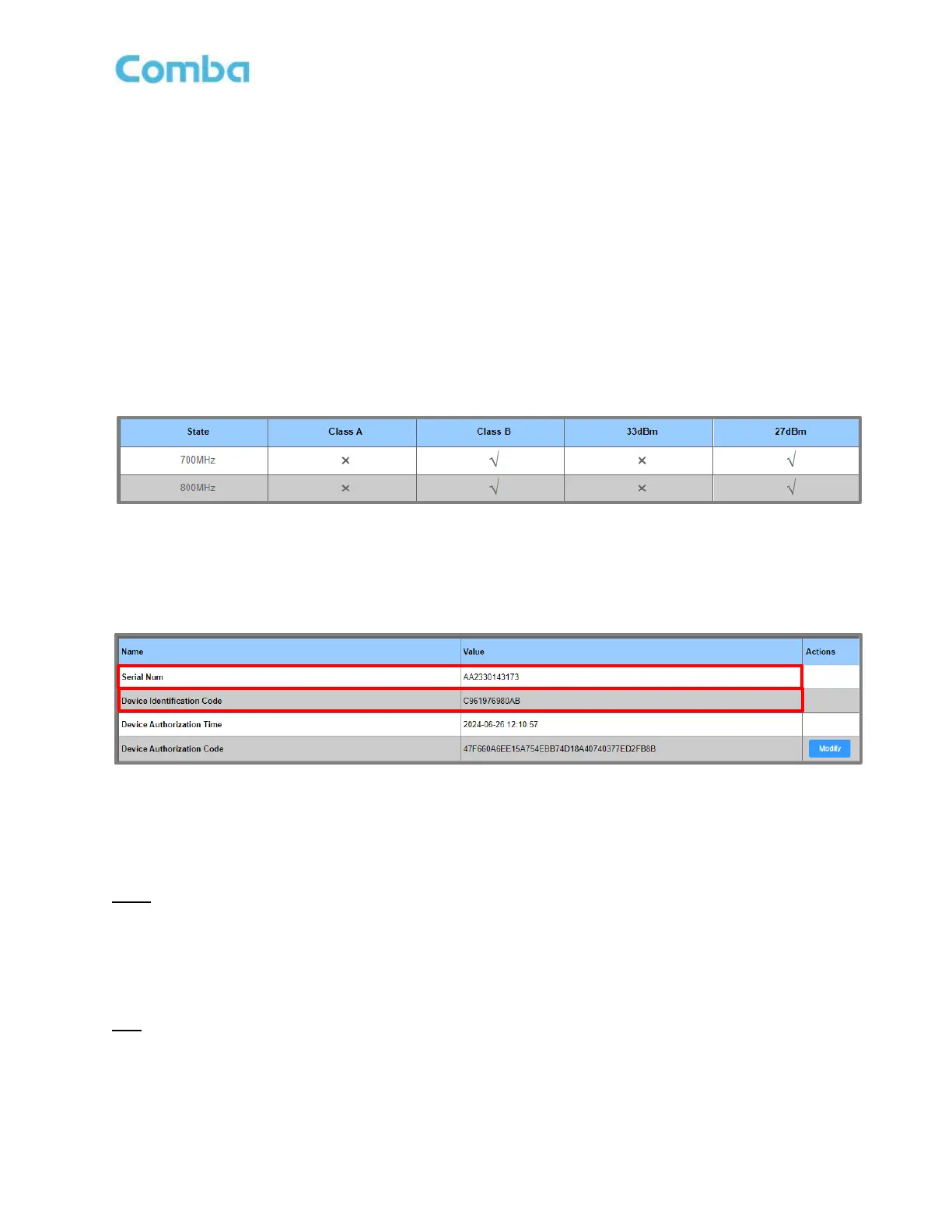
To view and/or upgrade the current License for a V3 device, the user must follow the below instructions to
navigate to the <License> page of each device (See Figure 169 below):
• BDA: Navigate to <Management – License>
• DAS MU: Navigate to <Management – License >
• DAS RU: Navigate to <Dashboard – Table Style - MU/RU (Click device) – Management – License >
Figure 169: V3 BDA/MU/RU License Upgrade – Viewing Current License in License Table
To request a new License Upgrade from your Comba Sales Rep., you must provide the device Serial
Number and the Device Identification Code. These 2 items can be found in the web GUI once the user
navigates to the <License> page of each device. See Figure 170 below.
Figure 170: V3 BDA/MU/RU License Upgrade - Serial Number and Device Identification Code
Once a new License Upgrade has been purchased, Comba will provide a new <Device Authorization Code>.
The user must follow the below instructions to apply a License Upgrade file to a V3 device:
BDA:
• Navigate to <Management – License – Device Authorization Code – Modify>
• Enter the <Device Authorization Code> from the license certificate and click save to activate license
• Refresh the webpage to check that the new license has been applied
MU:
• Navigate to <Management – License – Device Authorization Code – Modify>
• Enter the <Device Authorization Code> from the license certificate and click save to activate license
• Refresh the webpage to check that the new license has been applied



 To Next Page