©2024 Comba Telecom. All Rights Reserved.
568 Gibraltar Drive, Milpitas, CA 95035 | +1 408 526 0180
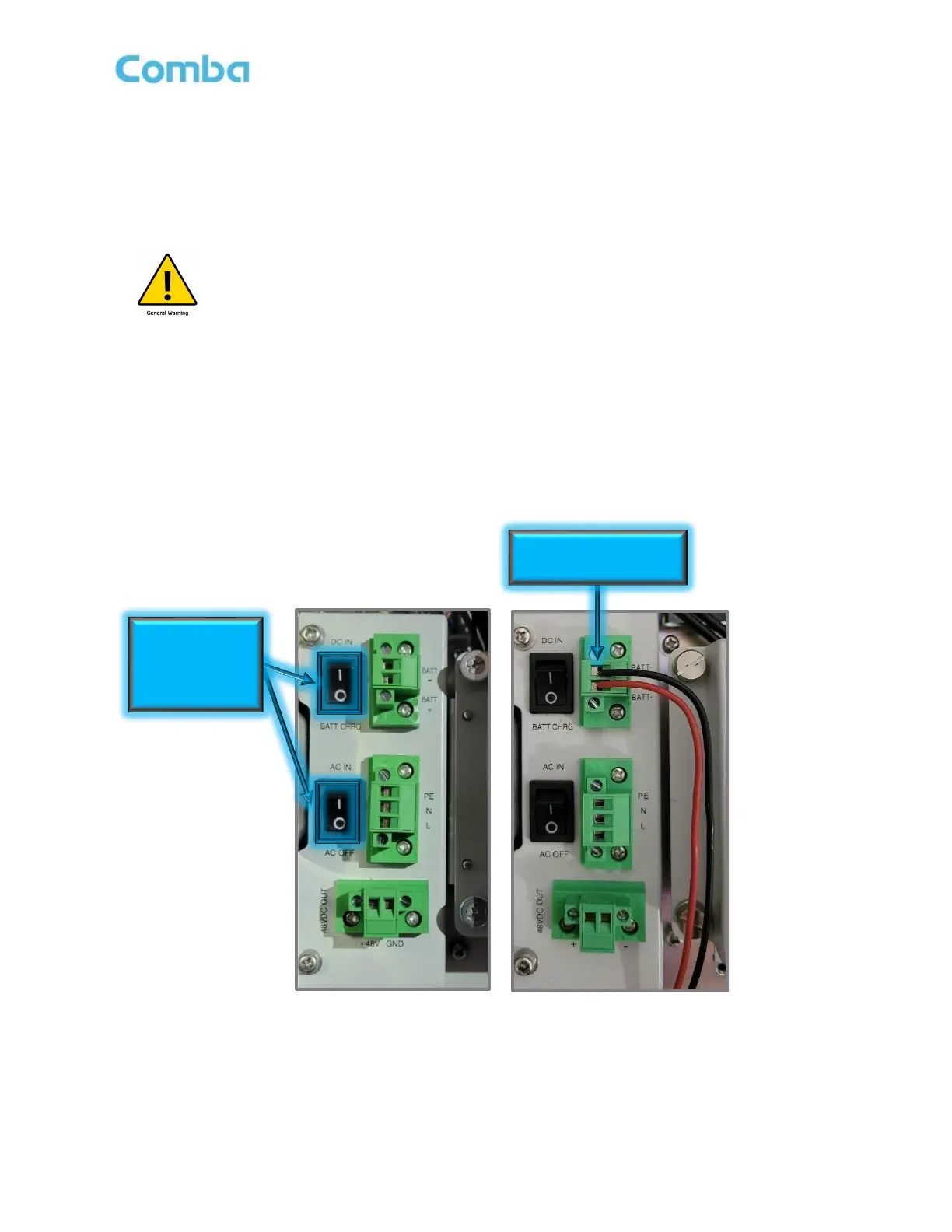
2.10 V3 BDA/MU/RU SYSTEM WIRING - DC POWER ONLY
In some cases, the V3 BDA/MU/RU will be fed directly from a Comba V1/V2 BBU or a third party supplied
48VDC power source such as a third party BBU or AC/DC converter. For those cases, the 48VDC Cable
provided by the installer can be fed directly into the BDA/MU/RU through a knockout and connected to the
DC/Battery Input. See below for wiring instructions.
Alert! The DC/Battery Negative terminal “BATT - ” inside the BDA/MU/RU is tied to the
ground! Use only for +48VDC or floating DC input devices. No -48VDC connections
are allowed! It is recommended to measure the power source before connecting it to
Comba equipment.
• Switch AC IN/AC OFF (POWER) to OFF (O) in the BDA/MU/RU.
• Switch DC IN/BATT CHRG (BATTERY) to “BATTCHRG” in the BDA/MU/RU.
• Ensure the 3
rd
Party 48VDC Power Source is completely powered OFF or disconnected so you will
not be connecting live/hot wires.
• Connect the 48VDC Wires from the 3
rd
Party source to the Phoenix connector inside the
BDA/MU/RU. The Phoenix connector is removable for ease of installation.
a. Connect -48VDC to “BATT - “
b. Connect +48VDC to “BATT +”
Figure 29: V3 BDA/MU/RU AC Power OFF Switch and Direct 48VDC Power Connection
Turn AC OFF and
DC Switch to
“BATT CHRG”
position (“O”)



 To Next Page