©2024 Comba Telecom. All Rights Reserved.
568 Gibraltar Drive, Milpitas, CA 95035 | +1 408 526 0180
3.34 ADVANCED SETTINGS – GAIN LIMIT / LNA BYPASS
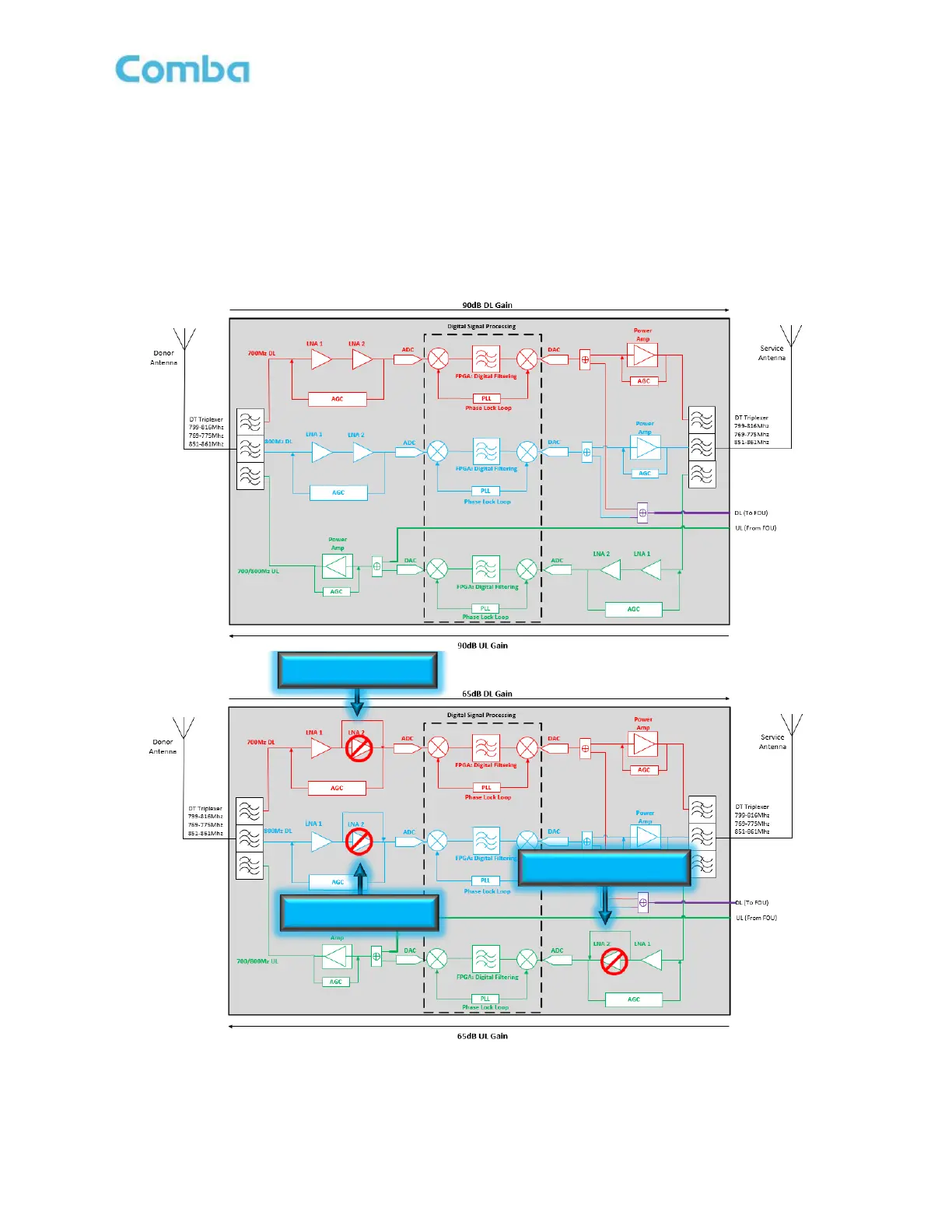
The Gain Limit / LNA Bypass feature is like having two types of BDAs in one, a low gain version and a high
gain version. The Gain Limit allows the user to reduce the MAX Gain of the system from 90dB to 65dB. The
default setting is 90dB. If the system requires between 60dB to 90dB of Gain in both the DL and UL paths,
then there is no need to adjust the Gain Limit parameter. If the system requires less than 6dB of Gain in
either the DL or UL paths, the user can use the Gain Limit / LNA Bypass feature to limit the MAX Gain to
65dB. The BDA/DAS System accomplishes this by bypassing one of the internal input LNAs and therefore
reducing the overall gain in the chain by 25dB. See Figure 153 for more details.
Figure 153: Advanced Settings – Gain Limit / LNA Bypass



 To Next Page