©2024 Comba Telecom. All Rights Reserved.
568 Gibraltar Drive, Milpitas, CA 95035 | +1 408 526 0180
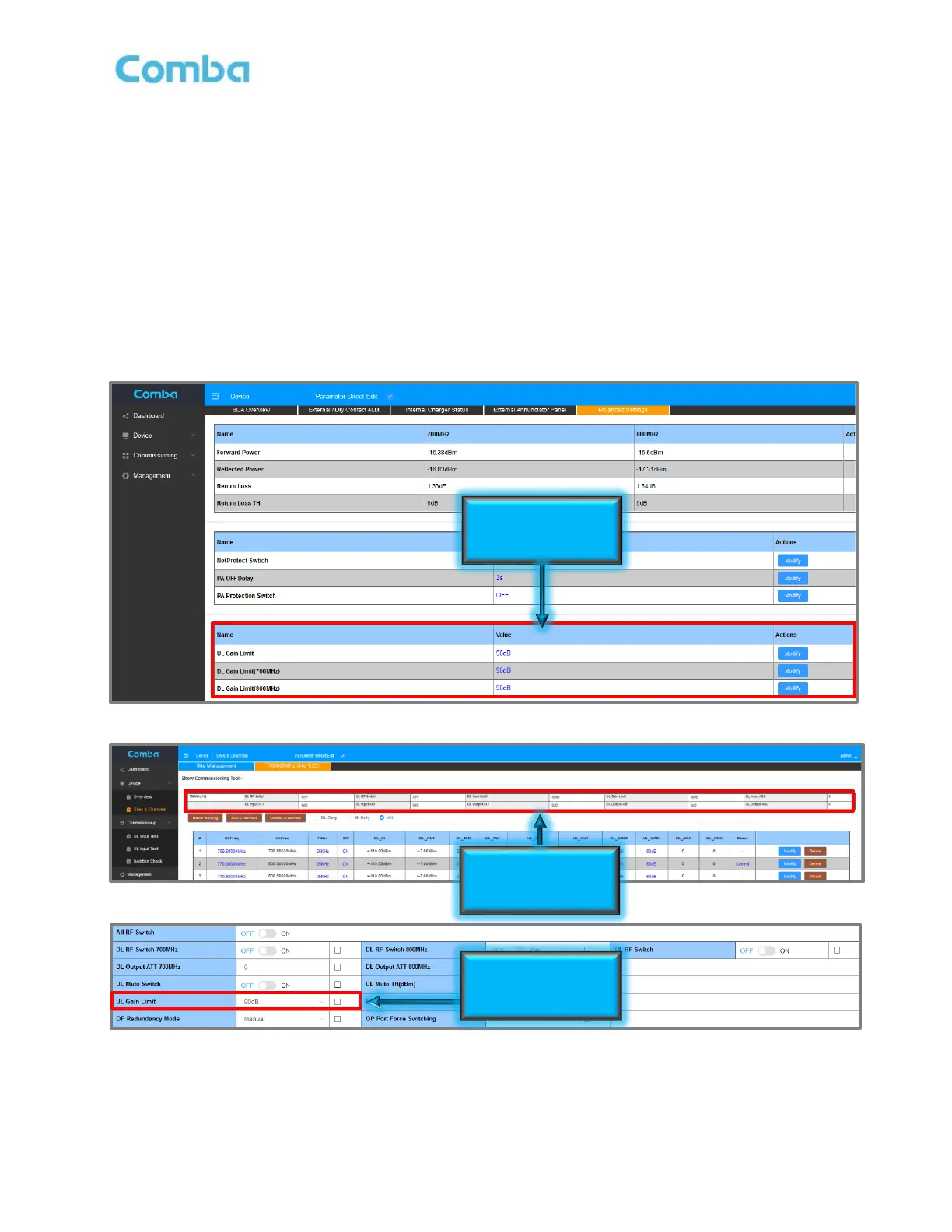
To modify the Gain Limit:
• For BDA, Navigate to <Device – Overview – Advanced Settings>
• For MU, navigate to <Home – MU Checkbox – Advanced>
• For RU, navigate to <Home – RU Checkbox – Advanced>
• Click <Modify> in the UL Gain Limit, DL Gain Limit(700MHz), or DL Gain Limit(800MHz) rows to
change the Gain Limit from 90dB to 65dB.
Alternatively, the Gain Limit can be adjusted in the <Site and Channels> page for each device in the window
above the filter section. Furthermore, the UL Gain Limit is available in the <Device – Batch Settings> section
for when in Fiber DAS mode so the user can Batch Set the UL Gain Limit settings to all RUs in the system if
desired. See Figure 154 below.
Figure 154: Setting Gain Limit / LNA Bypass in WEB GUI



 To Next Page