©2024 Comba Telecom. All Rights Reserved.
568 Gibraltar Drive, Milpitas, CA 95035 | +1 408 526 0180
6.7 DRY-CONTACT AND EXTERNAL ALARM SETTINGS
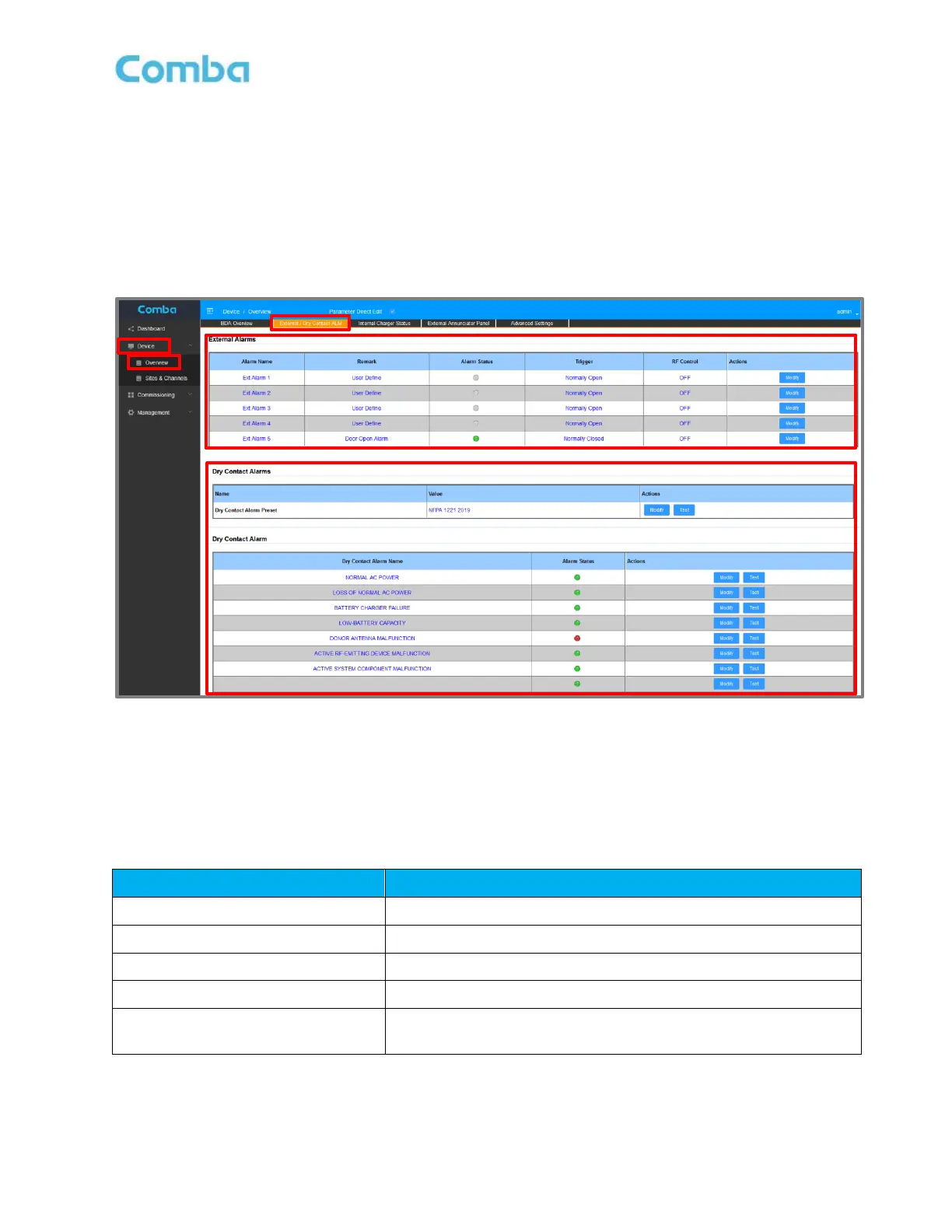
The user can easily configure the Dry Contact and External Alarms from the web GUI. The user can select a
default alarm preset or they can create a custom user-defined configuration. See Figure 187 below.
Note: The V3 APs DO NOT have any Dry Contact Outputs. However, their LEDs mirror the Dry
Contact Alarm configuration.
• Navigate to <Device – Overview - External/Dry Contact ALM>
Figure 187: V3 BDA/MU/RU - Dry Contact and External Alarm Setup through web GUI
There is multiple alarm preset options in the BDA/MU/RU web GUI so the user can easily configure alarms
for the local jurisdiction code requirements. The BDA/MU/RU and AP have replaceable alarm indicator
plates that match the software alarm presets. These alarm plates are included in the device accessory kits.
Furthermore, the user can define their own set of custom alarms for each Dry Contact Output. Refer to Table
34 below describing the available alarm presets.
Table 35: V3 BDA/MU/RU - Dry Contact and LED Alarm Presets
Custom configuration for custom alarm requirements. User can
set the specific internal device alarms for each Dry Contact



 To Next Page