©2024 Comba Telecom. All Rights Reserved.
568 Gibraltar Drive, Milpitas, CA 95035 | +1 408 526 0180
6.8 USER DEFINED DRY CONTACT AND LED ALARM CONFIGURATION
In some cases, the user may require an alarm configuration that is not consistent with one of the available
alarm presets. For the user to customize Dry Contact and LED alarm operation, they must access the web
GUI and choose the “User Defined” option in the device Dry Contact preset dropdown. Once this option has
been selected, the user can change the Dry Contact alarm name and configurations from the settings table.
Each Dry Contact alarm can now be custom named and configured to trigger upon any system alarm the
user chooses.
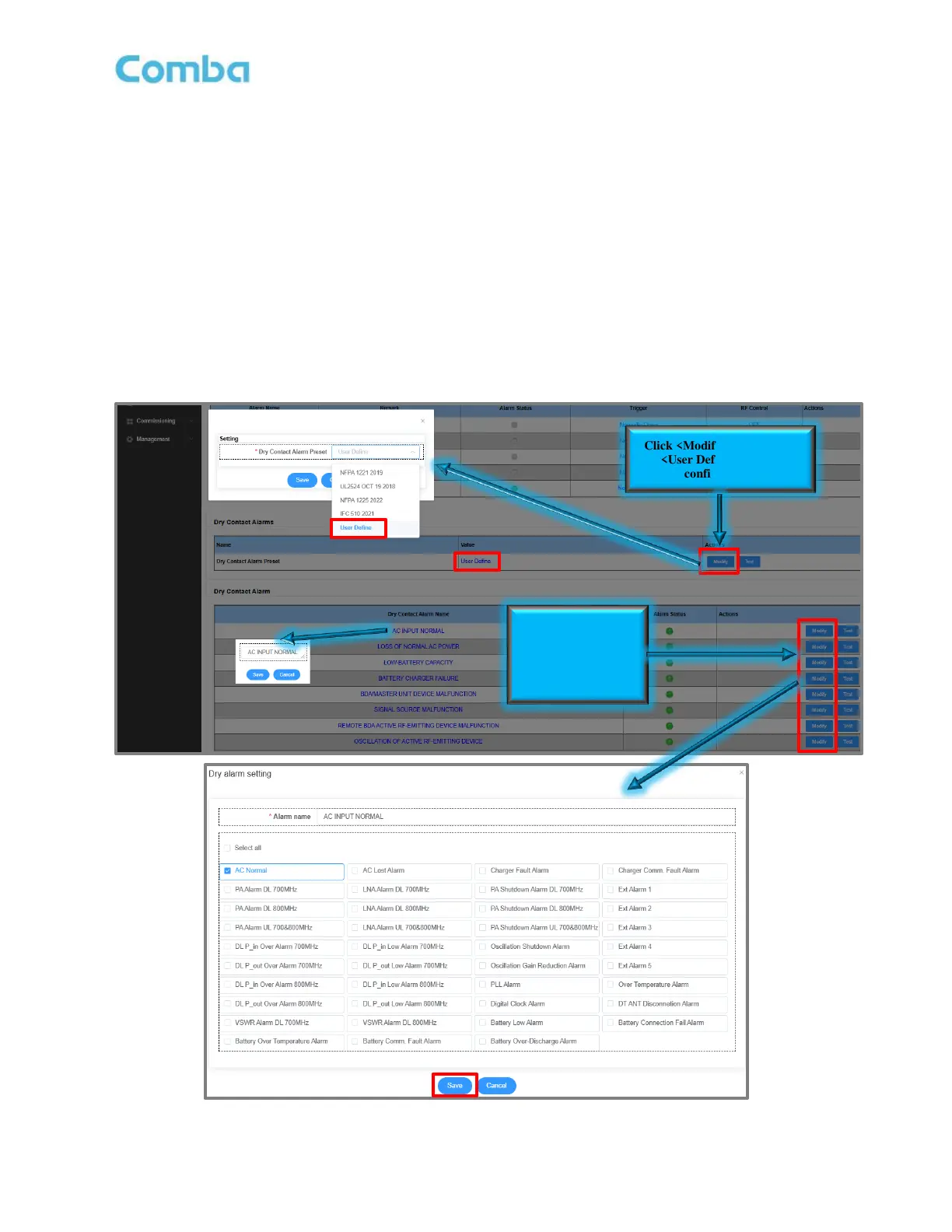
Figures 188 and 189 below are examples of how to configure a “User Defined” alarm option.
• In the BDA/MU/RU, navigate to <Device – Overview - External/Dry Contact ALM> and click on
<Modify> in the Dry Contact Alarm Preset row.
• Change a specific alarm name by clicking on the blue text in the Dry Contact Alarm row.
• Click on <Modify> in an alarm row to select which internal system alarms will activate the alarm.
Figure 188: V3 BDA/MU/RU - User Defined Dry Contact Alarm Setup



 To Next Page