©2024 Comba Telecom. All Rights Reserved.
568 Gibraltar Drive, Milpitas, CA 95035 | +1 408 526 0180
3.23 CREATE SUB-BAND FILTERS (CLASS B ONLY)
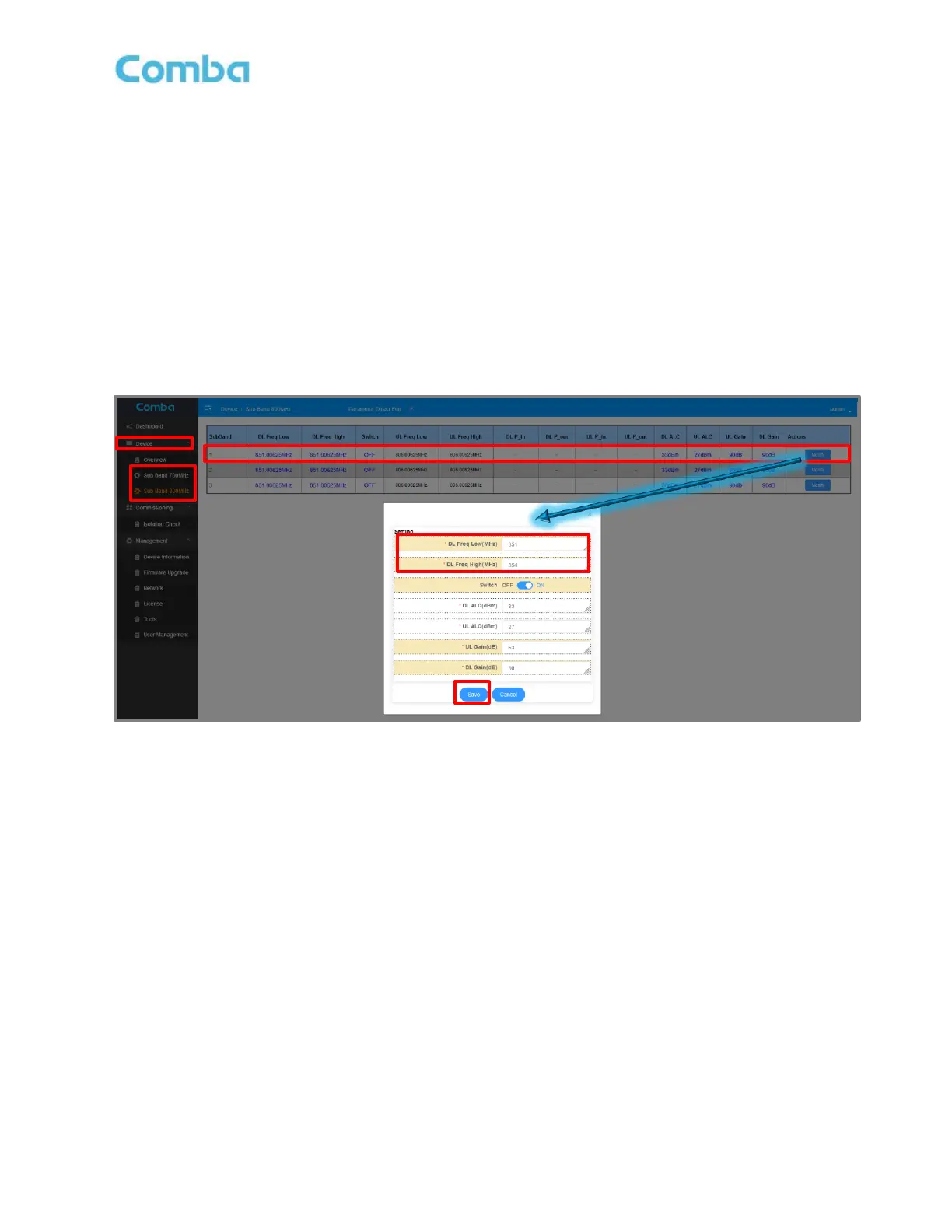
If the device is a Class B configuration, the user will need to configure the Sub-Band Filter(s) for each band.
The user can set up to 3, non-overlapping Sub-Band Filters to provide Band-Selective Amplification over the
desired frequency range(s).
• Navigate to <Device – Sub Band XXXMHz> for the frequency band you desire to setup.
• Click <Modify> for the Sub Band you wish to configure.
• Set the Start <DL Freq Low (MHz)> and Stop <DL Freq High (MHz)> Frequency for the Sub Band
Filter. Click <Save>.
• Note: DL/UL ALC (MAX Sub-Band Filter Power Level) and DL/UL Gain levels can be set at this time
if they are known from System Design or Technician Measurements.
Figure 114: V3 BDA/MU Create Sub-Band Filters (Class B Only)



 To Next Page