©2024 Comba Telecom. All Rights Reserved.
568 Gibraltar Drive, Milpitas, CA 95035 | +1 408 526 0180
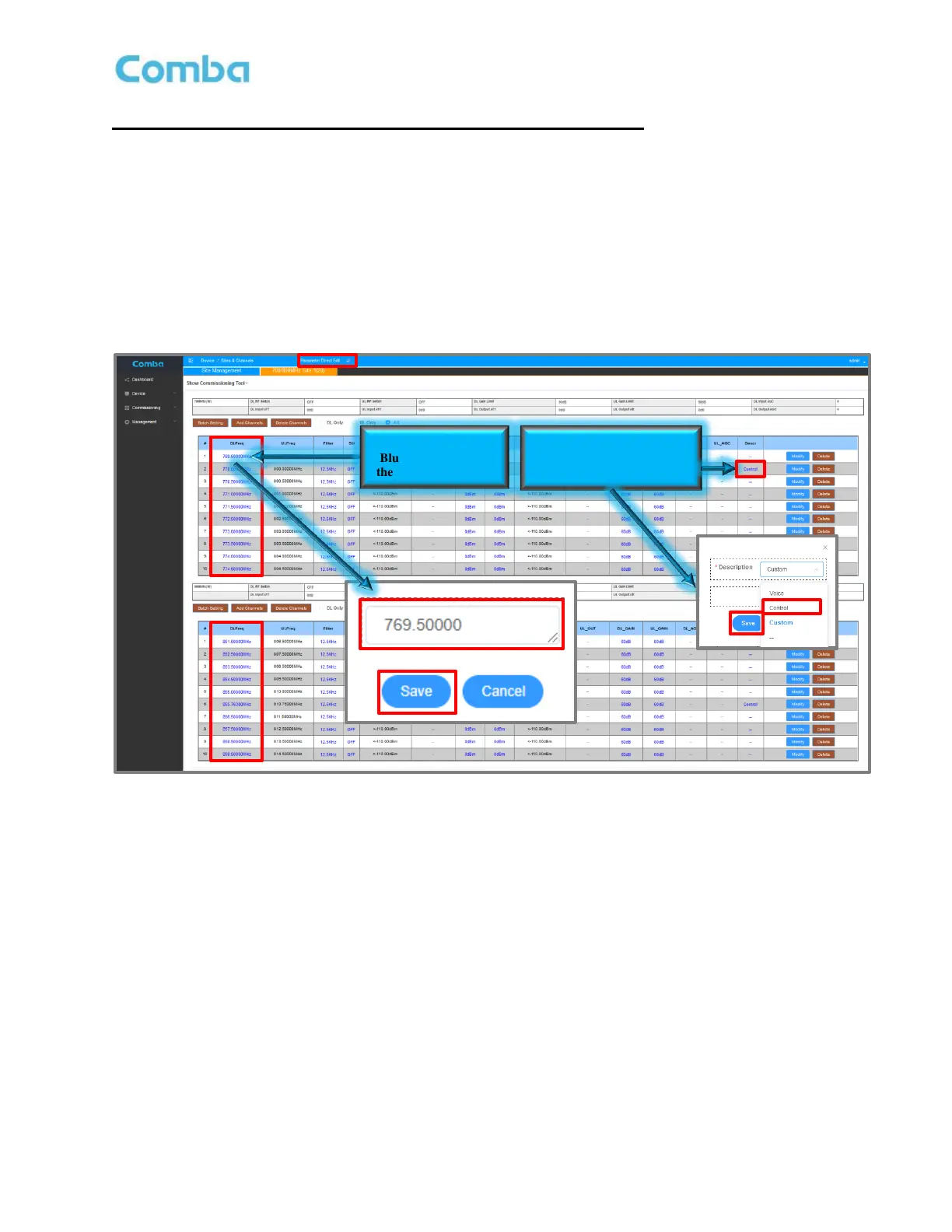
Setting Channel Filter Frequency (Same for BDA and DAS mode):
The user must set the center frequency for each Channel Filter that has been configured.
• Ensure the <Parameter Direct Edit> checkbox is checked.
• Click on the specific DL Frequency <DL Freq> that you want to set.
• Enter the Channel Center Frequency in the pop-up window. Click <Save>. Repeat for all Channel
Filters for each applicable band.
• If applicable, assign the Control Channel for each band by clicking on the “Dash” in the <Desc>
control channel frequency column. Select <Control> from the dropdown list and click <Save>.
Figure 113: V3 BDA/MU Setting Channel Filter Frequencies (Class A Only)



 To Next Page