©2024 Comba Telecom. All Rights Reserved.
568 Gibraltar Drive, Milpitas, CA 95035 | +1 408 526 0180
Optimizing Uplink in Fiber DAS
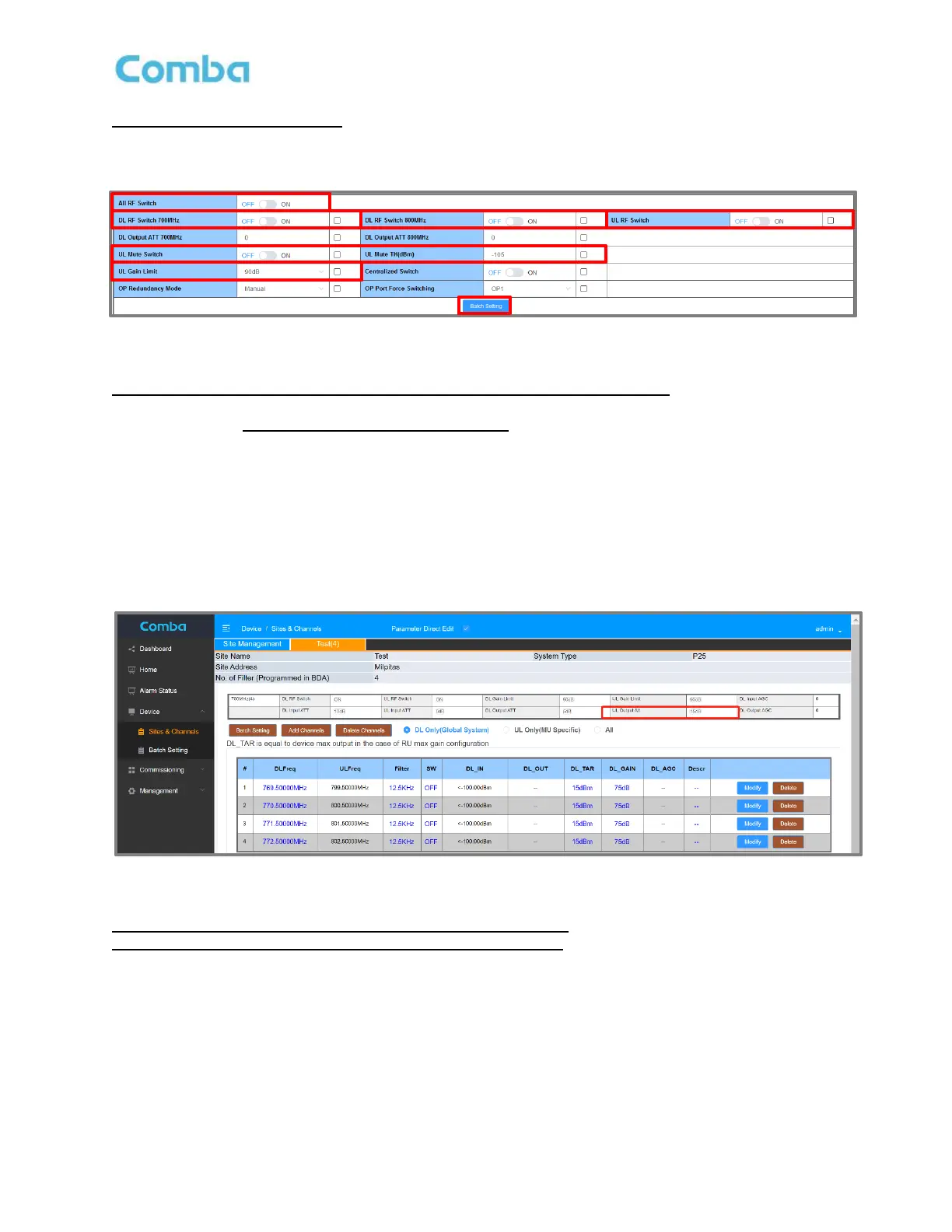
The RF Switches can be turned ON or OFF from Batch Setting, or individually in <Home>.
Figure 147: Optimizing Fiber DAS – Batch Setting RF Switches, UL Mute, and UL Mute Threshold
Use the same steps from the BDA section to optimize the Uplink for a Fiber DAS.
In most cases, the UL_TAR should be the same setting for all MU and RUs. If all MU and RU are
designed to have the same input range (DAS UL Dynamic Range), then setting the same UL_TAR and
UL_GAIN across all RUs is usually sufficient.
(if you have RUs that do not have the same input range, adjust gain on individual devices in Home – RU
pages)
The setting can be quickly done in the Batch Setting, including Gain Limit and Mute Settings.
UL Output ATT is a MU setting (but affects all MU and RUs) that must be set in <Device – Sites & Channels>
or <Home – MU – Overview / Channels & Sites>.
Figure 148: Optimizing Fiber DAS – Setting MU UL Output ATT
UL Mute Function is highly recommended for all MU and RUs.
NetProtect is NOT available in DAS in previous FW versions. The firmware will disable this function
automatically in DAS mode if it is not supported by the FW version.



 To Next Page