©2024 Comba Telecom. All Rights Reserved.
568 Gibraltar Drive, Milpitas, CA 95035 | +1 408 526 0180
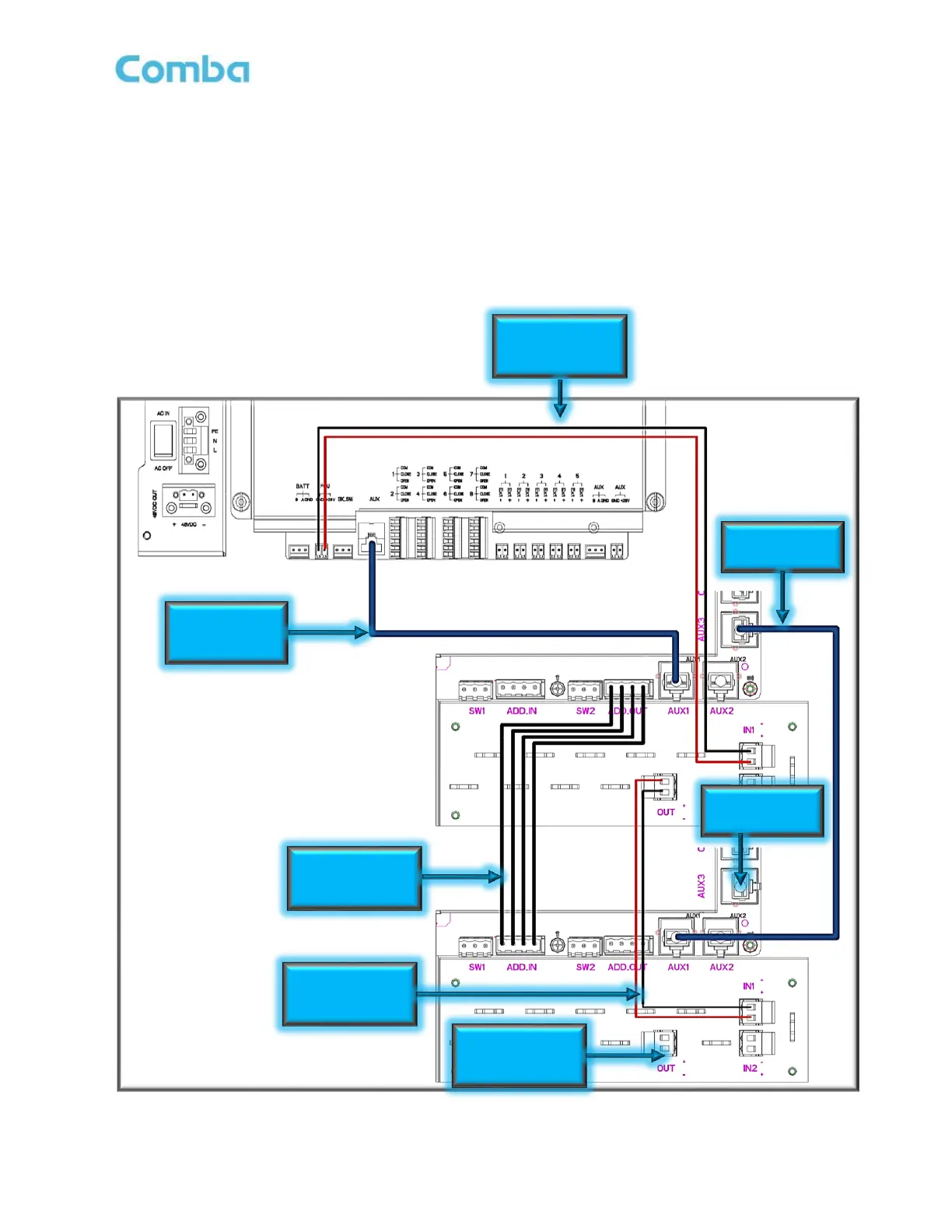
If there is more than one FOU required, connect as shown below in Figure 54. Figure 54 shows an example
of cascading 2 FOUs from a BDA/MU. Follow the same concept to cascade to a maximum of 4 FOUs.
Follow the below instructions when using more than one FOU:
• Install Address Cable between FOU(n) “ADD. OUT” to FOU(n+1) “ADD. IN” (cable not provided)
• Install DC Power cable between FOU(n) “OUT” to FOU(n+1) “IN1”
• Install ethernet RJ45 cable between FOU(n) “AUX3” to FOU(n+1) “AUX1”
Figure 54: V3 BDA/MU and V2 FOU Power and Communications Wiring – Multiple FOUs
28VDC Power



 To Next Page