©2025 Copeland LP.
026-1803 R13 Supervisor I&O User Guide 1 - 2
1.3 Direct Connect Instructions - Connect your laptop to Supervisory Controller’s
Ethernet Port ETH 1
All configuration can be accomplished through the E3’s built-in display or through a laptop, PC, or tablet. On your PC:
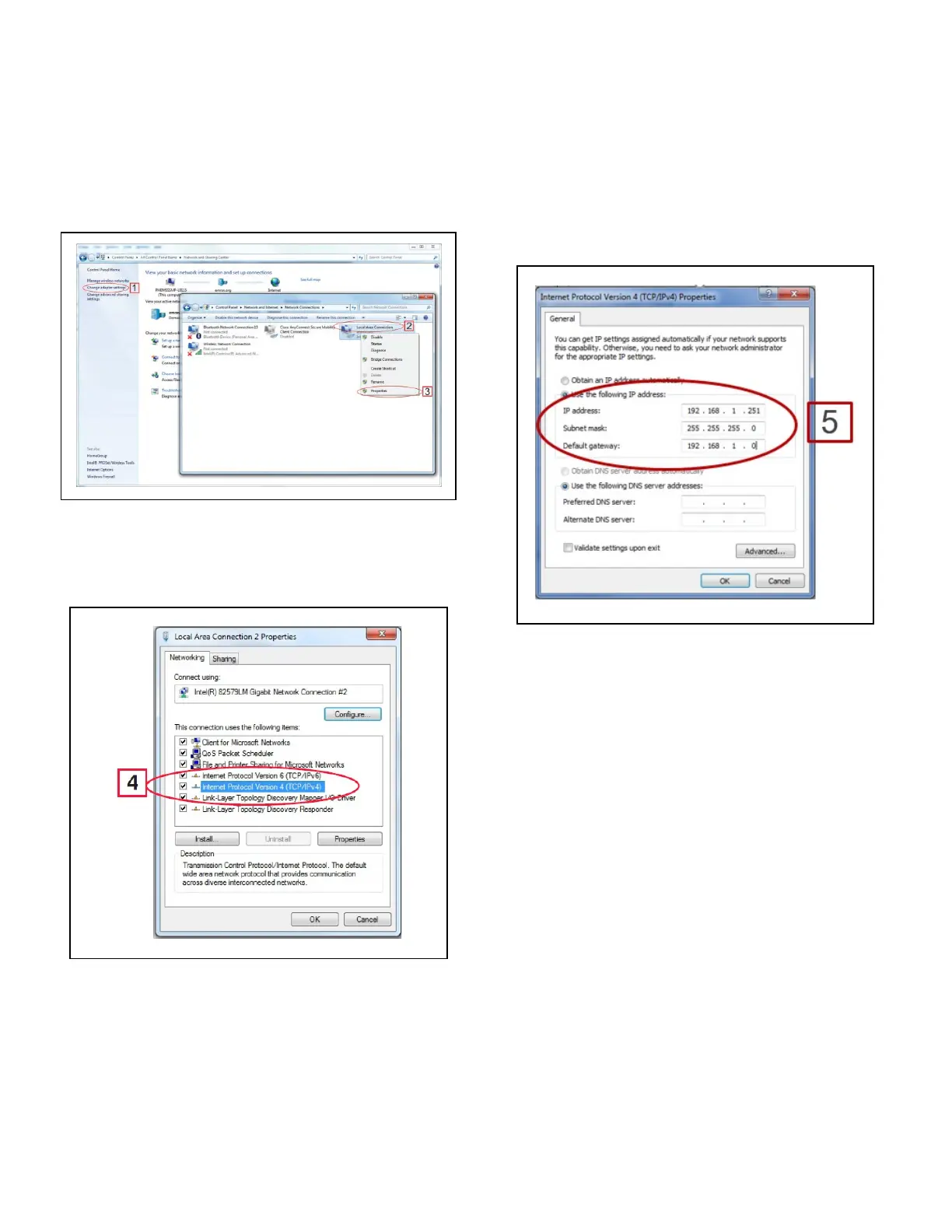
1. Under Control Panel - Network and Sharing Center,
select Change adapter settings.
2. Select the Local Area Connection port being used.
3. Select Properties.
4. Highlight the section Internet Protocol Version 4 (TCP/
IPv4) and click Properties:
5. Click Use the following IP address: and enter the IP
address 192.168.1.251 and the Subnet mask
255.255.255.0 of the PC being used on the Local Area
Network or direct connection and click OK:
Figure 1-1 - Change Adapter Settings
Figure 1-2 - Highlight Internet Protocol Version 4 (TCP/IPv4)
Figure 1-3 - IP Address and Subnet Mask



 To Next Page