©2025 Copeland LP.
026-1803 R13 Supervisor I&O User Guide 4 - 11
4.11 Creating a Backup and Restore
4.11.1 Backup
Creating a backup is important if you are planning to upgrade
the Supervisor firmware. A Backup file does not save
properties such as Ethernet settings, loaded license keys,
firmware versions, alarm history, and logs.
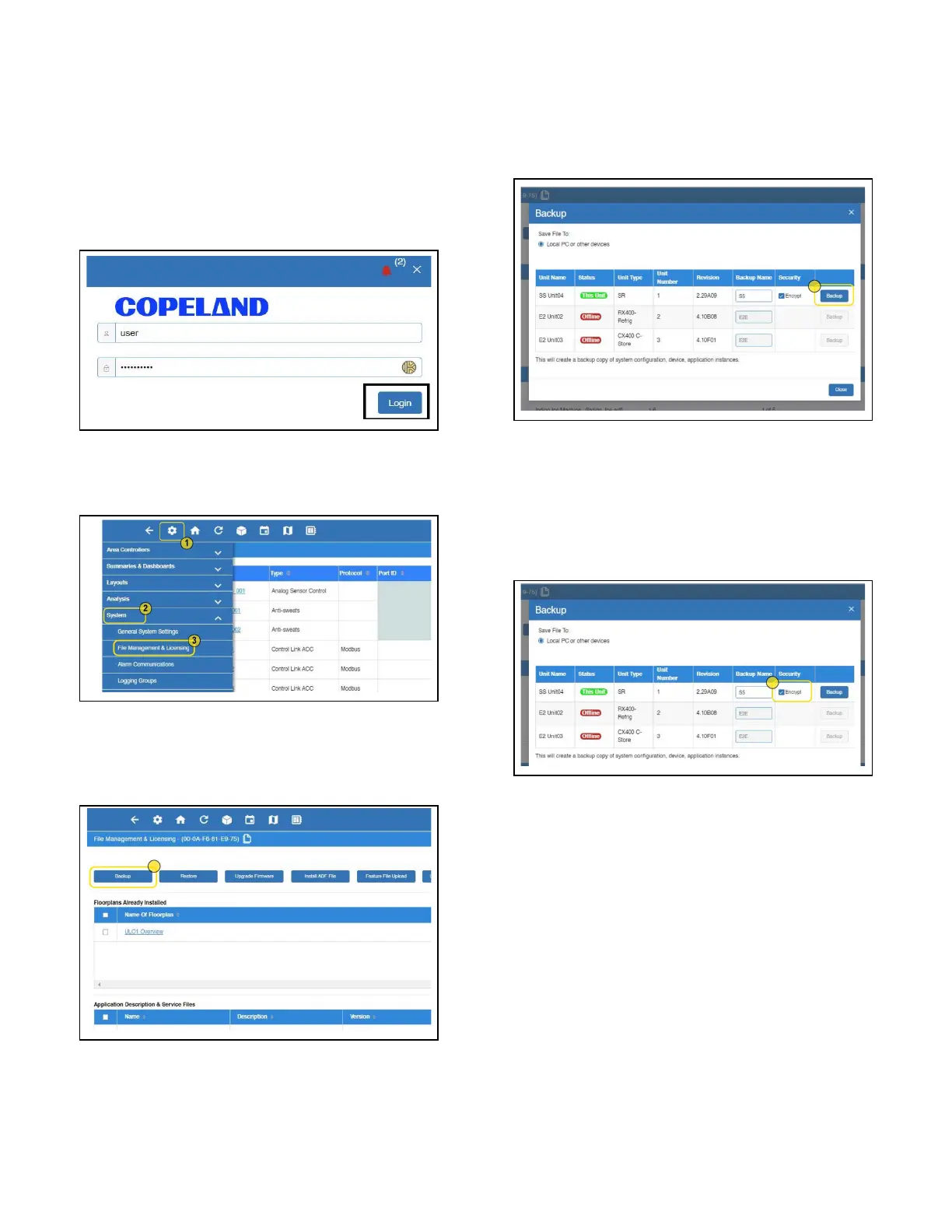
1. Log into the Supervisor.
2. From the home page, click the gear icon and choose
System > File Management & Licensing.
3. Click Backup and select where to save the Backup
(Local PC or Other Devices; SD Card) and enter a name
for the Backup.
4. Click Backup to save. The Backup file location will
appear at the bottom of your browser.
4.11.2 Encrypted Backup
Added the option to encrypt backups to enhance security.
Note: You must have at least 2.26F01 in order to restore an
encrypted backup file.
If you plan to install on a previous version, uncheck the
Encrypt box before performing the backup.
Figure 4-14 - Logging In
Figure 4-15 - File Management & Licensing
Figure 4-16 - Click Backup
Figure 4-17 - Backup File Location
Figure 4-18 - Encrypting Backup



 To Next Page