©2025 Copeland LP.
026-1803 R13 Supervisor I&O User Guide 9 - 46
9.32.7 The Effect of Enabling
Economization
Both MultiFlex RTU and AHU applications support the use of
both two-position (digital) and variable-position (analog)
economizers. Digital economizers, when enabled, behave
like a first stage of cool. When analog economizers are
enabled, the MultiFlex RTU or AHU will modulate the opening
percentage of the dampers based on its own mixed air
temperature measurements.
9.32.8 Dehumidification Control
An HVAC Zone application is responsible for reading the
relative humidity level within the HVAC Zone, comparing it to
a dehumidification setpoint, and sending a command to
dehumidify when the humidity is above the setpoint.
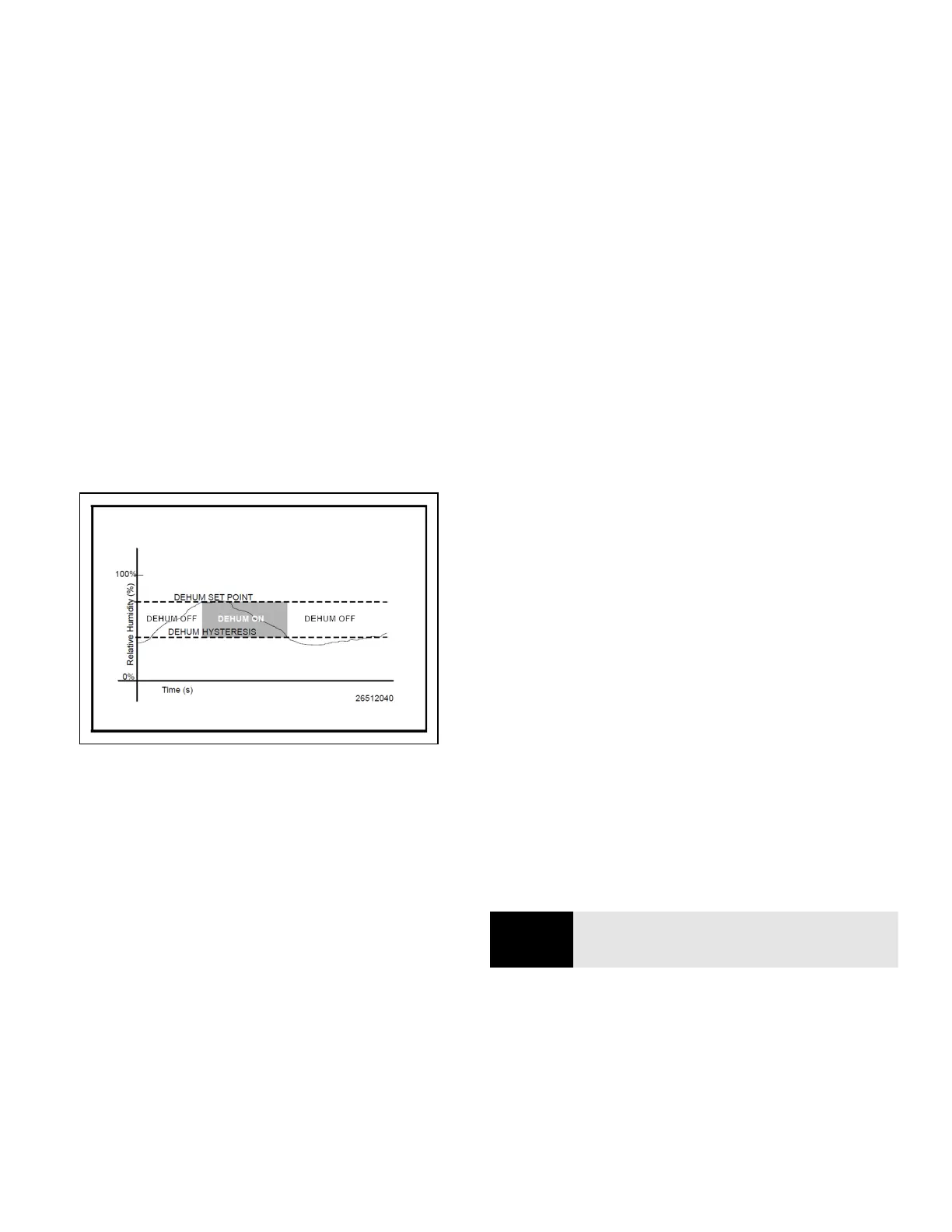
Once the HVAC Zone humidity level rises above the setpoint,
dehumidification will be active in all the HVAC Zone
application’s associated HVAC units until the indoor relative
humidity falls below the setpoint minus the dehumidification
hysteresis value. An example of is shown in the figure below:
The need for dehumidification may also be determined by a
digital humidistat. In this case, dehumidification is active only
when the humidistat input is ON.
9.32.9 HVAC Zone Humidity Input
Unlike HVAC Zone Temperature, which has 16 inputs that
combine into a single value, HVAC Zone humidity is designed
to be provided by a single input. However, there may be
some instances where one or more relative humidity sensors
exist within an HVAC Zone (such as an installation where
each MultiFlex RTU has its own humidity sensor for use in
Stand-Alone mode). If you have multiple humidity sensors in
an HVAC Zone and you want to combine these humidity
sensor values to calculate HVAC Zone Humidity, use an
Analog Combiner application to make the combination, and
tie the HVAC Zone application’s HVAC Zone Humidity input to
the output of the combiner.
9.32.10 Enabling Dehumidification
Effect
When an HVAC Zone application determines that
dehumidification is needed, it sends an ON signal to all its
associated controllers, signaling them to begin
dehumidification. It is up to the individual MultiFlex RTU, RCB,
or AHU to perform the dehumidification.
9.32.10.1 MultiFlex RTUs and RCBs
Once the MultiFlex RTU and RCB applications
acknowledge the signal to begin dehumidification, it will
search its outputs for a dehumidification device. If one is
configured, this device will be turned ON. Afterwards, cool
stages will be cycled ON (up to a user-defined
maximum number of stages) until all stages are ON or until
the Zone application signals dehumidification is complete.
When dehumidification is complete, the stages will cycle OFF
followed by the dehumidification device.
9.32.11 Optimum Start/Stop (OSS)
Optimum Start/Stop (OSS) is a feature that works along with
the HVAC Zone application’s occupied and unoccupied
temperature control modes. OSS takes control of heating and
cooling several minutes before the Zone application is
scheduled to change occupancy states. It prepares the area
for the upcoming change in setpoints. As a result, when the
occupancy state changes, the temperature is comfortably
within the range of the new setpoint.
Overrides initiated by the digital BYPASS TO OCC or BYPASS
TO UNOCC inputs will not initiate pre-starts or pre-stops.
Figure 9-19 - Dehumidification Control
NOTE
NOTE: OSS applies only to Zone applications that
use a time schedule to change occupancy states.



 To Next Page