©2025 Copeland LP.
026-1803 R13 Supervisor I&O User Guide H - 1
Appendix H: Reset and Clean Out Supervisory Controllers
Cleaning out a Supervisory controller should only be done if:
• If you are programming your controller for the first time.
• If all of the settings need to be cleared.
• If the program settings are unknown.
For best practices, before proceeding with a clean out, create a backup copy of system configurations, logs, and
applications.
E3 Reset and Clean Out on the Main Circuit Board
Open the E3 controller panel to access the circuit board on the back of the front panel door.
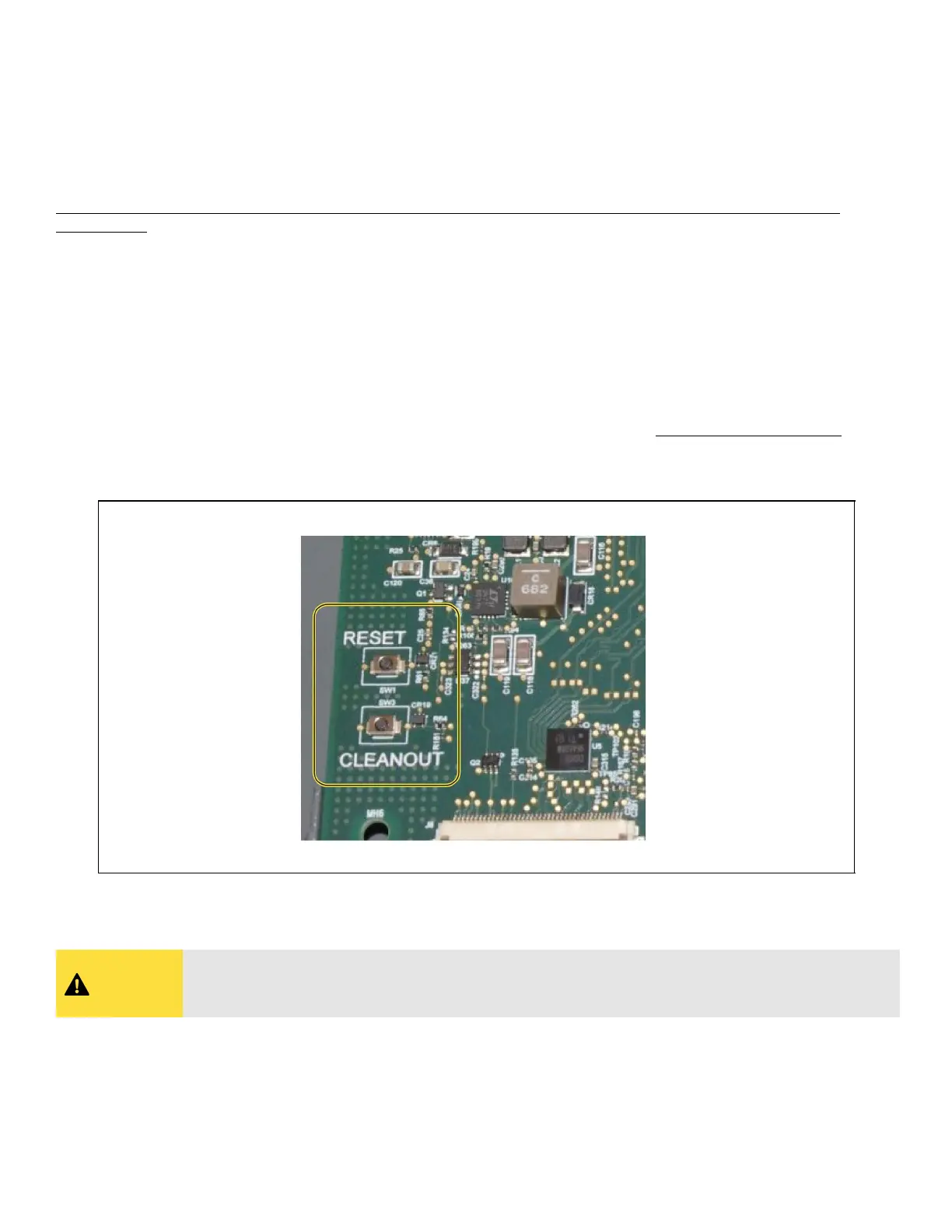
There are two buttons located at the bottom left on the main board labeled RESET and CLEANOUT.
• RESET - The button labeled RESET on the main board resets the controller. Pressing and holding this button for one second
will cause the E3 to reset and retain all programmed applications, logs, and other data stored in memory.
• CLEANOUT - The button labeled CLEANOUT on the main board is used to perform a function called clean out. Using this
button in conjunction with the RESET button will cause a cleanout, which is a reset that erases all data from memory
. The E3
will reboot after a cleanout with all programmed applications, logs, and other data erased.
E3 Main Circuit Board Reset and Cleanout Button
CAUTION
A clean out will erase all programmed parameters from memory. Do not follow these instructions
unless you are absolutely sure you wish to remove all applications and logs from memory. Best
practices is to Backup prior to a clean out.



 To Next Page