30 | Configuration Fundamentals
www.dell.com | support.dell.com
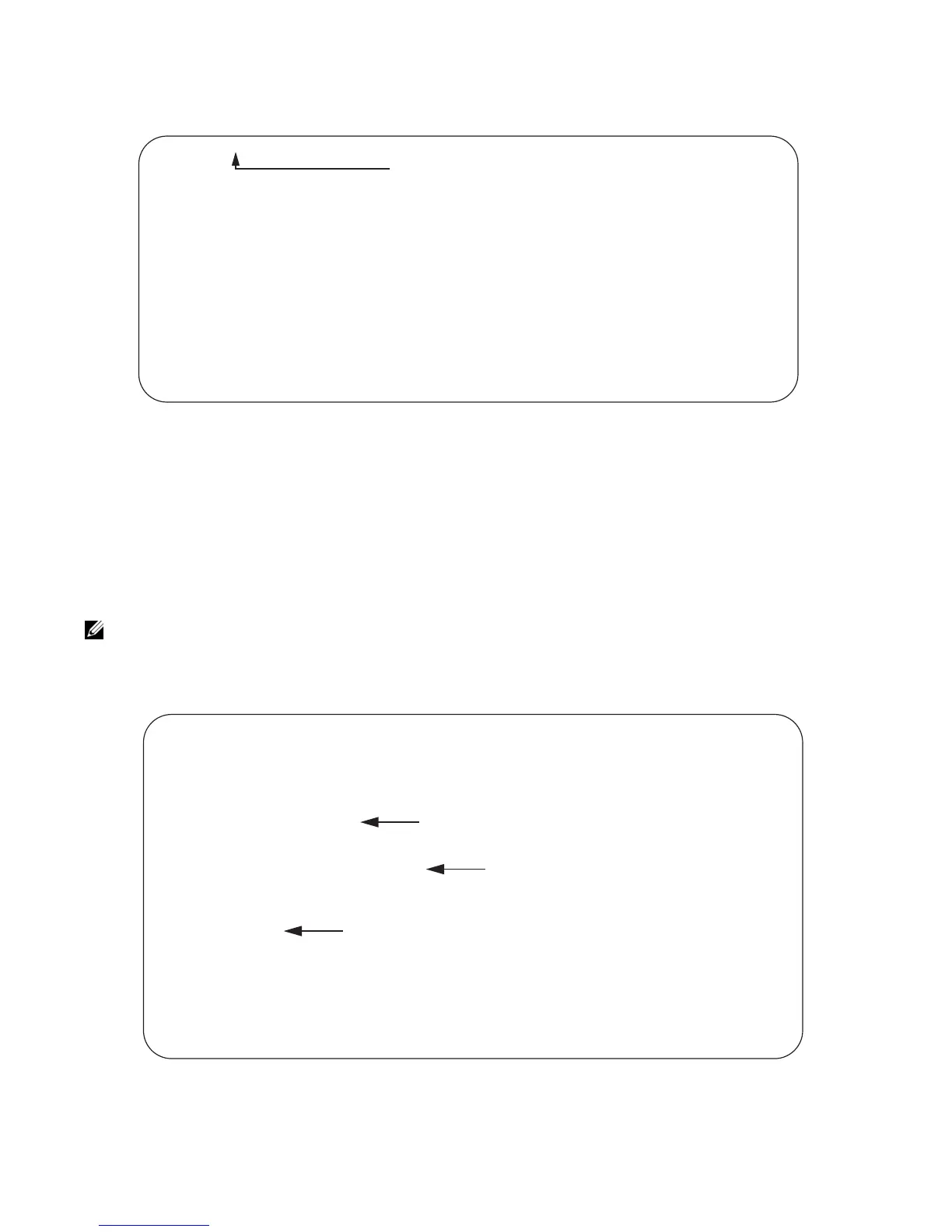
Figure 2-4. Using the do Command
Undoing Commands
When you enter a command, the command line is added to the running configuration file. Disable a
command and remove it from the running-config by entering the original command preceded by the
command
no. For example, to delete an ip address configured on an interface, use the no ip-address
ip-address
command, as shown in Figure 2-5.
Figure 2-5. Undoing a command with the no Command
Note: Use the help or ? command as described in Obtaining Help to help you construct the no form of a
command.
FTOS(conf)#do show system brief
Stack MAC : 00:1e:c9:f1:04:22
Reload Type : normal-reload [Next boot : normal-reload]
-- Stack Info --
Unit UnitType Status ReqTyp CurTyp Version Ports
------------------------------------------------------------------------------------
0 Management online MXL-10/40GbE MXL-10/40GbE 8-3-16-47 56
1 Member not present
2 Member not present
3 Member not present
4 Member not present
5 Member not present
“do” form of show command
FTOS(conf)#interface tengigabitethernet 5/1
FTOS(conf-if-te-5/1)#ip address 192.168.10.1/24
FTOS(conf-if-te-5/1)#show config
!
interface TenGigabitEthernet 5/1
!
ip address 192.168.10.1/24
shutdown
FTOS(conf-if-te-5/1)#no ip address
FTOS(conf-if-te-5/1)#show config
!
interface TenGigabitEthernet 5/1
no ip address
shutdown
FTOS(conf-if-te-5/1)#
IP address assigned
“no” form of IP address command
IP address removed

 To Next Page
 Loading...