73
The Sample ID is the ID entered by the operator from a keyboard or hand-held
barcode reader for a manually processed specimen. For automatically processed
specimens, the sample ID can be read from a sample tube barcode or entered into
a list for one of the automatic processing list modes. Sample IDs can be reused in
the ‘Abacus 5’ analyzer, but other identifying information together with the sample
ID uniquely identify the sample run.
This is the patient associated with this sample run. If none was entered or selected,
the default patient ID is set to 1.
This is the time and date that this sample was run.
This is the sample mode selected for this specimen. Each sample mode applies a
different set of normal ranges to this sample run.
Table 9. Sample Identification Information
9.3 Parameter Information
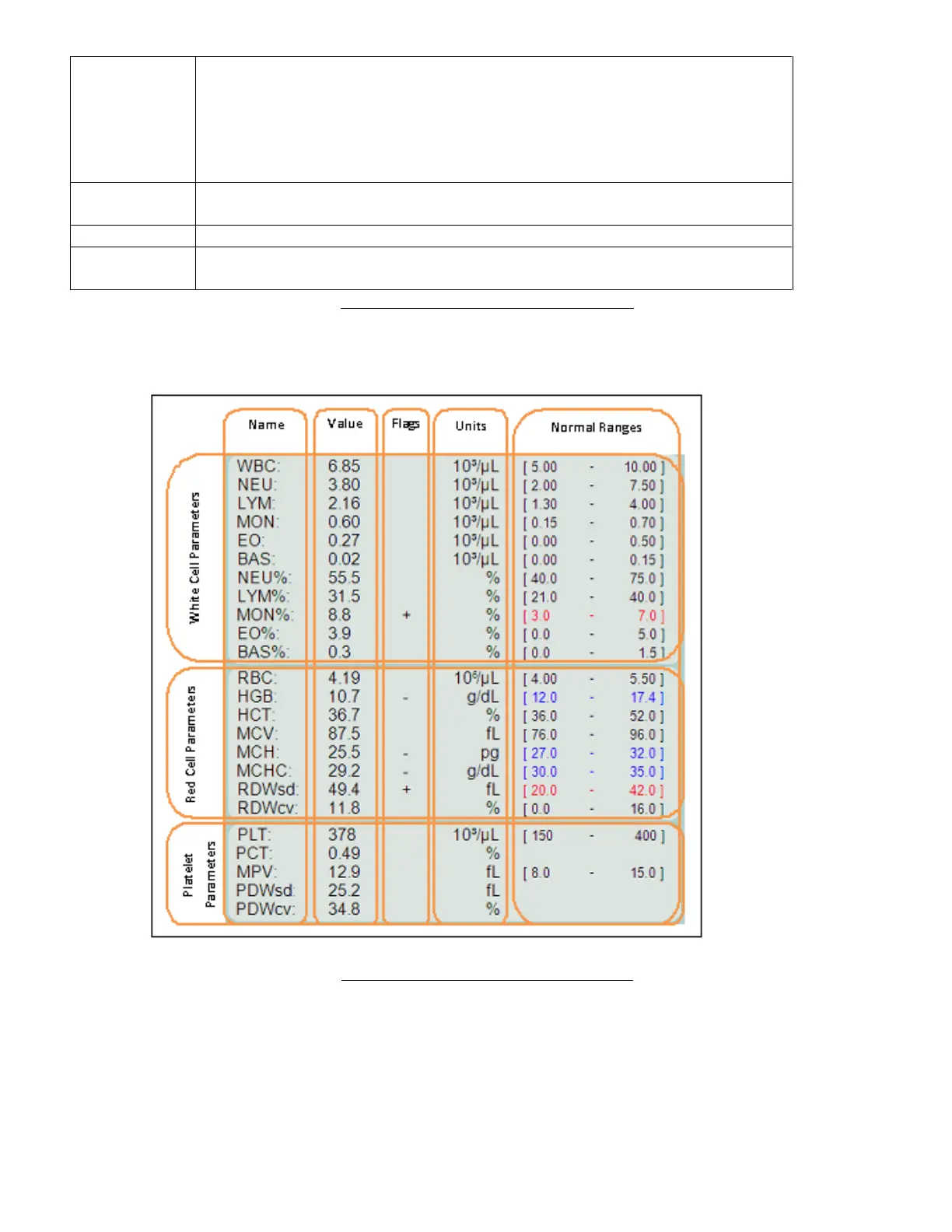
The parameter information area of the ‘Abacus 5’ analyzer result screen lists information on 24 parameters.
Figure 47. Parameter Information Display
Each row shows the parameter name, value, flags (normal range, linearity range, and high blank), units, and normal
range. The units area displays the differential percentage for the five leukocyte subpopulations (NEU, LYM, MON, EO,
BAS).
Parameter names are listed with their standard abbreviation. Parameter values are always displayed according to
their selected unit. In case of error during sample evaluation, the software will display ‘E’ or” ---" signs to indicate the



 To Next Page