Chapter 5
5-18
5.3.7 Relays ....................................................................................
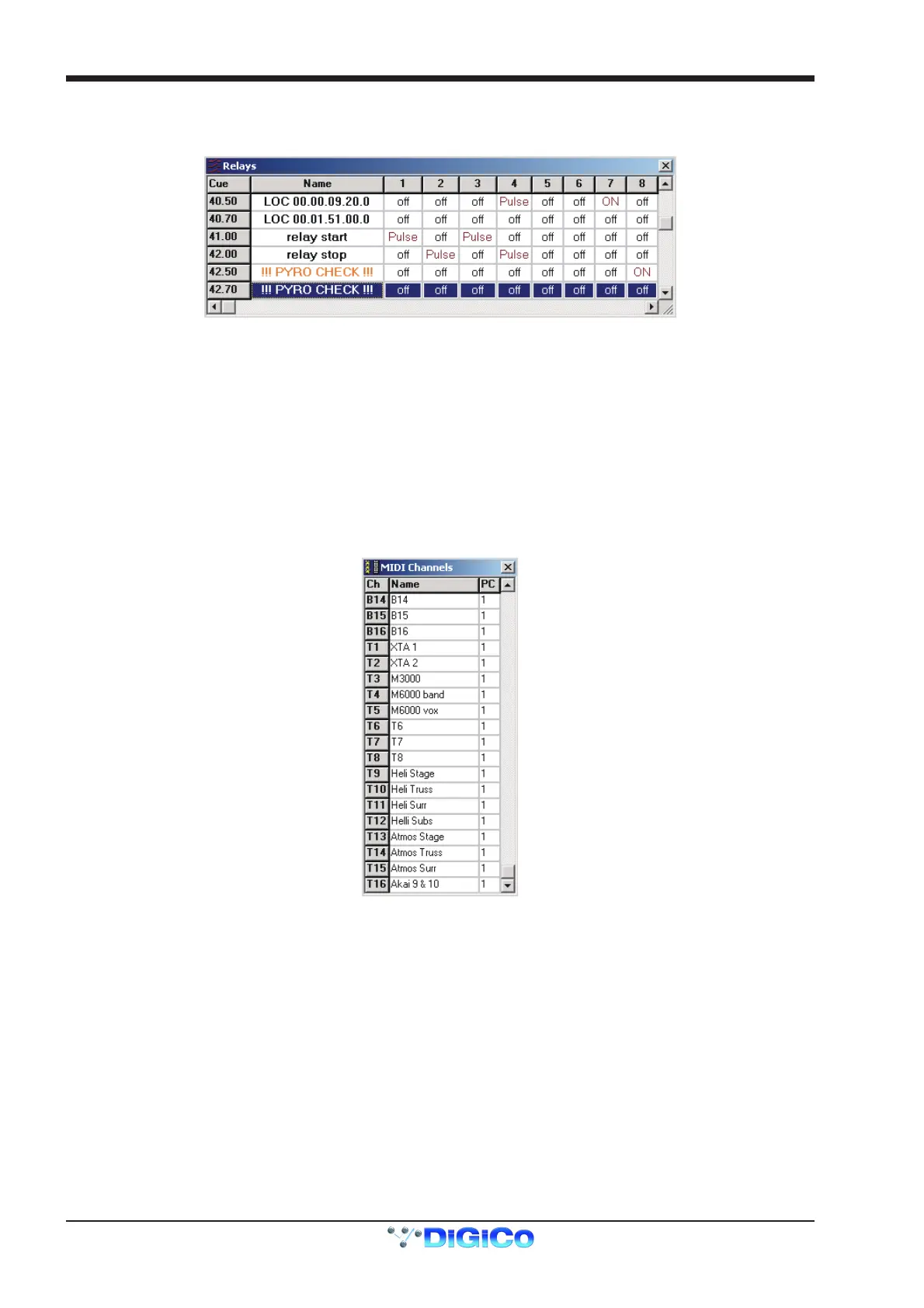
The icon showing a small set of red switches represents the Relays. There can be up to 32 of these according to the hardware configura-
tion of the console.
They can be programmed to send an ON, an OFF or a PULSE for each cue.
Left or right clicking in the box for a specific relay number in a cue will scroll through the three options available.
It is far simpler to program relays in the Cue Editor than in the Cue List on the D5T and it is not currently possible to program a pulse
using the D5T at all.
5.3.8 MIDI Channel Names............................................................
The icon showing three MIDI sockets and a small grid represents the MIDI Channel Names.
There may be up to three sets of 16 MIDI channels available, according to the console's hardware configuration. These are MIDI A, B and
T. T is the original MIDI interface on the console rear panel and A and B can be provided by GPI/GPO Combi cards installed in the
console.
If you are going to use MIDI to send messages to outboard equipment it is easiest to define the names and channels of the devices before
starting to program the messages. Open the channel names window and type the required name next to the relevant port.
For example in the following diagram, T3 is identified as the M3000. This simply indicates that the M3000 is connected to MIDI Port T and
receiving MIDI data on channel 3.



 To Next Page