Chapter 2
2-9
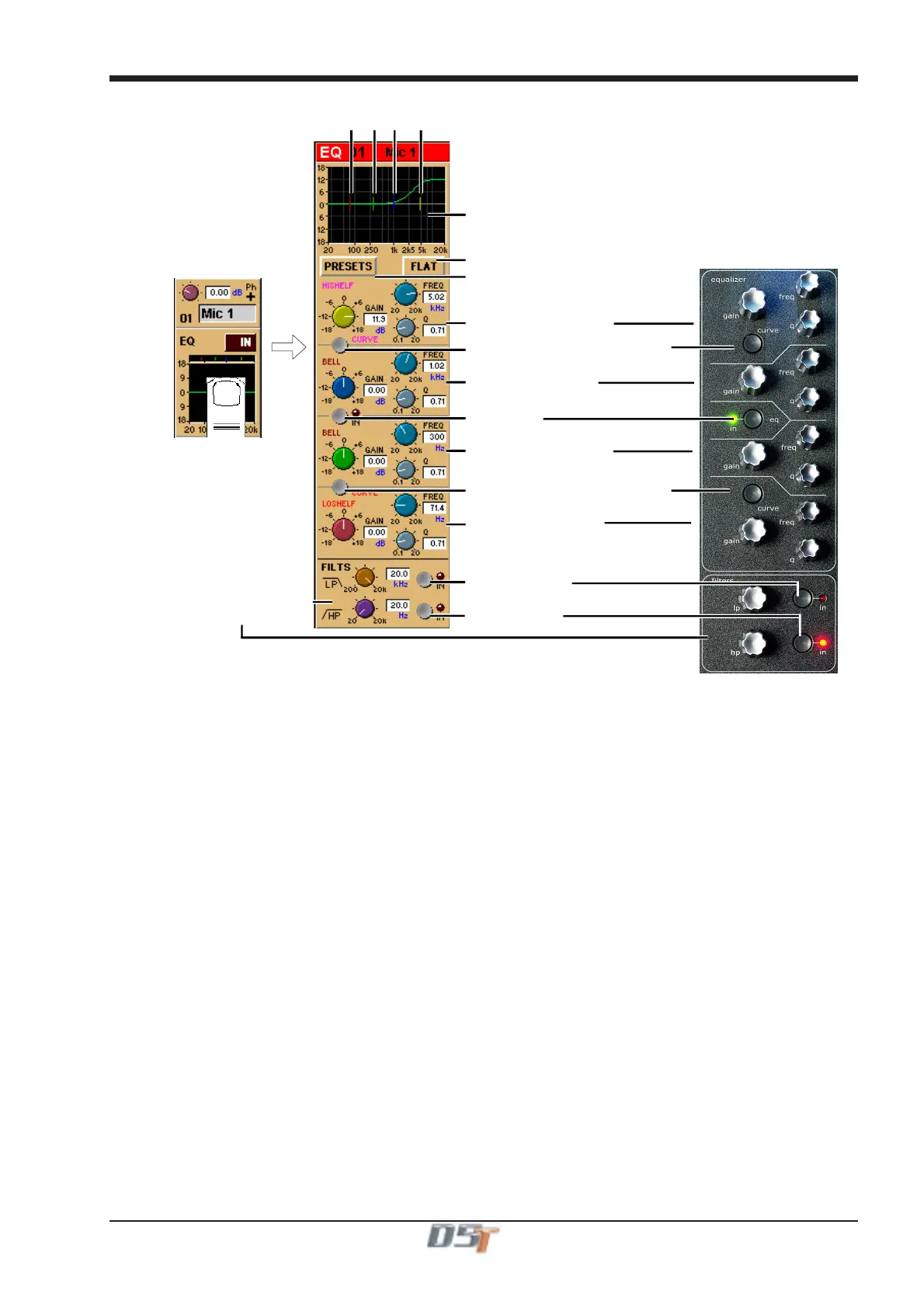
Response Graph
Filter Centre Frequencies
Preset Selector
Parametric 1 (Yellow)
Curve Select for Parametric 1
Curve Select for Parametric 4
EQ In/Out
Parametric 2 (Blue)
Parametric 3 (Green)
Parametric 4 (Red)
Hipass / Lopass Filters
Reset EQ
Lopass In/Out
Hipass In/Out
When expanded, the EQ Module shows the filter settings in detail, using a different colour for each filter. The In/Out switch and indicator
for the EQ module is located in the centre. When the EQ module is visible, the EQ controls at the right side of the screen operate
corresponding to the on-screen controls.
Preset Selector
Presets are used not only for complete channel setups, but also for EQ and Dynamics setups. They provide a way of storing the EQ
settings for a particular channel, so that these settings can be recalled instantly at a later date, or for another channel.
Touching the EQ module's Presets button displays a Selector panel for the EQ presets. The panel works in exactly the same way as the
Channel Preset Selector described earlier in this section (see 2.2.1), although an EQ preset only contains settings for the EQ controls, not
for the whole channel.
Flat Button
The Flat button forces all controls on the channel's EQ section to their default settings.
Equalisers
Filters two and three (blue and green) are swept parametric "bell-curve" equalisers, with a centre-frequency range of 20Hz-20KHz. They
provide up to 18dB Cut/Boost, with Q adjustable from 0.1 to 20.
Filters one and four (yellow and red) default to being a Hi and Low Shelf but each has an additional Curve switch which allows you to
select HiShelf / Lowpass or Bell for filter one and LoShelf / Hipass or Bell for filter four. When the Hipass or Lowpass function is selected,
the filter operates at 12dB/Octave, and the Q and Gain controls disappear.
Hipass / Lopass Filters
The Hipass and Lopass filters at the bottom of the module (purple and orange) operate at 12dB/Octave, and can be swept from
20Hz-20KHz (HPF) and 200Hz to 20KHz (LPF).
Note: The Hi and Lo Pass Filters are positioned preprocessing and therefore they will be unavailable to any internally gener-
ated signal such as the test noise.
These internally generated signals consist of:
1) Any signal in the Misc signal group (Talkback Mics, Test Tone and Noise).
2) SubGroup or Aux Buss results (labelled with a ~ eg ~ Aux1 L).
3) Internal FX Returns (any signal from the Effects input signal group which is used by the optional effects module).



 To Next Page