3-4
Chapter 3
3.1.2 Expanding the Buss Output View ......................................
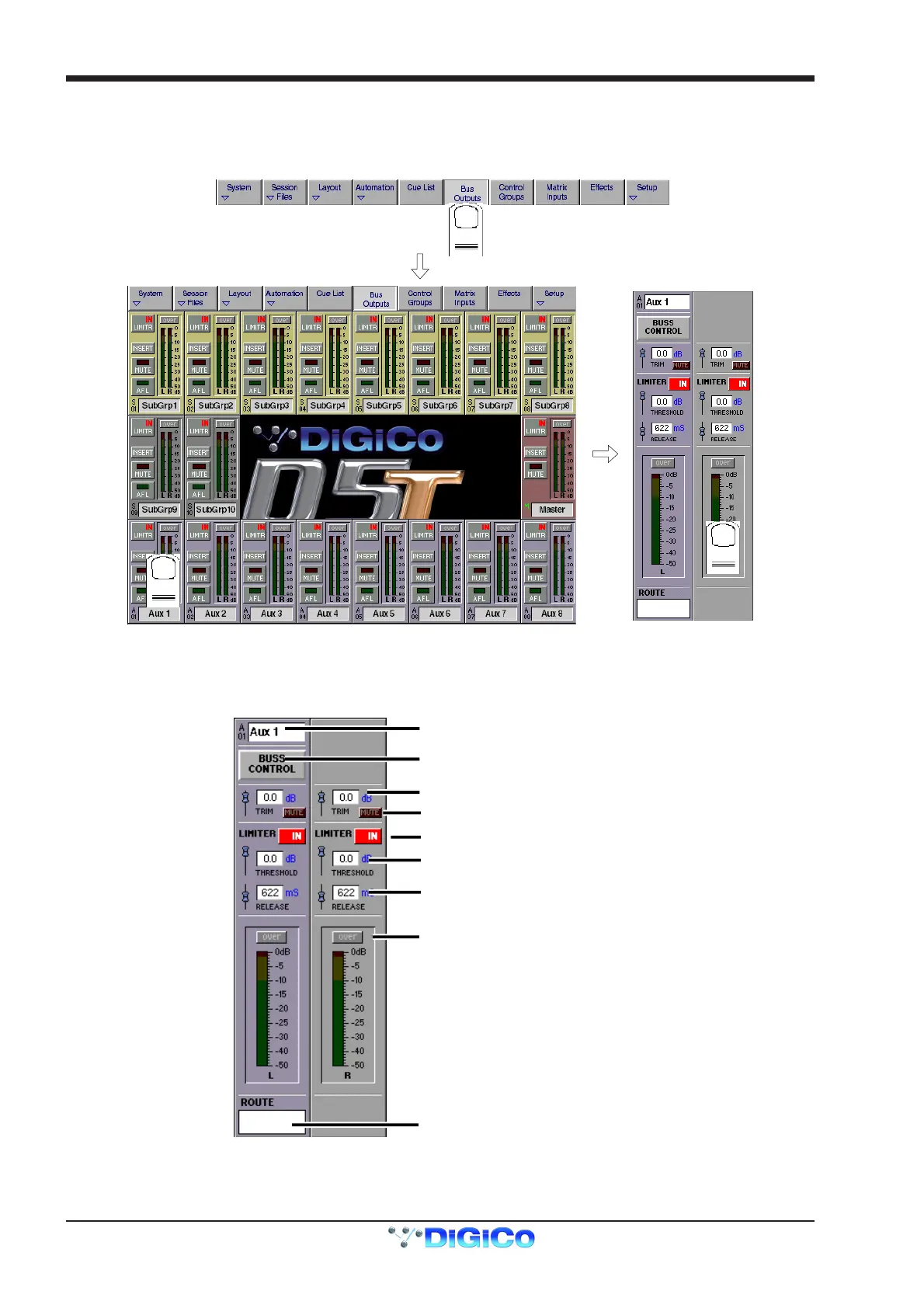
In the default state shown on the previous page, the level for each buss is controlled by a single fader, whether the buss is mono, stereo or
surround.
To see an expanded view of an assigned buss and access additional controls, touch the buss meter display.
Touching the expanded view of the buss meter will restore the display back to the single-fader mode.
3.2 Output and Buss Controls
Once an output channel is expanded, you can access its controls.
Buss Control button
Buss Label
Level Trim (use fader)
Limiter In/Out
Limiter Threshold (use fader)
Limiter Release (use fader)
"Over" Indicator
Output Routing
Mute
The Label, Buss Control and Routing settings apply to the whole buss, but for Stereo and Surround busses the other controls can be set
independently for each signal on the buss.



 To Next Page