Chapter 4
4-22
4.8 Audio Synchronisation
NOTE: If you are running an Optocore system, the console can only currently sync to Optocore at 48KHz therefore Optocore
must be selected as the sync source. If you are only using MADI connections, Master must be selected as the Audio Sync
source.
When the D5T is used with only analogue signals connected to both inputs and outputs synchronisation does not need to be
considered.
The mixer will operate in a self contained manner, operated as master sync source, usually at 48KHz, see below for setting this. This will
be the case even if some of the external equipment is in fact digital eg. digital delays, as long as their connections are analogue. From a
system point of view this is the simplest mode of operation.
However as the D5T offers digital audio interfacing and therefore synchronisation must be considered, if this is to be used.
To ensure glitch-free audio, digital signals must be correctly synchronised using a "Word Clock" or "Digital Sync". The D5T console can
act as Master, generating the word clock for other digital units in the system, or it can slave to an external digital sync input. External sync
can be derived either from a dedicated sync unit, or from an incoming digital audio signal connected via an AES/EBU or MADI signal
input.
The digital sync source will usually be set up when the console is installed, but it can be altered using the Audio Sync button in the Setup
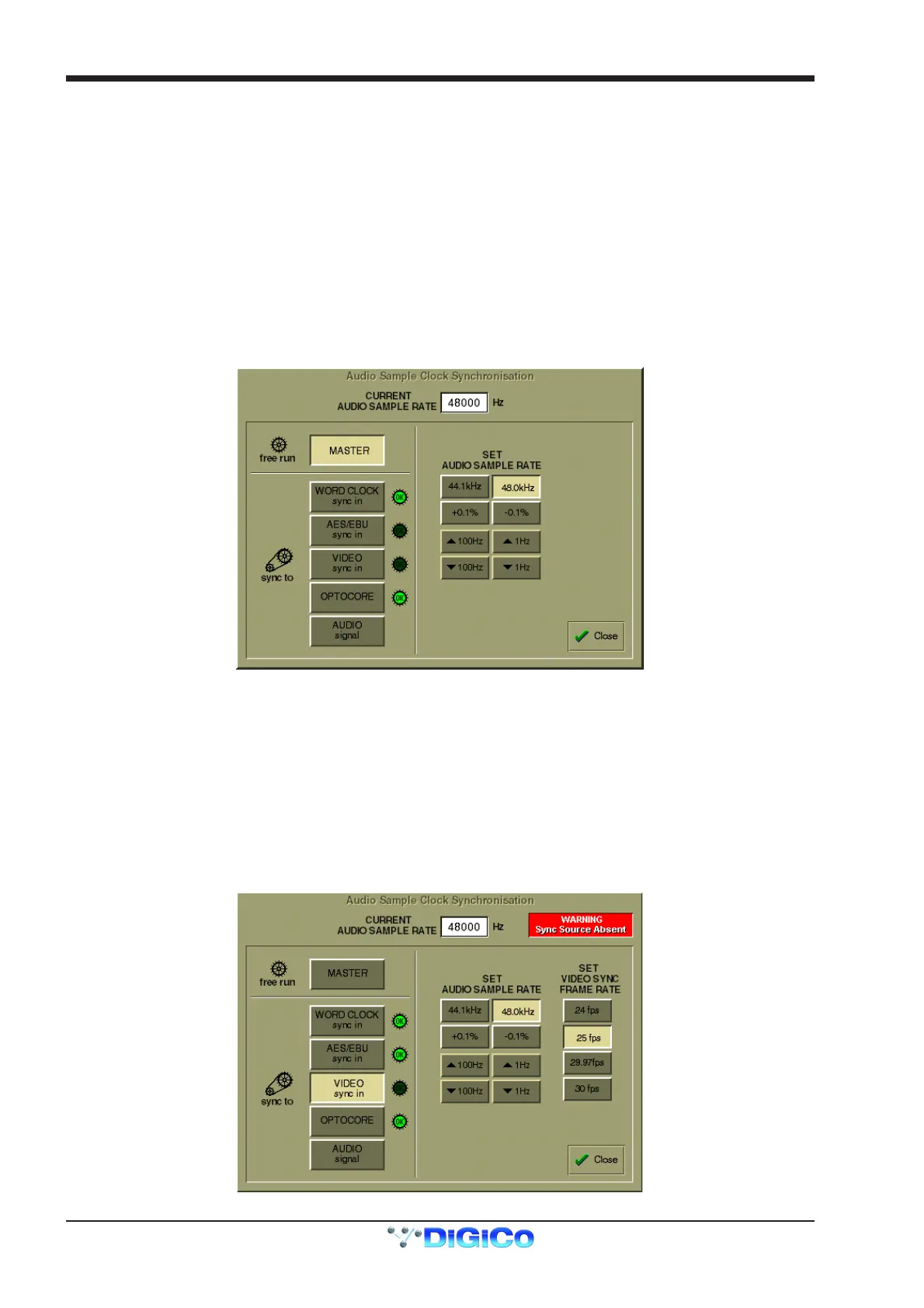
Menu. Pressing this button displays the Audio Sample Clock Sync control panel:
4.8.1 Internal Sync - Console As Master .....................................
If you choose to use the console as the master sync source, you can select a standard sample rate with the 44.1KHz or 48KHz buttons
and the adjust it if necessary in steps of +/- 0.1% or +/- 100Hz and 1Hz.
4.8.2 External Sync .......................................................................
WARNING! Operators should be aware that it is normal for a misclocked or unclocked digital audio system to produce loud, random
noises. This can be damaging to external systems, especially large PA systems. Take care to disable such systems until the digital sync
has been properly established and proved to be stable.
When you choose to sync to an external source, the control panel will immediately try to find the sync source you specify, and display a
warning if no sync can be found, as shown in the illustration below.
The presence of a valid sync source is indicated by the green OK lights, not by the button. If the selected sync source should disappear,
this panel will automatically be displayed with the warning message.



 To Next Page