Chapter 1
1-11
1.3.4 Routing the Channel Signal ................................................
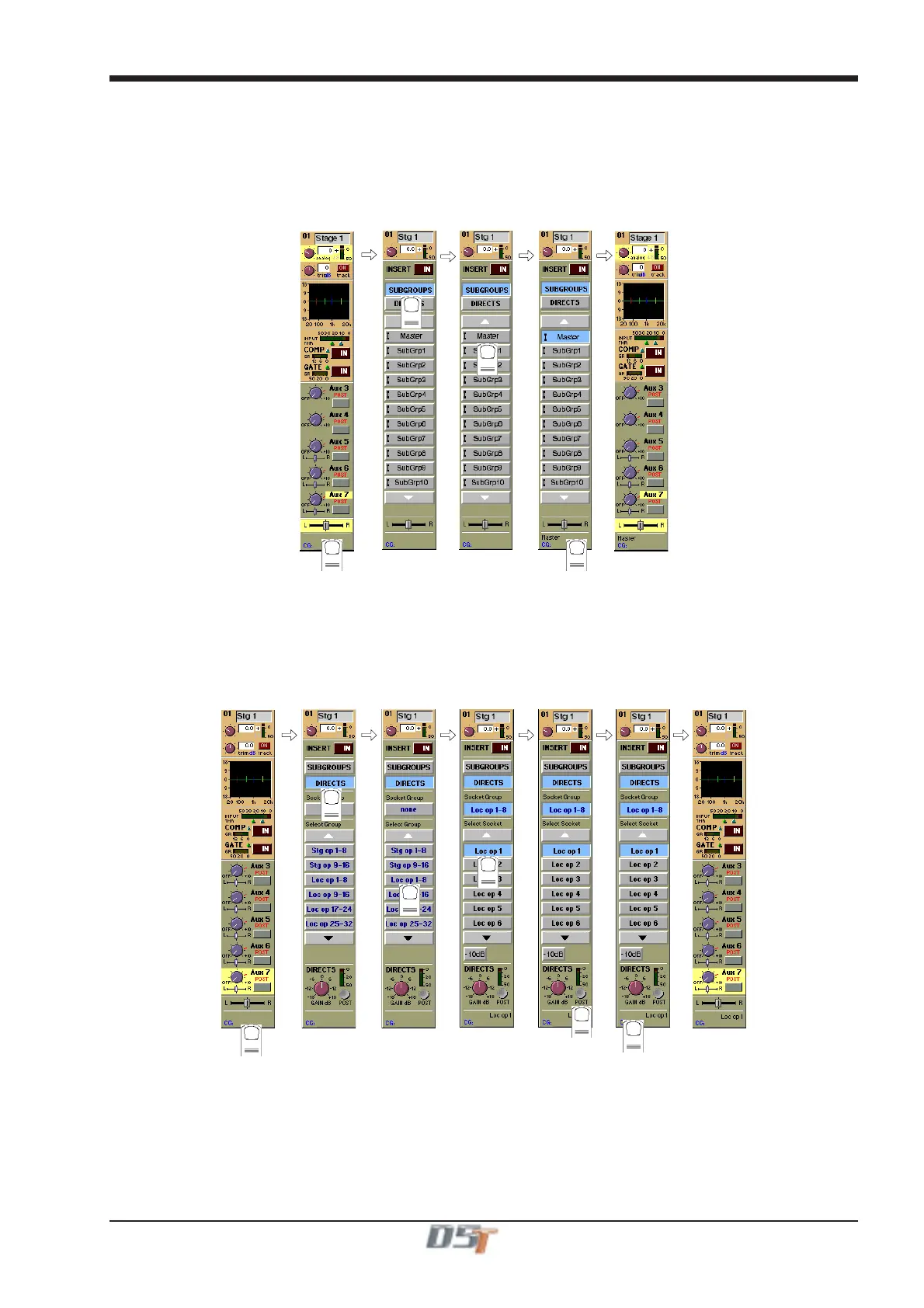
The channel signal can be routed to Sub Groups and Direct Outputs.
To Route to a Sub Group:
1) Touch the bottom of the input screen to open the routing panel.
2) Touch the Sub Groups button if it is not already highlighted.
3) Touch the Sub Group button(s) that you require eg. Master, SubGrp1 etc
4) Touch the bottom of the input screen again to return to the standard view.
2
3
4
1
To Route to a Direct Output:
1) Touch the bottom of the input screen to open the routing panel.
2) Touch the Directs button if it is not already highlighted.
3) Touch the name of the Socket Group to view the output socket names.
4) Touch the Output Socket button(s) that you require eg. Loc op 1, Loc op 2 etc.
5) Touch the Pre/Post button to specify the position of the Direct Out, relative to the channel fader, in the signal path.
6) Touch the bottom of the input screen again to return to the standard view.
1
2
4
5
6
3



 To Next Page