Chapter 1
1-10
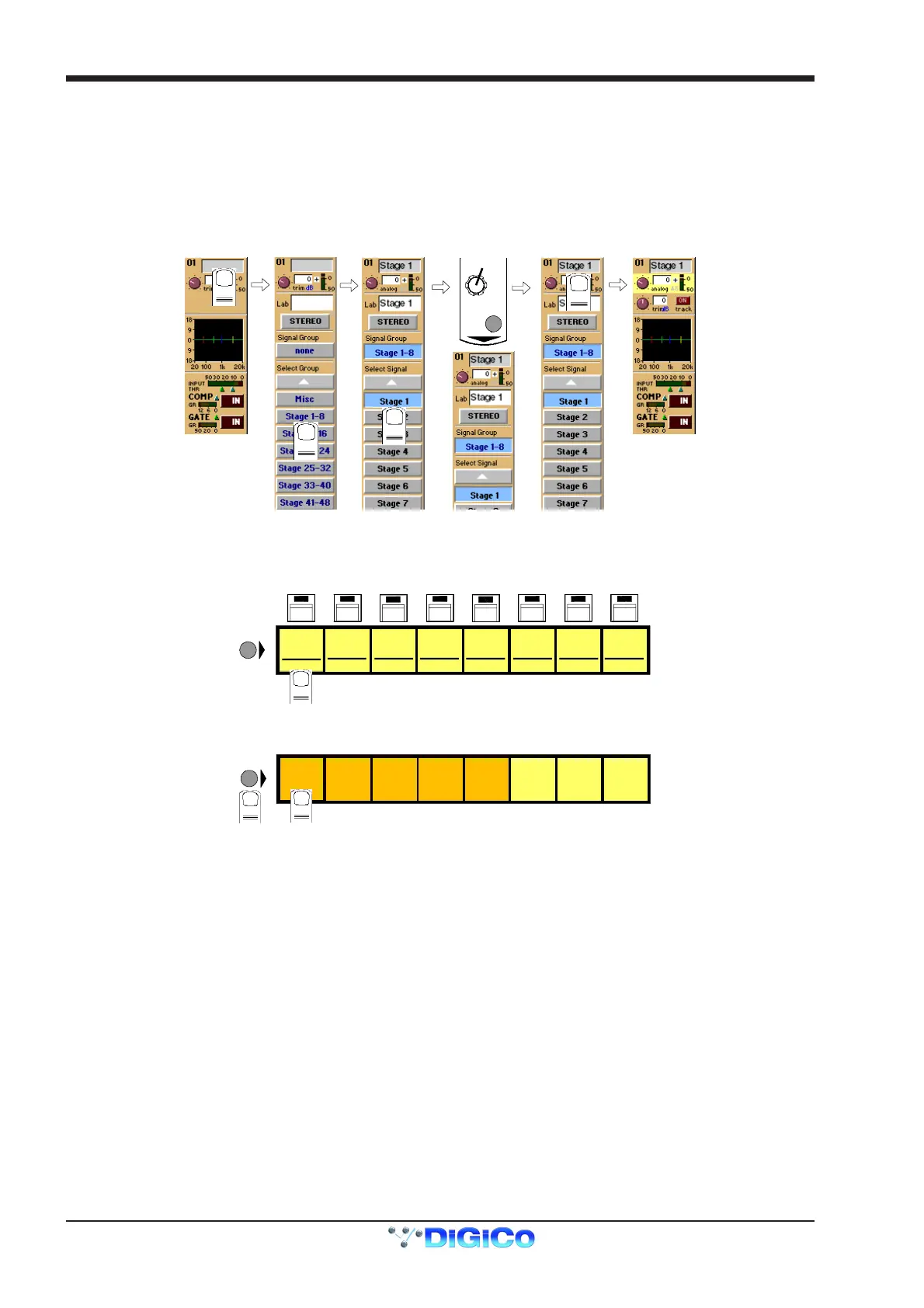
Input sources are divided into groups of signals eg. Stage 1-8 or Line 1-16.
To select an input source:
1) Touch the top of the input screen to open the input panel.
2) Touch the name of the Signal Group to view the signal names.
3) Touch the name of the signal to assign it to the channel.
4) Adjust the gain (analogue rack gain or digital trim selected by touching the required on screen control) with the worksurface rotary
control at the top of the channel.
5) Touch the top of the input screen again to return to the standard view.
Note: Touch the Lab box and type a name for the channel if required.
GAIN
1
2
3
4
5
If the Stereo is pressed, the input channel functions will control two input signals, the one which has been selected and the next one in the
rack.
eg. If Stage 1 is selected and the stereo button is pressed Stage 2 will also be controlled.
To Solo a channel use the Channel LCD Buttons just below the mute buttons in the channel strip.
mu
emu
e mu
emu
e mu
e mu
e mu
e mu
e
PFL
MIC 1
01 Mo
LCD
FUNCTION
PFL
MIC 2
02 Mo
PFL
MIC 3
03 Mo
PFL
MIC 4
04 Mo
PFL
MIC 5
05 Mo
PFL
MIC 6
06 Mo
PFL
MIC 7
07 Mo
PFL
MIC 8
08 Mo
These are multi-function buttons and by pressing the Channel LCD Function button on the left hand side you can select which function
they are currently assigned to.
SOLO SAFE
AUX SEND
>FADERS
BUILD
GANGS
FADER
ASSIGNS
CHANNEL
SOLO
ASSIGNS
CHANNEL
LCD
FUNCTION
1
2
SOLO
1OR2
ONLY
DISPLAY
NAME



 To Next Page