4-21
Chapter 4
4.7 Transport / Timecode Configuration
When the D5T is used in typical live sound applications there will be no time related control systems (timecode) or motion
control (tape transport) connected. Synchronisation and machine control does not need to be considered.
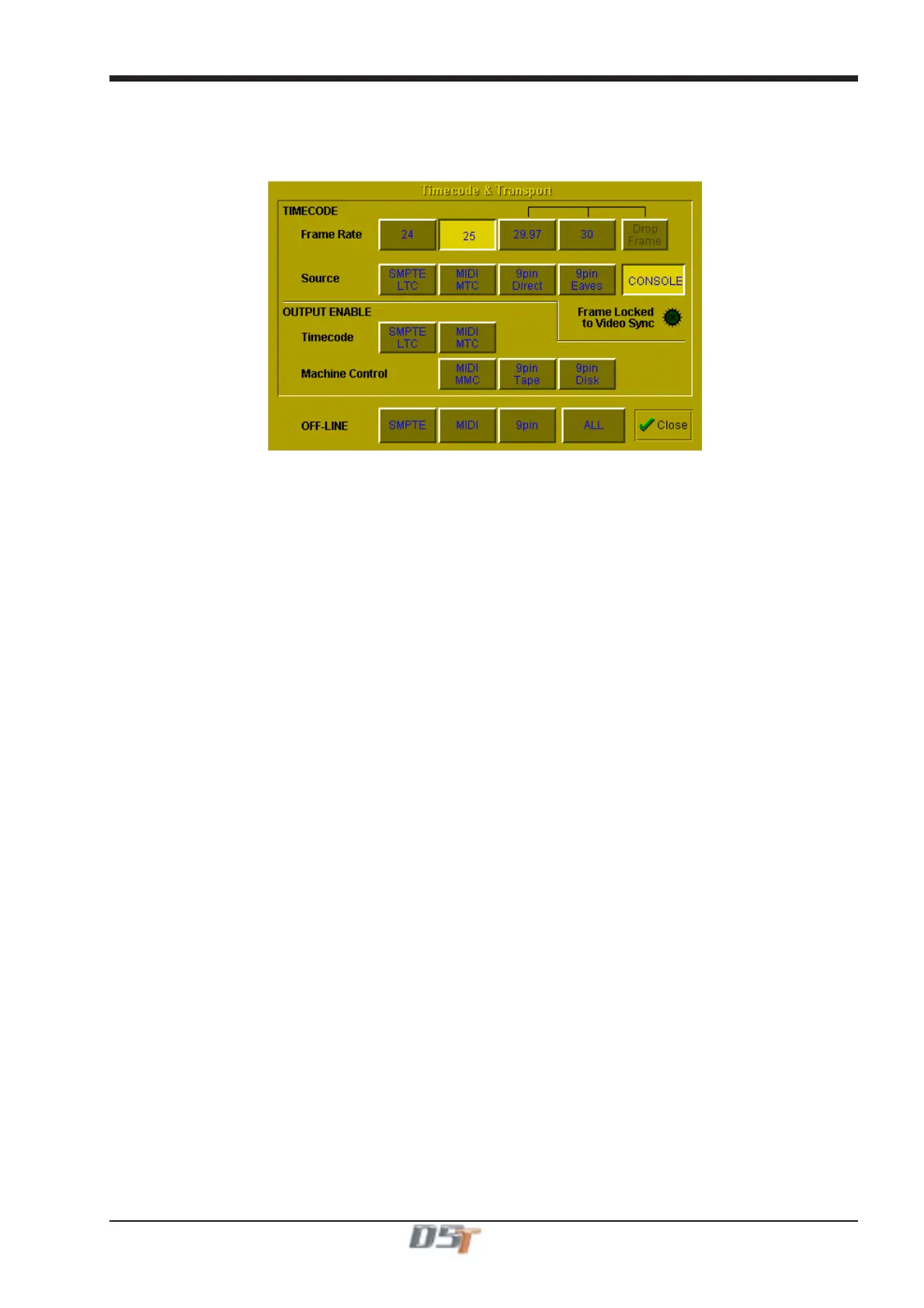
This panel can be accessed by touching the Setup button on the Master screen and then touching the Transport & Timecode button.
Frame Rate
This must be set up for the frame rate used by your other equipment. You can select from four different basic frame rates, with a drop-
frame option available for 29.97 and 30 fps.
Timecode Source
You can choose the Console option to make the console generate the master timecode for the setup, or you can choose to make the
console "chase" timecode which arrives at one of the external sockets - SMPTE (LTC), MIDI (MTC), or 9-pin. These external sockets are
located on the console rear panel.
The 9-pin Eavesdrop option requires a special 9-pin cable (See technical manual for details). The option is provided for installations
where the 9-pin connection runs between two other pieces of equipment (for example, a video machine and DAW), but the console is
required to chase this timecode. 9-pin does not normally allow more than a single direct connection between two machines, but using the
Eavesdrop cable, you can make the console "listen" to the timecode passing between two other machines, and to sync to and display this
timecode on the worksurface.
Note that if you are using 9-pin Eavesdrop mode, you cannot use any of the options for direct 9-pin connection.
Timecode Output Enable
Whether the console is operating as timecode master or deriving its timecode from another device, you can choose to route a timecode
signal out from the MIDI (MTC) and/or SMPTE (LTC) sockets. If timecode is being received from another device it is regenerated before
being routed to the output.
Machine Control Enable
The console can only send Control signals if you have enabled a Machine Control output. This can be MIDI Machine Control (MMC) and/
or 9-pin Disk or Tape. Note that you cannot output 9-pin control if you are using the Eavesdrop option to read timecode.
MIDI Machine Control has limited transport features, supporting only the Play, Record, FF, Rewind, Stop and Locate functions. 9-pin
control supports Shuttle and Jog functions.
Off-line Buttons
The configuration panel allows you to temporarily disable all timecode and transport control to any combination of outputs. The ALL button
disables all timecode and machine control output - this is especially useful to prevent external machines trying to chase the console
timecode.
Video Sync Lock Indicator
By connecting a video or black/burst signal to the video frame sync input on the worksurface rear panel, you can provide an external frame
sync for the timecode. If the console is acting as timecode master or regenerating timecode, the frame boundaries in the timecode are
then locked to those on the incoming video signal. If the lock is operating, the green indicator on the panel lights up to indicate this.



 To Next Page