Chapter 2
2-23
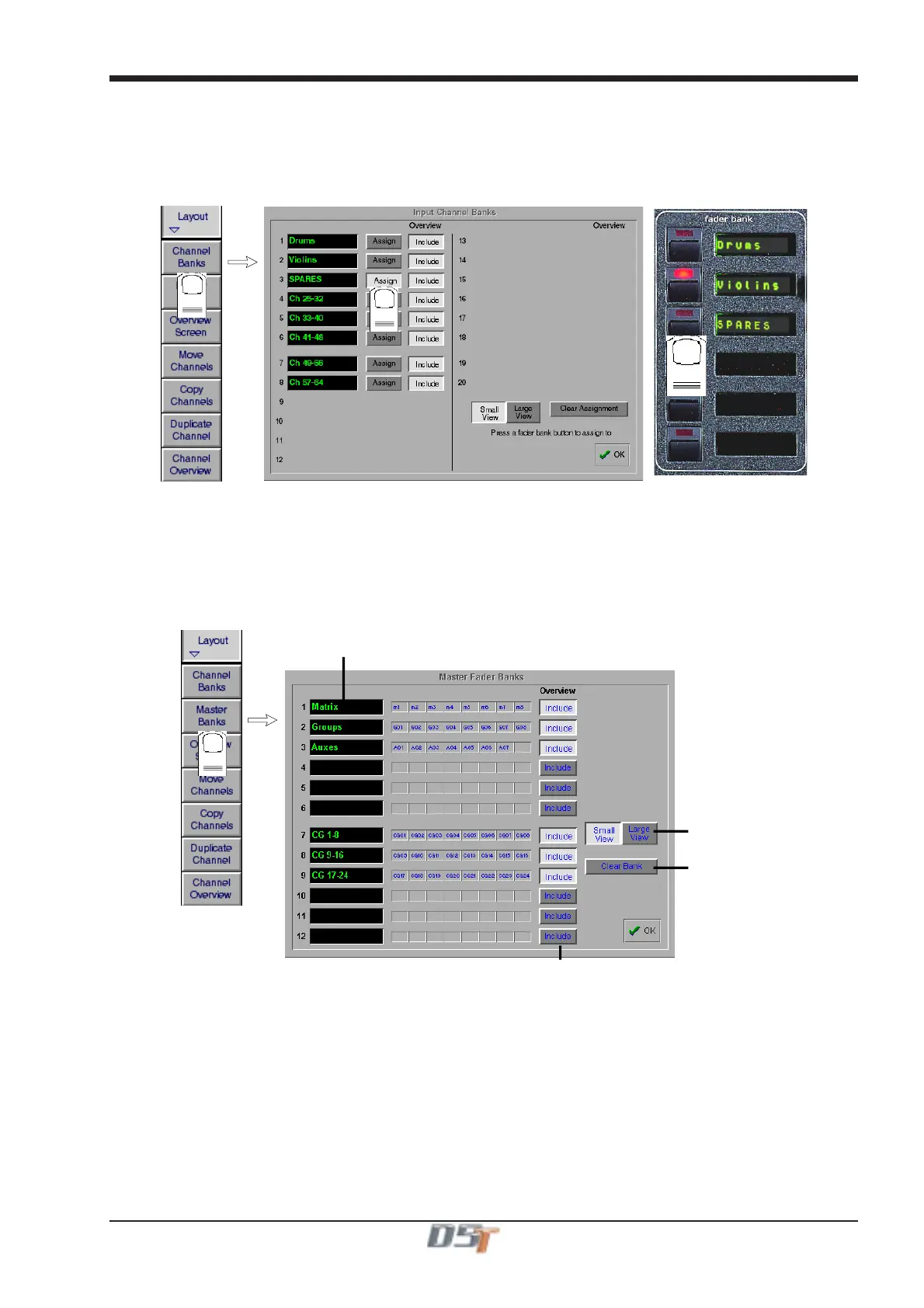
To Clear a Channel Bank from a worksurface Fader Bank:
1) Touch the Clear Assignment button.
2) Press the Fader Bank button that you wish to clear.
To assign a Channel bank to one of the console worksurface Fader Banks:
1) Touch the Channel Bank Assign button
2) Press the relevant Fader Bank button.
2
1
3
2.4.4 Master Banks ........................................................................
The naming and assignment of the worksurface Master Fader Banks is controlled from the Master Fader Banks panel in the Layout menu
on the Master Screen.
To Name a Master Fader Bank, touch the existing name eg CG 1-8 and type a new one.
To include the Master Fader Bank on the Overview Screen touch the Include button next to the relevant Bank name.
To change the appearance of the Master Fader Banks on the Overview Screen touch the Small or Large View buttons at the bottom of
the panel.
Touch here and type to
name Master Bank
Include Master Bank
Clear Bank from
Worksurface
Overview Scree
size



 To Next Page