Chapter 2
2-13
Pan Control
Panning to the Master and Group busses is Stereo or Surround, depending on the console configuration. Pan position for each channel
can be controlled in two ways: by using the rotary controls in the Lower Row below the on-screen channel display, or by Selecting the
channel and using the Joystick. For surround panning, the Joystick is much more intuitive than using a pair of rotary controls.
Surround Panning
With Surround console formats, in addition to the surround Pan control, there are two additional controls for LR/LCR and Sub in 5.1
format and one control for LR/LCR in LCRS format.
When using the Joystick to Pan the Selected channel, you will find that the Joystick position is shown on the Pan control as a pair of
green lines. Moving the Joystick moves these lines, but does not move the Pan position of the channel itself until the green lines travel
over the real Left-Right or Front-Back pan position. Once the Joystick position has passed through the real Pan position, further move-
ment of the Joystick will then alter the Pan position in the normal way.
When using the rotaries for surround panning, the upper rotary controls the Left-Right position, and the lower rotary controls Front-Back.
Preset Pan Positions
The upper button directly below the pan rotaries can be used to reset panning positions.
In a stereo console it will switch panning between left, centre and right positions with successive presses. In LCRS and 5.1 consoles the
button works in a similar way for each available position.
Panning Stereo Channels
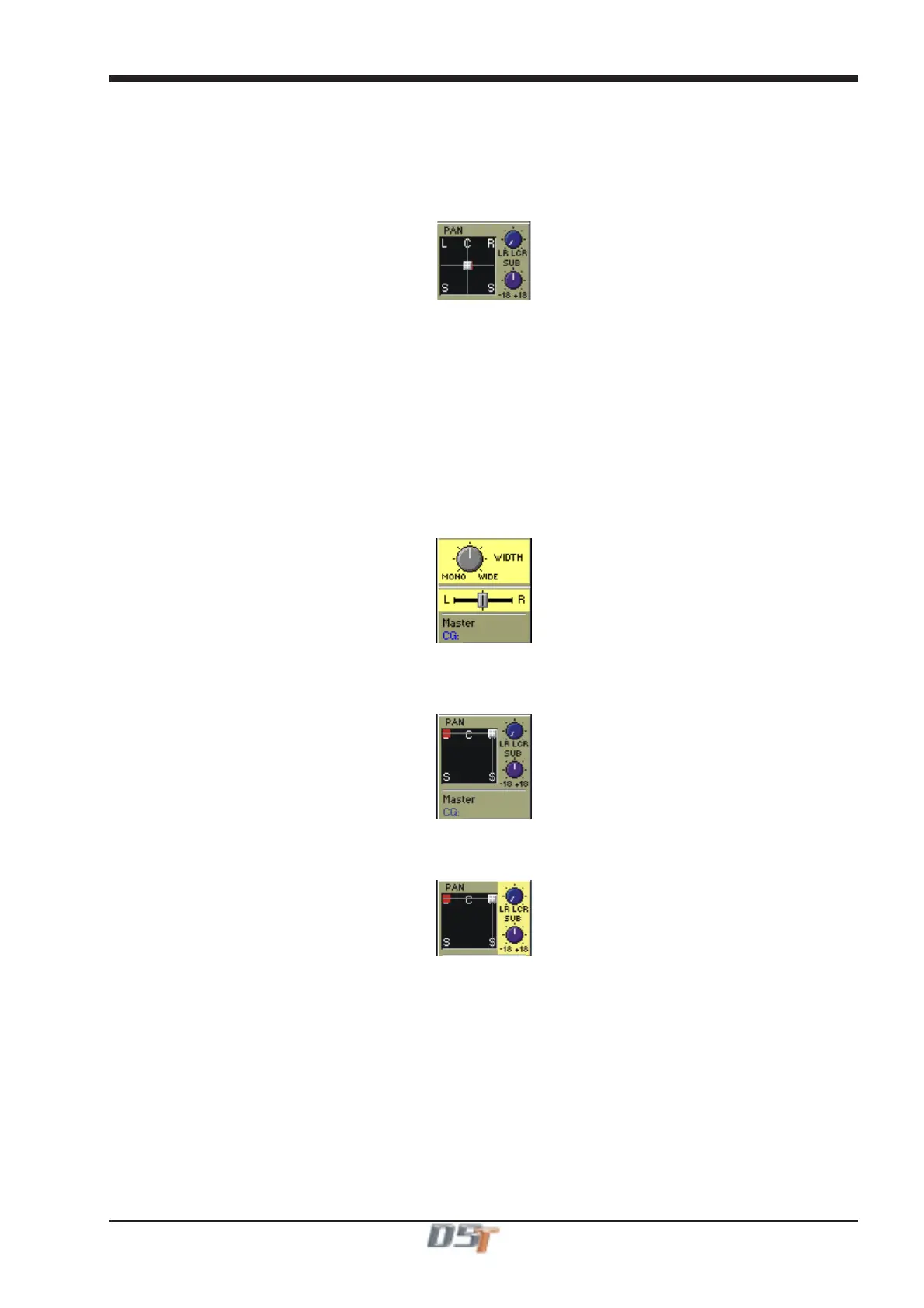
When an input channel is stereo and therefore controlling a pair of input signals the pan control will appear in one of the following ways.
In a stereo console configuration the upper rotary serves as a width control with the full left position being mono, the centre position being
normal stereo and the full right position being wide stereo. The width control is accessed by scrolling down past the pan. The lower rotary
serves as a balance control between the relative levels of the stereo pair.
The surround panner for stereo inputs simultaneously controls the position of both left and right signals. The joystick and wheel directly
control the position of the left signal, and the right signal is automatically mirrored on the left-right axis. A red indicator shows the position
of the right signal. This provides some control of width. The signals can also be crossed to reverse the stereo image.
When panned to centre, left and right will be mono. Front-back, Sub and LR/LCR are always identical for both left and right signals.
LR/LCR Blend and Sub
The LR/LCR and Sub controls can be adjusted using the normal Pan/Aux rotaries below the screen - use the Screen Scroll buttons to
move the highlight down from the Pan control to highlight LR/LCR and Sub.
The LR/LCR Blend control adjusts the type of Panning that is applied when sending to Surround busses.
It blends a normal stereo panner with an LCR panner by varying amounts, allowing control of how much L & R is fed into C. The default is
full LCR in a New Session, but note that when loading older surround sessions the level is taken from the old Divergence control, which
defaulted to hard left (= full LR).
A Blend setting of LR (Full left) only allows LR panning with no signal going to the C buss whilst a setting of LCR (full right) allows
panning between L and C up to the control's centre position and panning between C and R thereafter.
The Sub control is only present on 5.1 console configurations. It is a trim control with unity gain at the centre position for sending the
signal to the Sub channel of a surround buss or output.
Controlling the Sub Feed
When a Sub control is present the lower button directly below the pan rotaries switches between three different states for controlling the
Sub Feed. Successive presses of the button will change to the following states:
LCRSS on - The signal can go to all busses except the sub buss according to the channel pan position. (Default mode)
Sub on - The signal can only go to the Sub Buss. (Indicated by a B in the display)
All on - The signal can go to all busses including the Sub Buss. (Indicated by LCRSS and B in the display)
The current state is indicated by letters in the background of the pan control display.
NOTE: This control is contained in snapshots and channel presets. It is part of the Panning Scope for Snapshots.



 To Next Page