5-7
Chapter 5
5.1.12 The Cue Scope Editor ........................................................
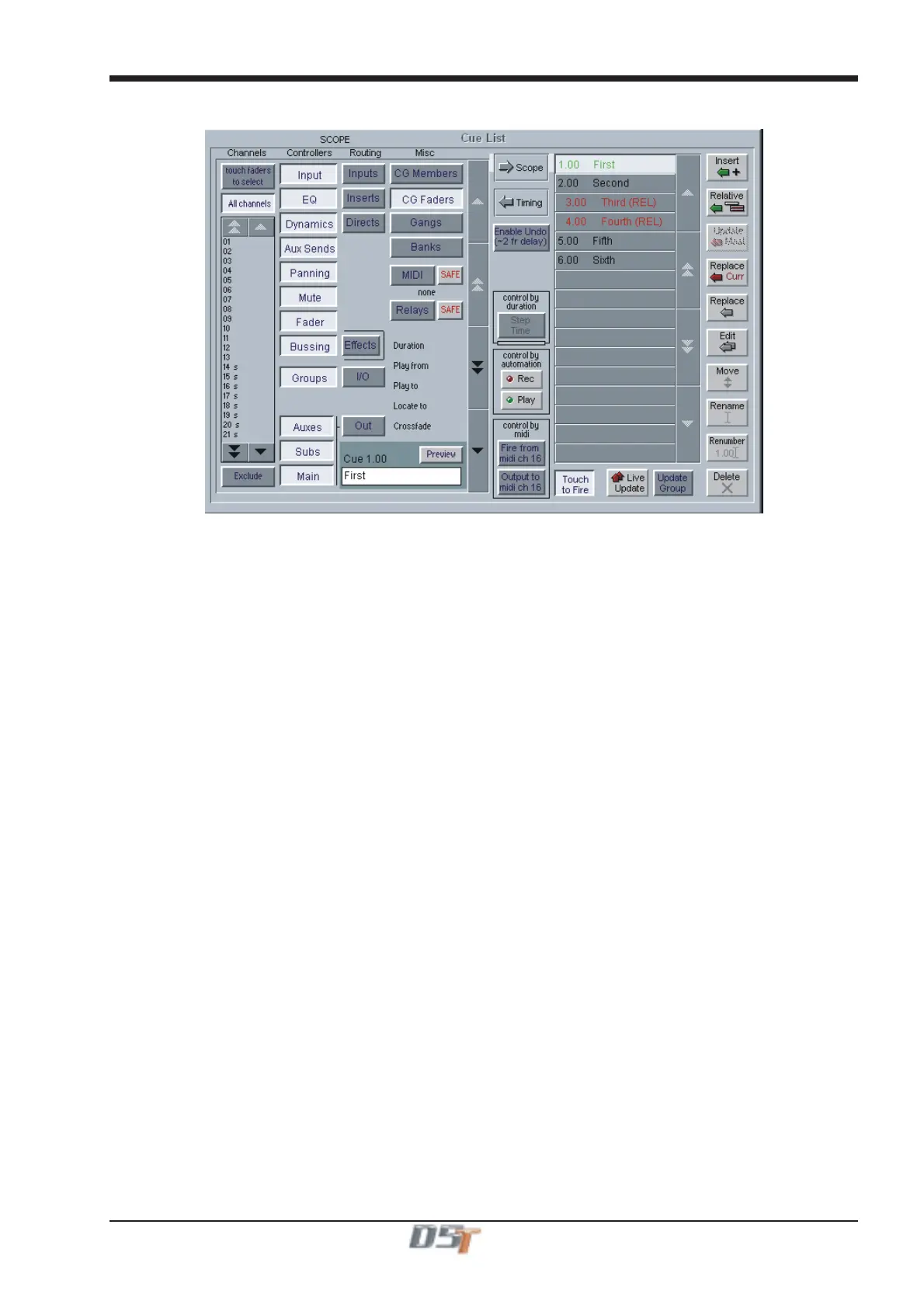
Pressing the Scope button expands the panel to display and edit the scope for one cue, indicated by a light band linking the cue list to the
scope. The scroll buttons in the centre of the panel move the scope editing up and down the cue list.
If the Preview button is pressed the scope for the next cue in the list is displayed.
5.1.13 Channel Scope ...................................................................
The input channels which are included in each cue can be set by pressing the Touch Faders To Select button and touching the required
faders which will be added to the list (touching a fader again will remove it from the list).
Press the All Channels button if the cue is to be global.
If the Exclude button at the bottom left of the panel is pressed then the cue will apply to all the channels which are not on the list.
Note: If both All Channels and Exclude are highlighted, the cue will have no effect on any input channels.
Channel scope is not applied when recalling Banks (layouts).
5.1.14 Controller Scope ................................................................
Controllers
The first eight Controller scope buttons relate to input channels only.
Input - digital trim, delay, label, input balance, ms decode, left right swap. EXCLUDES Stereo switch.
EQ - all controllers.
Dynamics - all controllers except stereo link.
Aux Sends - aux send level, on/off, pan, pre/post.
Panning - panner, divergence, sub level.
Mute - channel mute switch.
Fader - channel fader.
Bussing - buss routing buttons.
Effects - all FX controllers. EXCLUDES FX configuration (Presets).
Groups - Matrix Groups - all controllers including EQ, Dynamics and label.
Auxes - Aux buss outputs - all controllers and label.
Subs - Sub Group buss outputs - all controllers and label.
Main - Master buss outputs - all controllers and label.
Routing
Input - Channel and Matrix input routing, label, analogue gain and 48v switch.
Inserts - Input channel send and return routes, send gain, -10dB, pre/post switch and insert in/out.
If Buss Controllers are included in the scope this also includes buss inserts.
Directs - Input channel send route, send gain, -10dB and pre/post switch.
Groups I/O - Matrix Groups output and direct routing and -10dB switch.
Out - If Buss Controllers are included in the scope this includes the relevant buss output routing and -10dB switch.
Misc
CG Members - Control Group label and a complete list of each group’s members.
CG Faders - Control Group faders only.
Gangs - Input channel gang members.
Banks - Each cue stores the current assignment for all controllers on the worksurface:



 To Next Page