Chapter 4
4-16
4.5 Master LCD Function Buttons
Pressing the Master LCD Function button on the left hand side of the Master Section allows you to select the function that the individual
Master LCD Buttons are currently assigned to.
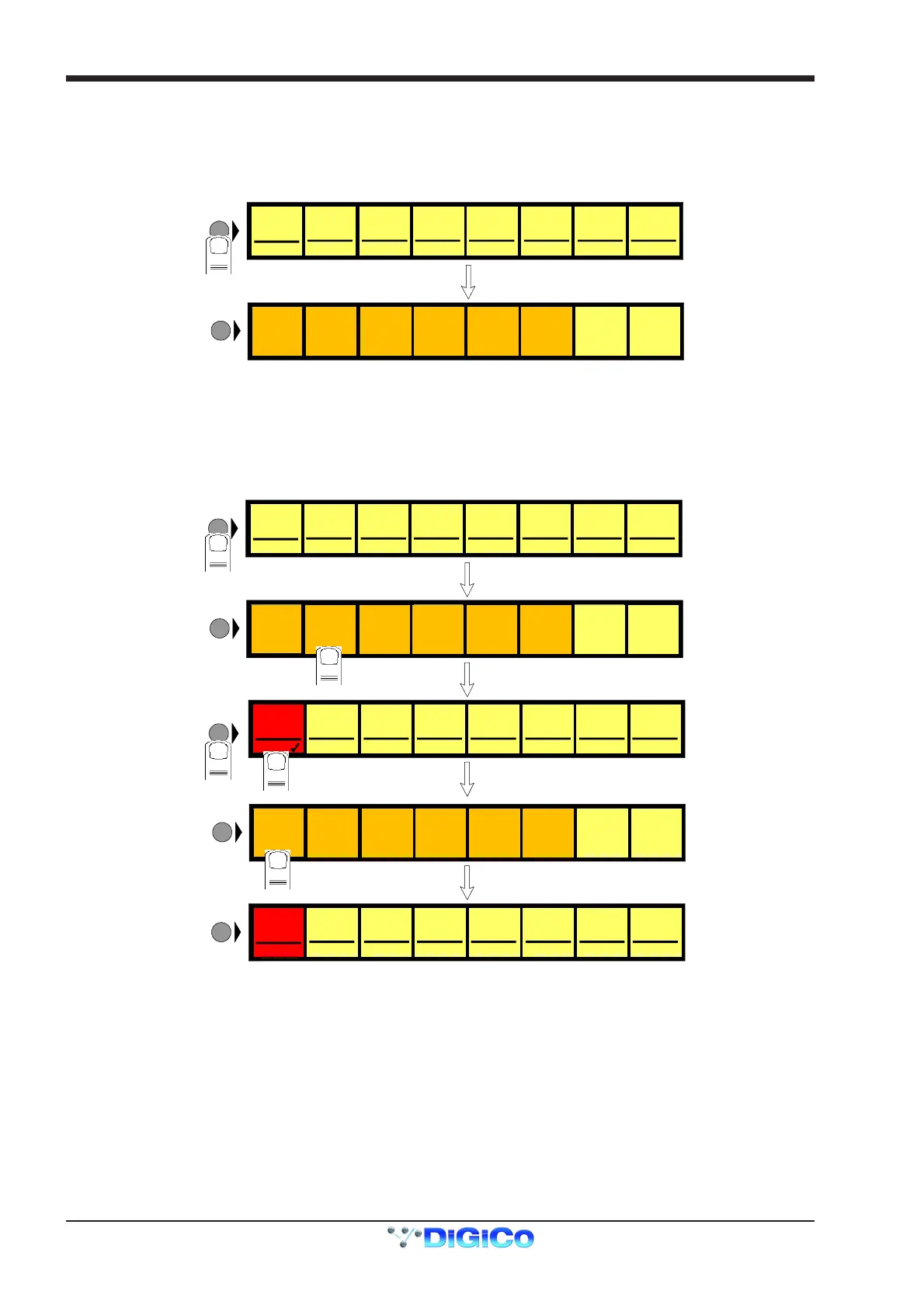
To Show Functions
Press the Master LCD Function button.
Grp 01
G01 [0]
FUNCTION
SOLO SAFE
ASSIGN
FADERS
SOLO
ASSIGNS
AUX>ROT
SOLO
ASSIGNS
AUX>FAD
Grp 02
G02 [0]
Grp 03
G03 [0]
Grp 04
G04 [0]
Grp 05
G05 [0]
Grp 06
G06 [0]
Grp 07
G07 [0]
AFL AFL AFL AFL AFL AFL AFL AFL
Grp 08
G08 [0]
LCD
FUNCTION
1
UNASSIGN
FADERS
BUILD
BANK
SOLO
1OR2
To Make Masters Safe From All Cues
The Safe function makes selected SubGroup, Aux and Control Group Master Faders safe from all Cues.
1) Press the Master LCD Function button for the relevant bank.
2) Press the Safe button.
3) Press the Master LCD buttons for the Masters that should be Safe (they will turn red and a tick will appear).
4) Press the Master LCD Function button to exit Safe mode.
5) Press the Solo function button to return to the standard view.
Grp 01
G01 [0]
FUNCTION
SOLO SAFE
ASSIGN
FADERS
SOLO
ASSIGNS
AUX>ROT
SOLO
ASSIGNS
AUX>FAD
Grp 02
G02 [0]
Grp 03
G03 [0]
Grp 04
G04 [0]
Grp 05
G05 [0]
Grp 06
G06 [0]
Grp 07
G07 [0]
Grp 08
G08 [0]
LCD
FUNCTION
1
UNASSIGN
FADERS
BUILD
BANK
2
SAFE
Grp 01
G01 [0]
SAFE
Grp 02
G02 [0]
SAFE
Grp 03
G03 [0]
SAFE
Grp 04
G04 [0]
SAFE
Grp 05
G05 [0]
SAFE
Grp 06
G06 [0]
SAFE
Grp 07
G07 [0]
SAFE
Grp 08
G08 [0]
LCD
FUNCTION
3
4
SOLO SAFE
SOLO
ASSIGNS
AUX>ROT
SOLO
ASSIGNS
AUX>FAD
LCD
FUNCTION
BUILD
BANK
5
Grp 01
G01 [0]
LCD
FUNCTION
Grp 02
G02 [0]
Grp 03
G03 [0]
Grp 04
G04 [0]
Grp 05
G05 [0]
Grp 06
G06 [0]
Grp 07
G07 [0]
Grp 08
G08 [0]
AFL AFL AFL AFL AFL AFL AFL AFL
SOLO
1OR2
ASSIGN
FADERS
UNASSIGN
FADERS
SOLO
1OR2
AFL AFL A FL AFL AFL AFL AFL AFL



 To Next Page