Chapter 2
2-15
SubGroup Routing
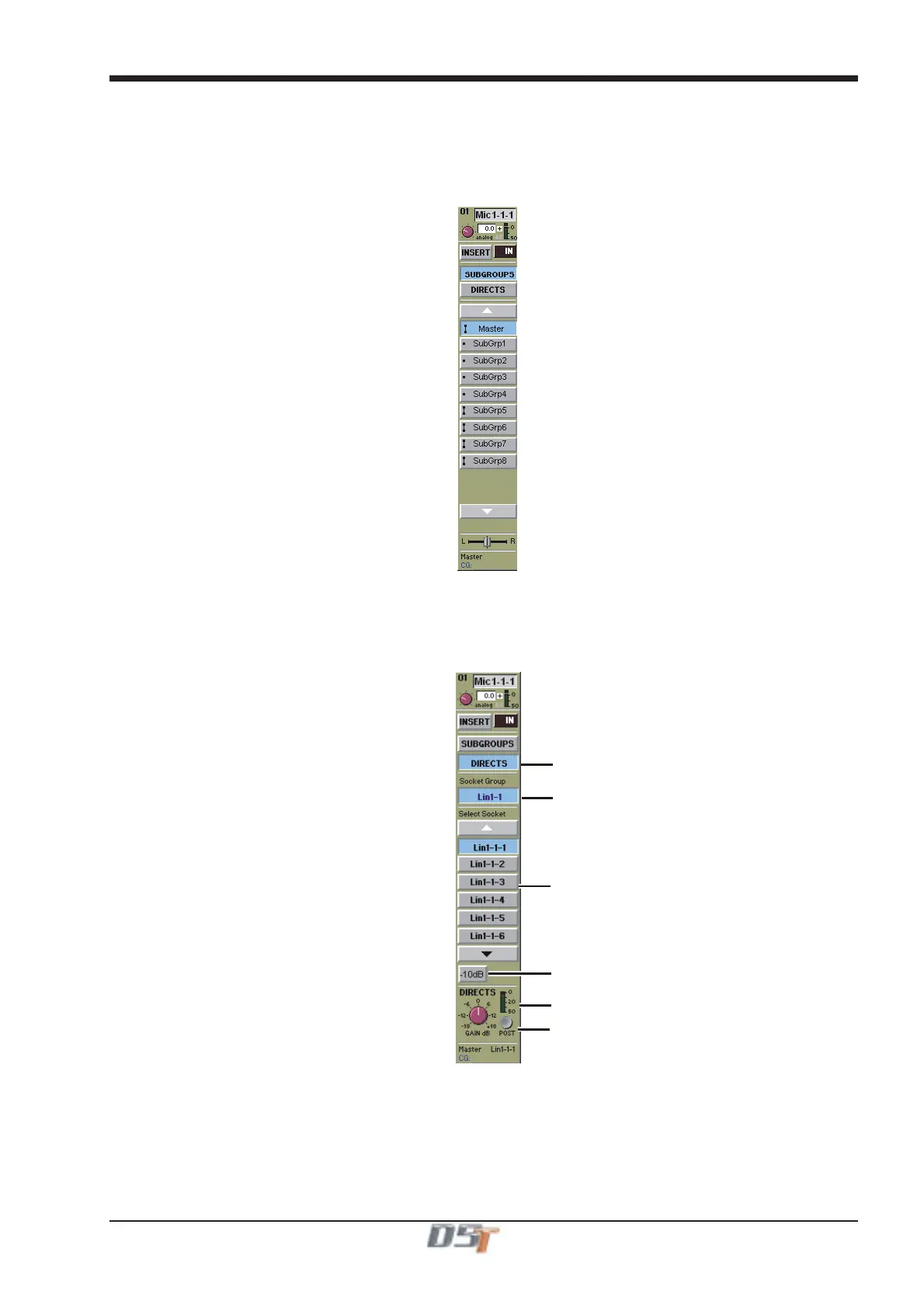
When the SubGroups button is selected, the on-screen SubGroup buttons allow you to connect the channel to any number of output
subgroup busses - mono subgroups are displayed with a single dot (SubGroups 1-4 in the diagram below), while stereo busses appear
with a double dot (groups 5-8) and surround busses with a small box. To connect or disconnect the signal, simply press the on-screen
button for the relevant SubGroup.
The number and type of SubGroups depends on the console configuration.
Direct Outputs
You can also choose to route the channel signal directly to any of the console's output sockets, by touching the Directs button. This shows
a display of the console's Output sockets, so that you can select any number of sockets for the Direct Out.
Output Socket Group Selector
Pre/Post Fader Switch
Level Trim & Meter
Directs Selector
Output Socket Selector
Minus 10dB Output Switch
A Direct Output can operate in one of three modes:
PRE M = Pre Mute and Pre Fader
PRE = Post Mute and Pre Fader
POST = Post Mute and Post Fader
Its level can be trimmed by +/-18dB and a -10dB pad can be applied.



 To Next Page