Chapter 2
2-16
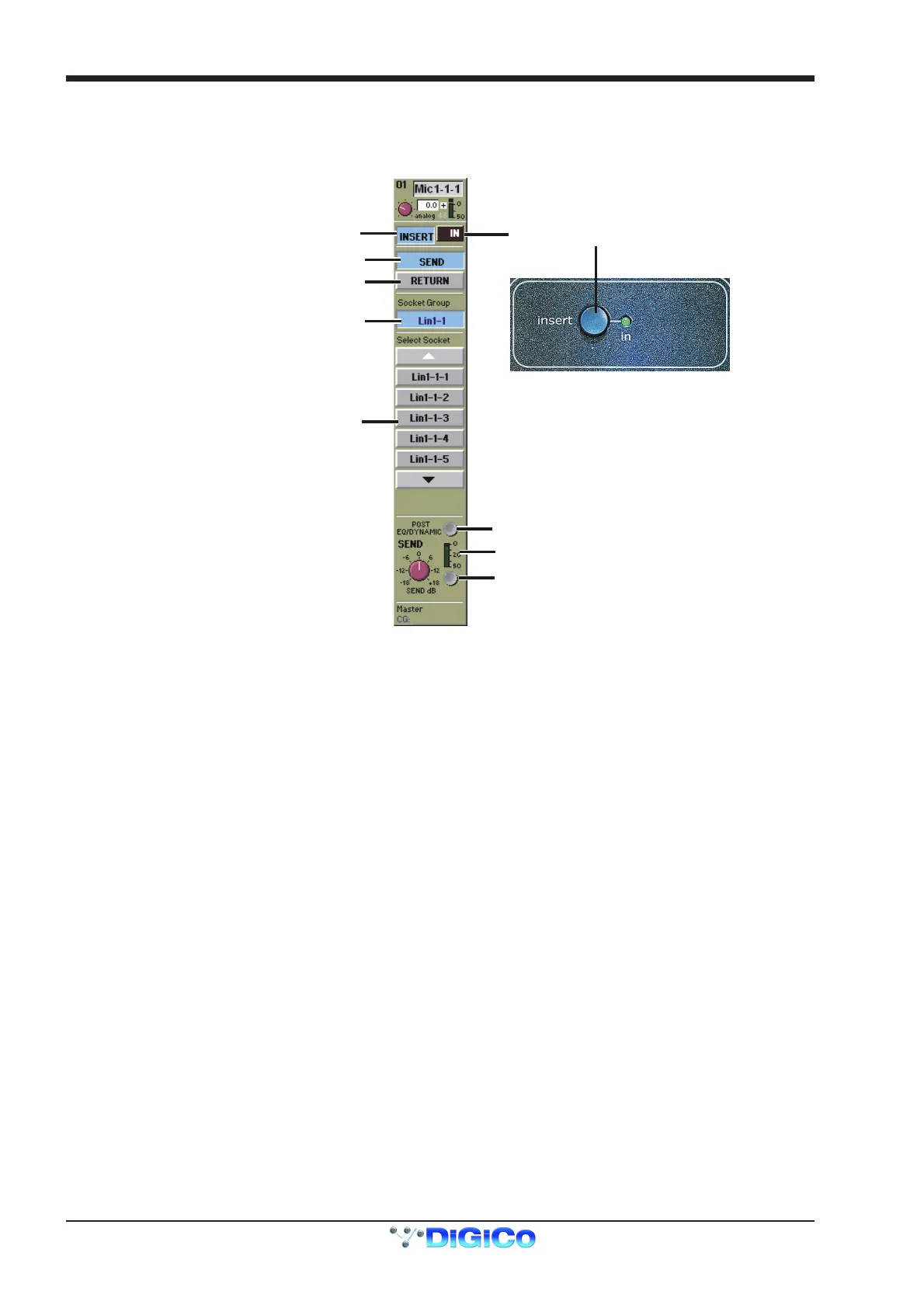
Insert Routing and On/Off Switch
This button controls the routing for the input channel insert send and return selection.
Touching the word Insert displays a panel which allows you to select Send and Return sockets in the same way as you would select an
Input socket or a Direct output. There is also a Send Gain control providing a trim of +/-18dB.
Socket Group Selector
Pre/Post EQ/Dynamics Switch
Level Trim & Meter
Touch to Select Send Socket
Socket Selector
Insert On/Off
Insert On/Off
Touch to Select Return Socket
Touch Here to
Open / Close Panel
Worksurface Control
The Insert can be PRE or POST EQ and Dynamics switched by the button just above the Send Gain.
If you touch the In button, the channel's signal is taken from the Insert Return socket and thus switches the insert on.
The In button is also on the console worksurface on the top right hand side of the input screen.
Note: If the insert is switched on but a socket has not been assigned for the insert return then there will be no signal audible in
the channel.



 To Next Page