Chapter 4
4-6
4.2 Configuring the Console
As a digital console, the D5T is highly configurable, allowing a wide range of different bussing formats and channel configurations. This
section describes how to use the command buttons on the Master Screen to Configure, store and recall sessions.
A Session file contains the following information:
• The console configuration.
• The Cues.
• The Dynamic automation.
A Session file therefore represents a complete "snapshot" of the console, and is the simplest way to store and recall a complete system
setup.
4.2.1 Session Files Menu..............................................................
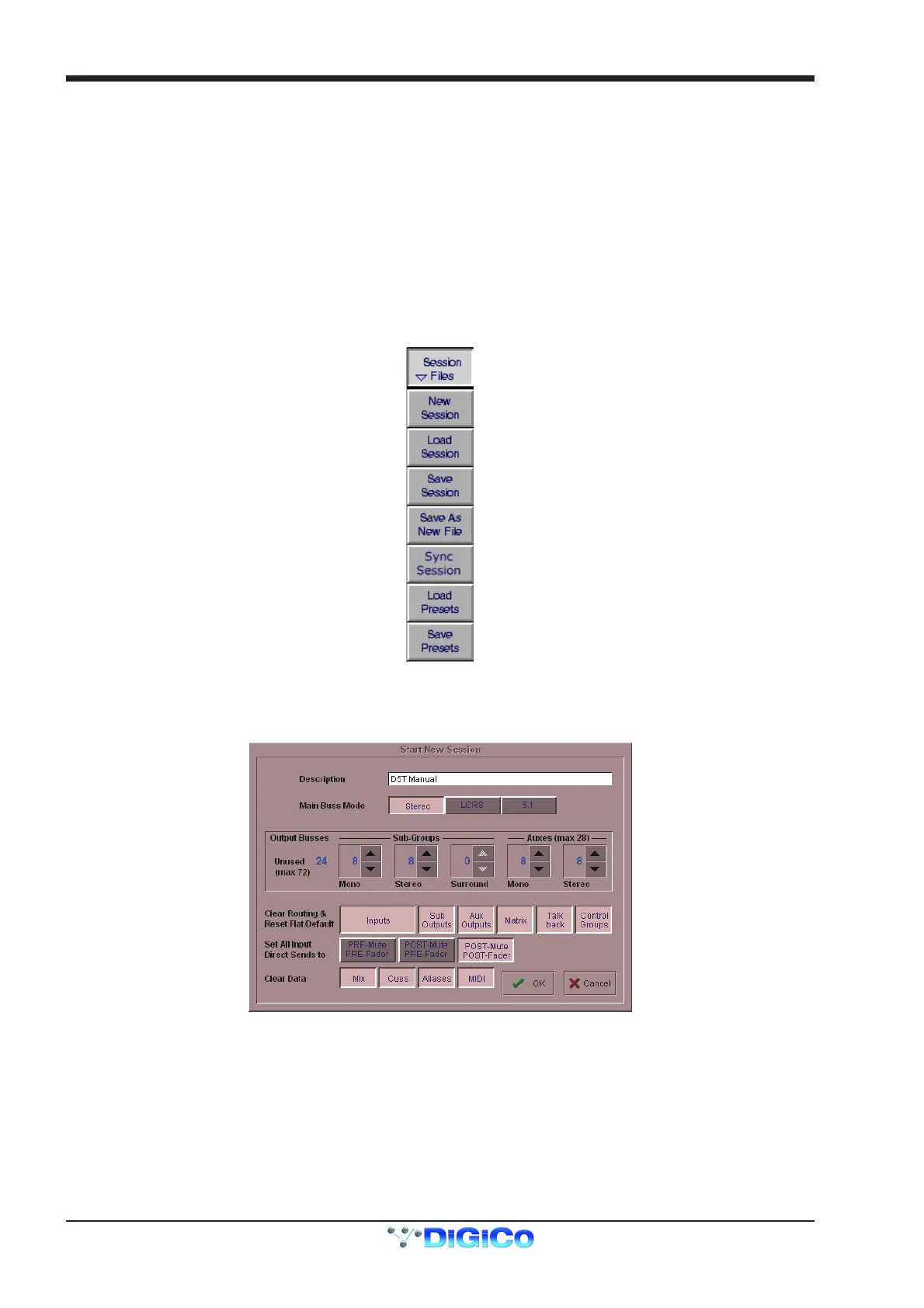
All of the configuration and file management functions are handled in the Session Files Menu which is accessed by touching the button on
the Master Screen.
4.2.2 The New Session Panel .......................................................
To create a new session, touch the Session Files button on the master screen and then touch the New Session button. The following
panel will appear:
The Main Buss Mode defines the format of the Main buss as Stereo, LCRS Surround or 5.1 Surround. This also affects the options for
selecting the Sub Group and Aux buss formats: if the Main buss is stereo, the other busses cannot use the Surround formats, and if the
main buss is Surround format, the other busses cannot use a different Surround format (although they can be stereo).
The Sub Groups and Auxes settings allow you to define the format and number of the Aux and Sub Group busses.
The total amount of busses cannot exceed 72.



 To Next Page