Chapter 4
4-18
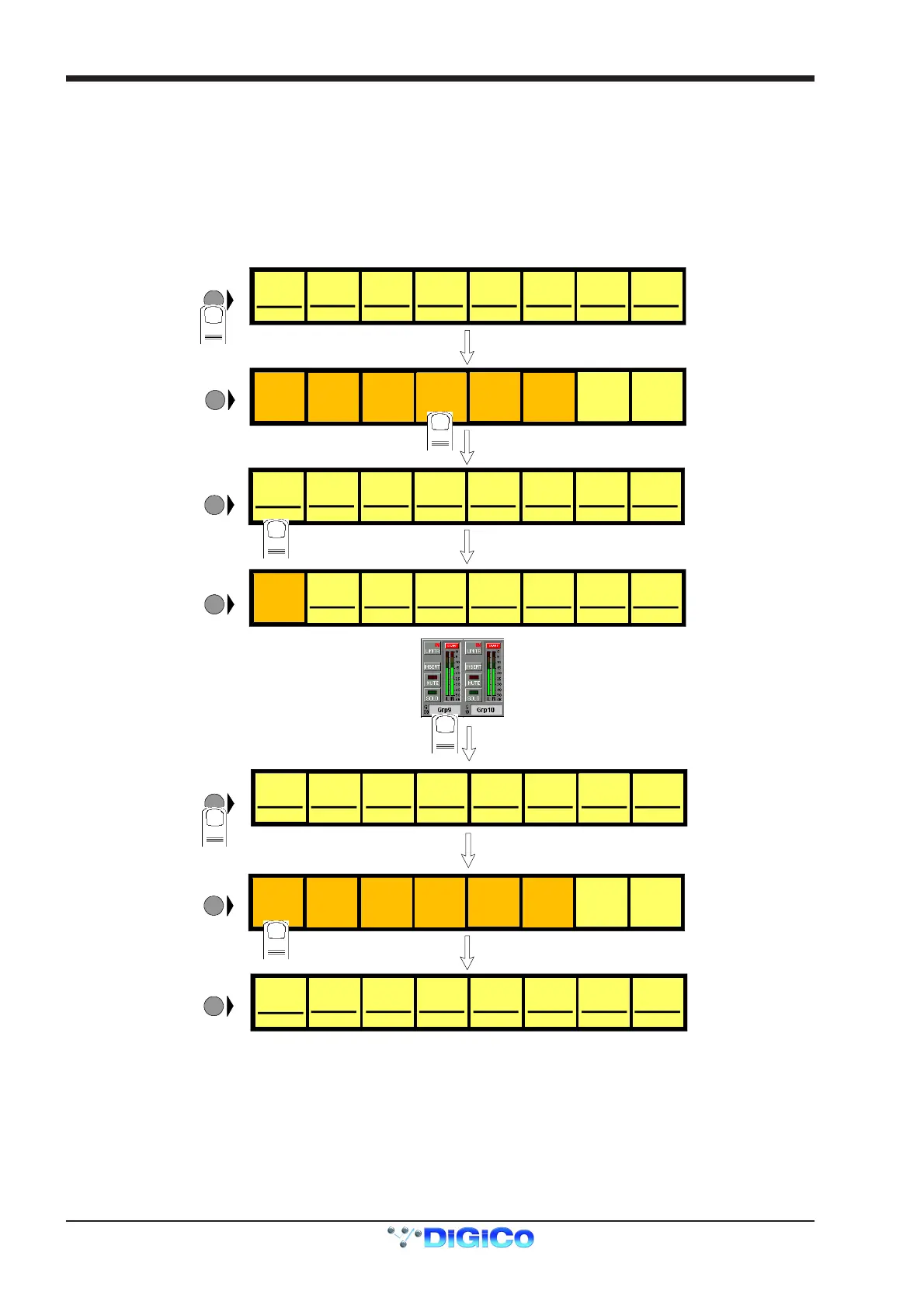
The contents of a Master Fader Bank can be customised at any time by adding or removing faders from it.
To Assign Faders To Banks
1) Press the Master LCD Function button for the relevant bank.
2) Press the Assign Faders button.
3) Press the Master LCD button for the Master fader that you wish to use.
4) Touch the on screen meter for the Buss that you wish to Assign or touch an Input Channel screen or Control Group display. If
several LCD Assign buttons are pressed, they will be filled from left to right starting with the channel that is touched.
5) Press the Master LCD Function button to exit Assign Faders mode.
6) Press the Solo function button to return to the standard view.
Grp 01
G01 [0]
LCD
FUNCTION
SOLO SAFE
SOLO
ASSIGNS
AUX>FAD
Grp 02
G02 [0]
Grp 03
G03 [0]
Grp 04
G04 [0]
Grp 05
G05 [0]
Grp 06
G06 [0]
Grp 07
G07 [0]
Grp 08
G08 [0]
LCD
FUNCTION
1
BUILD
BANK
2
ASSIGN ASSIGN
Grp 01
G01 [0]
Grp 02
G02 [0]
Grp 03
G03 [0]
Grp 04
G04 [0]
Grp 05
G05 [0]
Grp 06
G06 [0]
Grp 07
G07 [0]
Grp 08
G08 [0]
LCD
FUNCTION
3
Grp 09
G09 [0]
LCD
FUNCTION
Grp 02
G02 [0]
Grp 03
G03 [0]
Grp 04
G04 [0]
Grp 05
G05 [0]
Grp 06
G06 [0]
Grp 07
G07 [0]
Grp 08
G08 [0]
ASSIGN ASSIGN ASSIGN AS SIGN ASSIGN AS SIGN ASSIGN AS SIGN
ASSI GN ASSI GN
Grp 02
G02 [0]
Grp 03
G03 [0]
Grp 04
G04 [0]
Grp 05
G05 [0]
Grp 06
G06 [0]
Grp 07
G07 [0]
Grp 08
G08 [0]
ASSI GN ASSIGN ASSIGN ASSIGN ASSIGN ASSIG N ASSI GN
TOUCH
SCREEN
to assign
LCD
FUNCTION
ASSIGN ASSIGN
Grp 02
G02 [0]
Grp 03
G03 [0]
Grp 04
G04 [0]
Grp 05
G05 [0]
Grp 06
G06 [0]
Grp 07
G07 [0]
Grp 08
G08 [0]
ASSI GN ASSIGN ASSIGN ASSIGN ASSIGN ASSIG N ASSI GN
Grp 09
G09 [0]
ASSI GN
5
4
LCD
FUNCTION
SOLO SAFE
LCD
FUNCTION
6
AFL AFL A FL AFL AFL AFL AFL AFL
AFL AFL AFL AFL AFL AFL AFL AFL
ASSIGN
FADERS
UNASSIGN
FADERS
SOLO
1OR2
SOLO
ASSIGNS
AUX>ROT
SOLO
ASSIGNS
AUX>FAD
BUILD
BANK
ASSIGN
FADERS
UNASSIGN
FADERS
SOLO
1OR2
SOLO
ASSIGNS
AUX>ROT



 To Next Page