APPENDIX L: TROUBLESHOOTING
ECO Manual
340
Your ECO is locked up and you cannot use it:
1. Plug in the USB keyboard and mouse. On the keyboard, hold down the
<CTRL>and<ALT>keys and press the <DELETE> key.
2. Click on the
Shutdown Menu.
3. Click on the
Restart option.
If this does not fix the problem:
4. Perform a
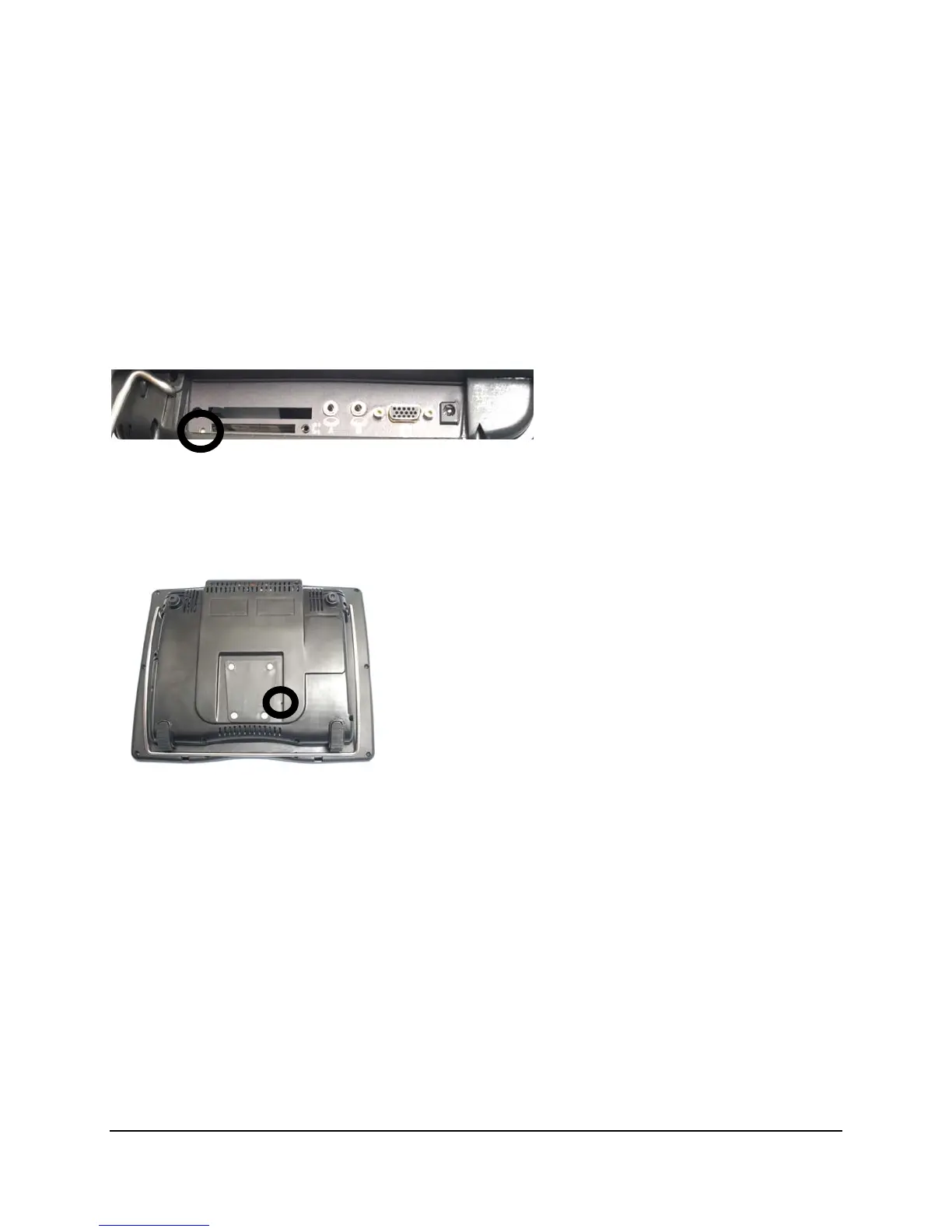
side-button reset by pushing the end of a straightened paper clip in the small hole
on the left side panel until you touch/push the reset bottom at the bottom of the hole.
If this does not fix the problem:
5. Perform a back-button reset by pushing the end of a straightened paper clip into the small hole
to the right of the mounting plate on the back of your device.
If this does not fix the problem:
Call the PRC Service Department at 800-262-1990.
You are using your ECO program and CORE vocabulary but you keep getting error
beeps and/or things are not working correctly:
You probably have a Windows program open and Output turned On.
Go to the Toolbox and open the OUTPUT MENU. Make sure the Output option is OFF.
If you frequently use the internal computer and encounter problems with your ECO software,
always check the
OUTPUT MENU first. When the Output option is ON, anything you do
using the ECO program and Unity overlays will be sent to the computer. If you forget you have



 To Next Page