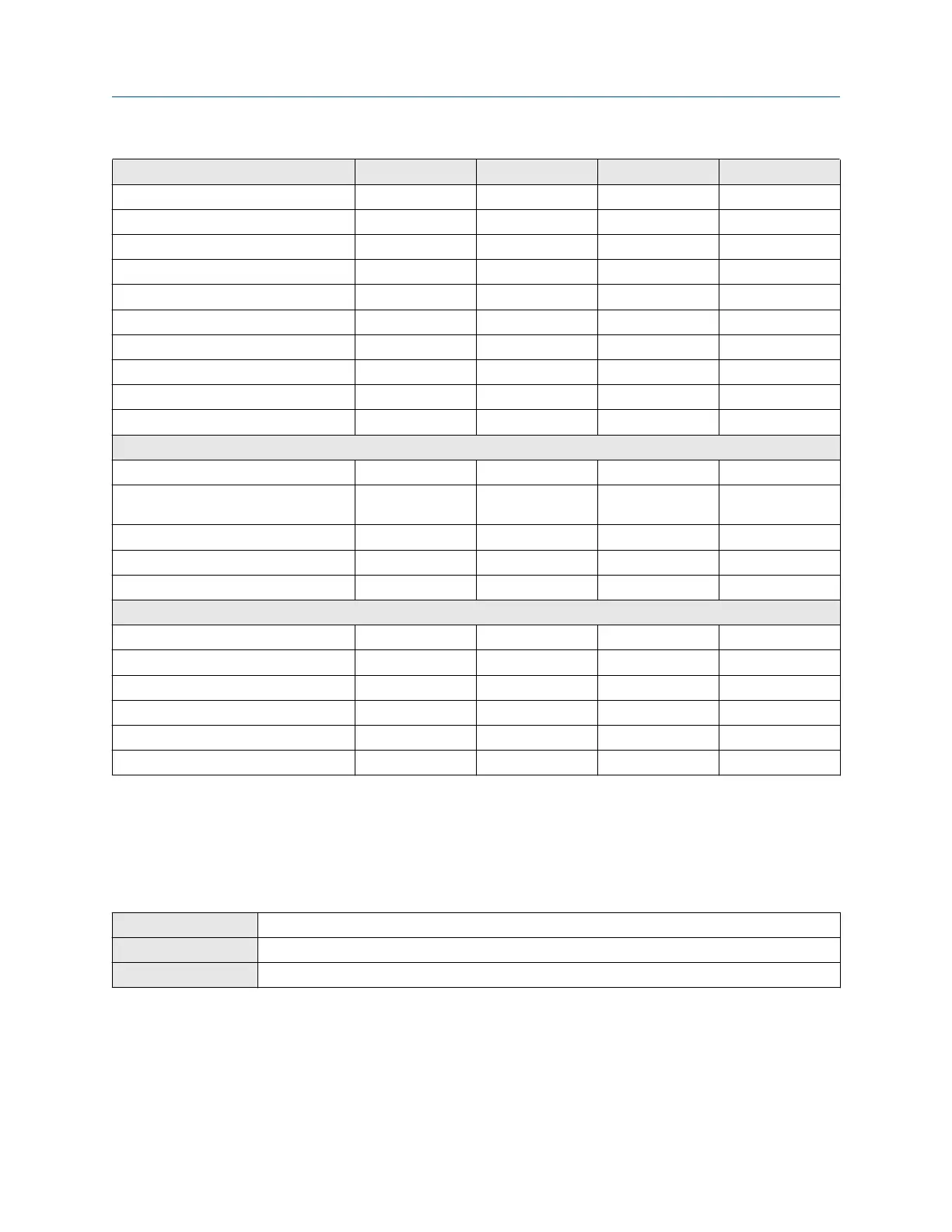
Process variable PV SV TV QV
Drive gain ✓ ✓ ✓ ✓
Tube frequency ✓ ✓ ✓
Meter temperature ✓ ✓ ✓
Board temperature ✓ ✓ ✓
Inlet (LPO) amplitude ✓ ✓ ✓
Outlet (RPO) amplitude ✓ ✓ ✓
Live zero ✓ ✓ ✓
PV loop current ✓ ✓ ✓
% of range ✓ ✓ ✓
Two-phase flow severity ✓ ✓ ✓ ✓
API referral
Temperature-corrected density ✓ ✓ ✓ ✓
Temperature-corrected (standard)
volume flow rate
✓ ✓ ✓ ✓
Average temperature-corrected density ✓ ✓ ✓ ✓
Average temperature ✓ ✓ ✓ ✓
CTPL ✓ ✓ ✓
Concentration measurement
Density at reference ✓ ✓ ✓ ✓
Specific gravity ✓ ✓ ✓ ✓
Standard volume flow rate ✓ ✓ ✓ ✓
Net mass flow rate ✓ ✓ ✓ ✓
Net volume flow rate ✓ ✓ ✓ ✓
Concentration ✓ ✓ ✓ ✓
Configure burst communications
Burst mode is a mode of communication during which the transmitter regularly broadcasts HART
®
digital
information to the network via the primary mA output. As a general rule, Burst mode should only be enabled if
a triloop is being used.
Configure HART burst messages
Display
Menu → Configuration → Inputs/Outputs → Channel A → HART Settings → Burst Message x
ProLink III Device Tools → Configuration → Communications → Communications (HART) → Burst Mode
Field communicator Device Settings → Communication → HART → Burst Configuration → Configure Burst Message
Burst messages contain information on process variables or transmitter status. You can configure up to three
burst messages. Each message can contain different information. Burst messages also provide the mechanism
for trigger mode and event notification.
Procedure
1. Navigate to the burst message you want to configure.
Configuration and Use Manual Configure digital communications
MS-00809-0200-1600 May2024
Configuration and Use Manual 115



 To Next Page